All in One CRM Explained for Freelancers and Small Teams
You open Excel to check a prospect, search your inbox for the last conversation, look at your calendar for the next meeting, and then open an invoicing app to see whether the previous project was paid. By the time you've pieced together the client's history, the follow-up you meant to send has already slipped into tomorrow.
That's the problem an all in one CRM is designed to solve. It brings contacts, deals, email follow-ups, scheduling, and invoices into one working space, so you can manage the client relationship without rebuilding the context every time you switch tools. The important question for a freelancer isn't whether a CRM has the longest feature list. It's whether the system reduces friction enough that you'll keep using it.
A spreadsheet can store a follow-up date, but it can't notify anyone automatically. You still need to open the file and remember to check it, which leaves opportunities vulnerable to human memory, as explained in this overview of why Excel isn't a reminder system.
Key takeaway: A unified workflow matters more than a crowded feature list when you're managing a modest client base.
For a freelancer with fewer than 50 clients, a lightweight platform such as MicroCRM can be a practical way to combine essential work without adopting an enterprise system. You can evaluate the approach by starting with the tasks that currently create the most repetition: finding client details, tracking deal stages, sending follow-ups, booking appointments, and preparing invoices.
Want to better organize your clients and business opportunities?
👉 Try MicroCRM for free. No credit card is required.
Table of Contents
- What an All in One CRM Really Means
- Core Capabilities to Expect Inside an All in One CRM
- Benefits and Drawbacks for Freelancers and Micro Businesses
- How to Choose the Right All in One CRM Checklist
- Migration and Onboarding Without the Headache
- Practical Use Cases and Your Next Step
What an All in One CRM Really Means
A solo consultant finishes a discovery call, then faces three separate tasks: update the contact record, schedule the follow-up, and prepare the next proposal. An all in one CRM connects those actions so the client's details and progress remain available in one workspace.
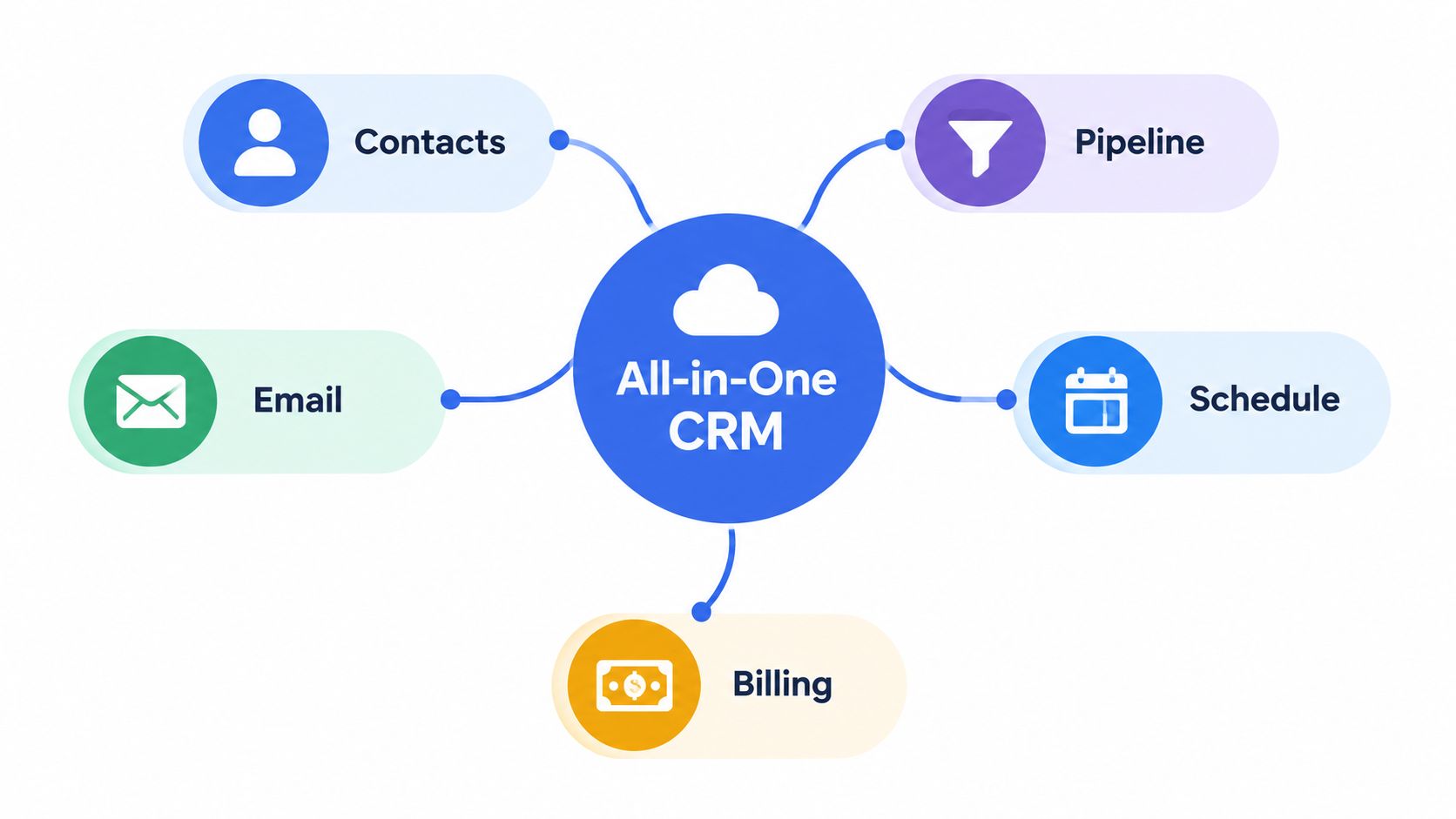
A shared workbench is a useful comparison. A photographer keeps lenses, batteries, memory cards, and cleaning tools within reach because walking to separate rooms slows each job. The workbench does not improve the photographer's skill. It cuts unnecessary movement and keeps related tools together. An all in one CRM applies the same idea to client work.
The connected workflow often follows this path:
- A contact enters the system. You record the person's details, company information, tags, and previous interactions.
- The contact becomes an opportunity. You place the prospect in a stage such as inquiry, proposal, negotiation, or won.
- The next action stays attached to the record. An email, reminder, or appointment remains connected to that client.
- The commercial work continues in the same place. After the deal closes, you can create and send an invoice without re-entering the client's information.
This connection separates a unified CRM from a collection of unrelated apps. You spend less time switching windows, searching old messages, and copying details between systems. A small-business CRM can bring together contact management, sales pipelines, appointment scheduling, and invoicing, as described in this overview of CRM and billing workflows.
The choice is not a feature race. For a business serving fewer than 50 clients, a smaller system may fit better than an enterprise suite with extensive customization, advanced permissions, artificial intelligence add-ons, and complex automation builders. Those tools can support specialized processes, while also creating setup and maintenance work that a solo operator does not need.
Use the following video as another introduction to connecting CRM activities in one workflow.
The practical definition is simple: one place holds the information needed to move a client from first conversation to completed payment, and the interface is easy enough to use during a busy working day. A suitable CRM reduces adoption friction, rather than adding enterprise complexity for its own sake.
Core Capabilities to Expect Inside an All in One CRM
A useful CRM should support the complete client journey, not just store names. For a small business, each capability earns its place by reducing a specific piece of administrative work.
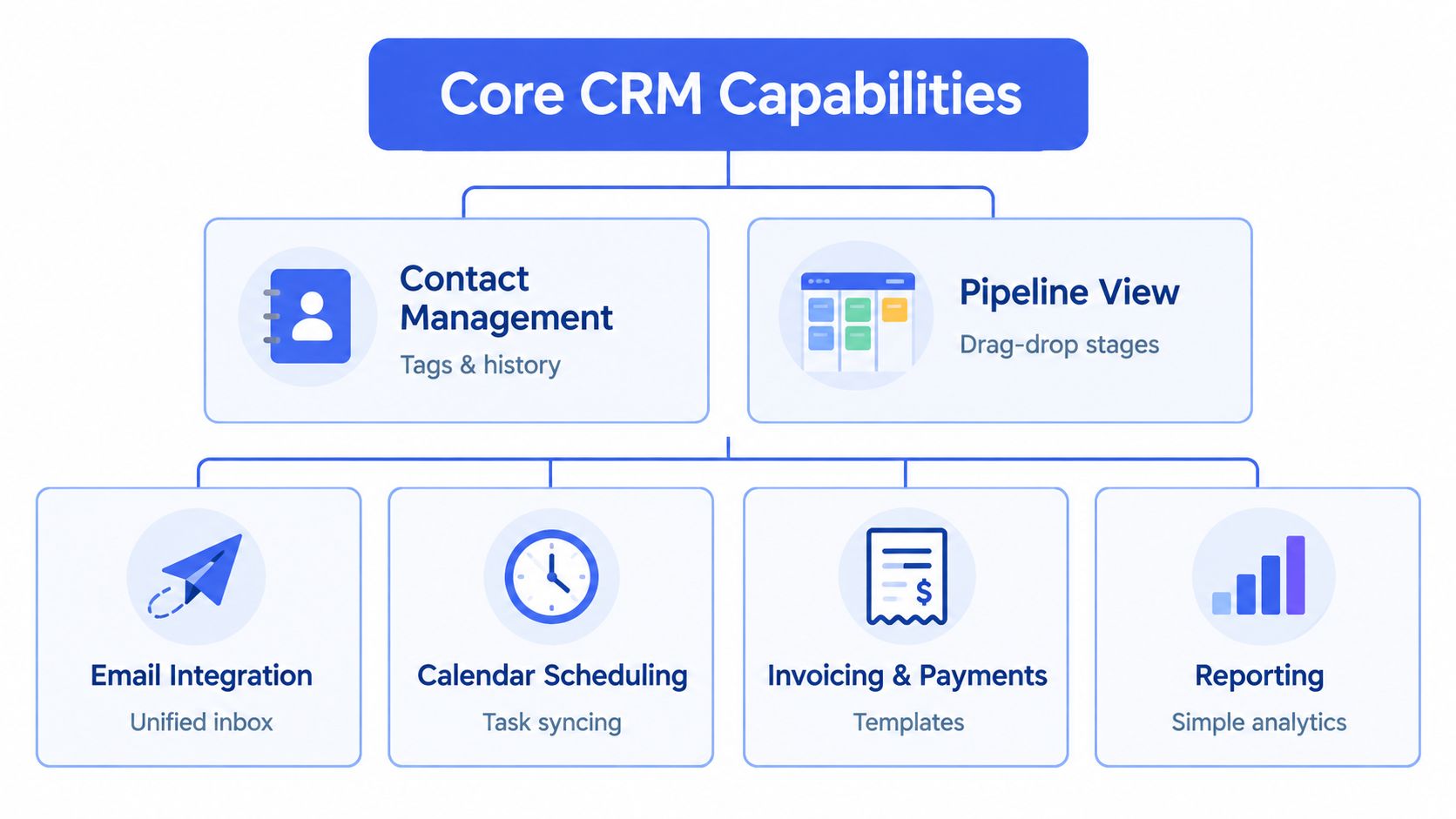
Contact management
The contact record is the foundation. Look for search, tags, notes, and a visible interaction history. A freelance designer should be able to open a client profile and quickly see the original inquiry, the proposal discussion, the current project status, and the last follow-up.
Good contact management prevents information from living only in your inbox or memory. It also helps you separate prospects, active clients, past clients, referral partners, and leads for a particular service.
A visual pipeline
A Kanban pipeline turns an abstract sales process into a visible board. You might create stages such as new inquiry, discovery call, proposal sent, approved, and completed. Dragging a deal between stages gives you an immediate view of what needs attention.
Automatic probability calculations can add a rough forecast to the visual stages, but the pipeline should remain easy to update. If moving a deal requires several forms and menus, you'll return to the spreadsheet because it feels faster.
Email and follow-up tools
An integrated composer should support reusable templates, variable placeholders, and follow-up sequences. A coach might prepare a proposal follow-up, a meeting reminder, and a post-session check-in, then adapt each message for the individual client.
Automation should support your process rather than hide it. You need to know which messages are scheduled, which have been sent, and where a personal response is more appropriate.
Calendar scheduling
A calendar connects a potential deal to an actual conversation. Appointment scheduling and availability management can reduce the back-and-forth involved in finding a suitable time.
For a photographer, this might mean linking an inquiry to a consultation. For a consultant, it might mean keeping discovery calls and recurring client meetings visible beside pipeline activity.
Invoicing and payments
Invoicing belongs in the workflow because winning a deal is only one step. A practical system should help you create a professional invoice, generate a PDF, send it by email, and work with the currencies relevant to your clients.
Modern CRM and invoicing systems can also send automated reminders, apply late fees, and schedule recurring invoices, which can improve payment follow-up without requiring you to remember each action manually, according to this guide to CRM invoicing automation. For a deeper look at this combination, see CRM software with billing.
Reporting
Reports should answer practical questions quickly. Which deals are active? How much revenue is associated with open opportunities? Which activities are overdue? A small business usually needs clear revenue, deal, and activity KPIs rather than a complex analytics department.
The test is simple: can you understand your current position without exporting data into another spreadsheet?
Benefits and Drawbacks for Freelancers and Micro Businesses
The case for an all in one CRM becomes clearer when you compare it with the daily cost of disconnected tools. A freelancer may not need a large sales operation, but they still need to remember conversations, keep proposals moving, schedule meetings, and collect payment.
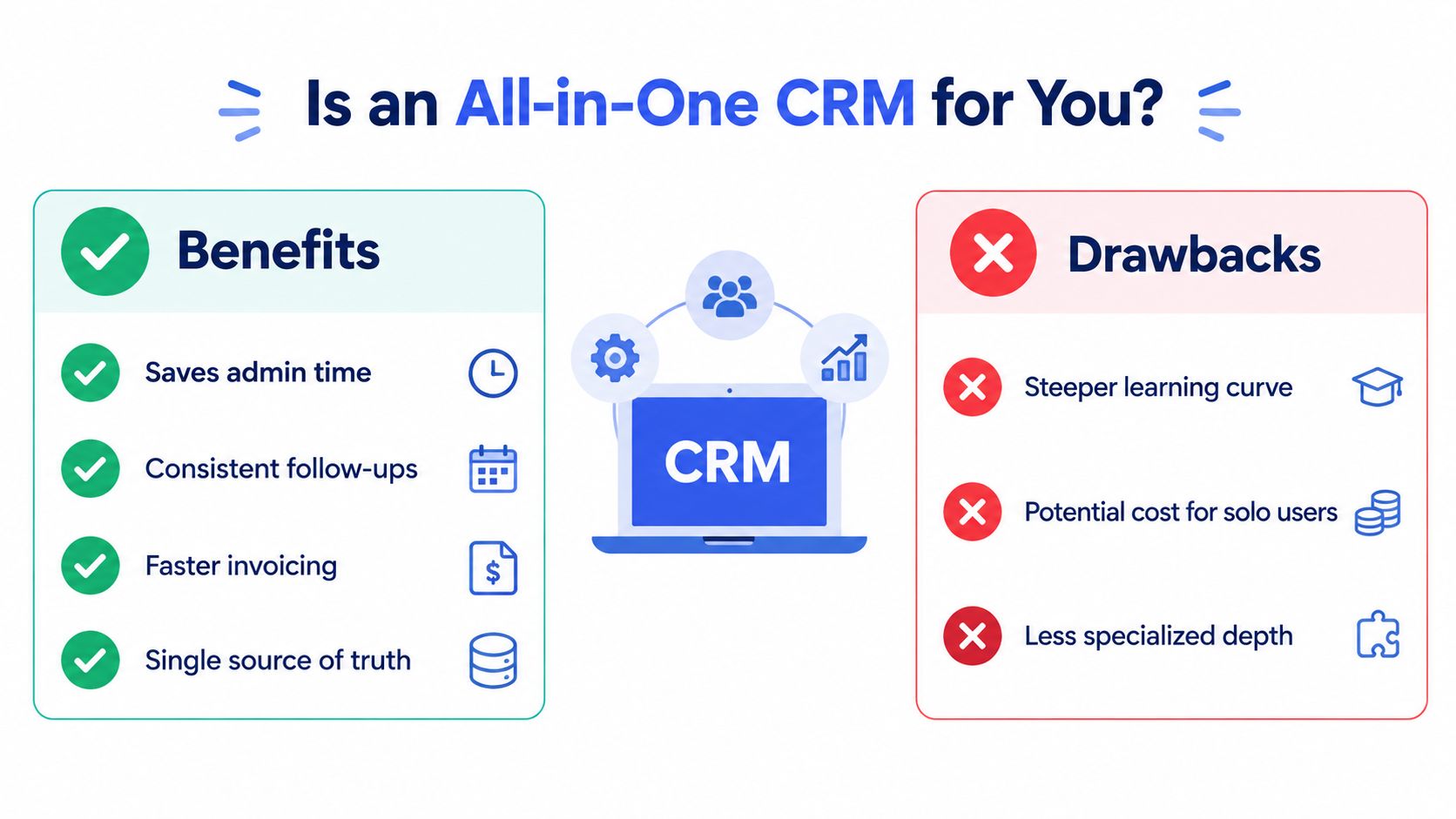
The benefits are practical:
- Less administrative repetition: Client details can flow from a contact record into a deal and then into an invoice.
- More consistent follow-ups: Reminders and sequences make the next action visible instead of leaving it buried in an inbox.
- Faster billing: Invoice creation and delivery happen alongside the client relationship.
- A clearer pipeline: A Kanban view shows which opportunities are new, waiting, active, or complete.
- Fewer context switches: You don't have to reconstruct the full relationship from several unrelated applications.
A unified platform can also make work easier to hand off. Even if you're currently solo, a future assistant or collaborator can understand the status of a client from the record rather than asking you to explain every detail.
Where the trade-offs appear
The same bundling that creates convenience can create compromise. An all in one product may provide adequate invoicing but lack the depth of a dedicated accounting platform. Its email tools may suit follow-ups but not a full marketing campaign. Its calendar may handle appointments without replacing a specialist scheduling system.
Complexity creates a separate risk. If the platform requires extensive configuration before you can add a contact or move a deal, the system becomes another administrative task. Smaller firms already show a persistent adoption gap. One cited study reports CRM use among companies with fewer than 250 employees at 52.5%, compared with 78.4% among companies with 1,000 to 2,500 employees, as reported in this small-business CRM adoption coverage.
For a very small business, the best system is often the one you'll open consistently, not the one with the most capabilities.
You may also pay for functions you never use. A solo operator managing a small group of clients doesn't necessarily need enterprise permissions, elaborate automation trees, or a large collection of integrations. The decision should focus on fit, adoption, and the amount of work the software removes.
How to Choose the Right All in One CRM Checklist
Start with your workflow, not the vendor's feature page. Write down what happens from first inquiry to payment, then identify where information is currently duplicated, forgotten, or difficult to find.
Use this checklist to compare tools:
| Evaluation Criteria | What to Look For | Why It Matters |
|---|---|---|
| Setup speed | Sign-up that leads directly to usable contacts and deals | You should be able to test the workflow before investing major time |
| Essential features | Contacts, pipeline, email follow-up, calendar, and invoicing | These functions cover the core freelancer journey |
| Feature discipline | A focused interface without unnecessary AI or automation layers | Fewer distractions can improve regular use |
| Pricing transparency | Clear plans, a free option, and the ability to pause without losing data | You can control costs as your workload changes |
| Security | AWS storage, encryption at rest and in transit, and Amazon Cognito authentication | Client information needs sensible protection |
| Language support | The languages you and your clients require | Familiar wording reduces avoidable confusion |
| Usage limits | Contact, deal, email, and sequence limits stated clearly | You can identify when a plan may stop fitting |
| Billing workflow | Professional invoices, PDF creation, email delivery, and currency support | Billing stays connected to the client record |
| Scheduling | Availability management and appointment booking | Prospects can move toward a real conversation |
| Reporting | Revenue, deal, and activity indicators | You can review the business without building custom reports |
The market includes both broad suites and focused products. An essentials-first option such as MicroCRM combines contacts, deal tracking, invoicing, email sequences, calendar scheduling, and reporting in one interface. That kind of design may suit a freelancer who wants fewer moving parts rather than a long configuration project.
Security deserves a direct check. Ask where data is stored, how it's encrypted, how users authenticate, and whether you can export your records. Also check what happens if you pause the account. A pause option with data preserved gives you more flexibility than deleting the workspace whenever demand slows.
The global CRM market is projected to reach $126.17 billion in 2026, and one industry summary says 91% of companies with 10 or more employees use CRM software, while small-business adoption is estimated around 65% to 74%, depending on the survey and segment, according to CRM market and adoption statistics. Those figures show why you shouldn't evaluate a tool only by how popular the category is. Test whether its workflow fits your business.
For more selection criteria, use this guide to choosing a CRM. Sign up for a free plan when possible, and confirm that the trial doesn't require a credit card before importing your working data.
Migration and Onboarding Without the Headache
Migration becomes manageable when you treat it as a cleanup project rather than a simple upload. Begin with a copy of your Excel file or existing CRM export, and keep the original untouched until you've checked the new records.
Remove duplicate contacts, fix inconsistent names, and decide which columns are useful. A freelancer usually needs the client name, email, phone number, company, status, notes, next action, and relevant billing details. Extra columns often transfer old clutter into a new system.
A low-friction migration sequence
- Test a small batch. Import a limited group of contacts first. Check names, email addresses, tags, notes, and deal relationships.
- Define pipeline stages. Match your existing categories to clear Kanban stages, such as inquiry, call booked, proposal sent, active, and complete.
- Add the next action. Every active opportunity should have a practical next step, not just a status label.
- Create essential templates. Start with the messages you send repeatedly, including inquiry responses, proposal follow-ups, and appointment reminders.
- Connect scheduling. Add your availability and confirm that appointments appear where you expect them.
- Create one invoice. Use a real but low-risk example to verify the customer details, PDF output, currency, and email process.
Quick onboarding matters because migration is often the point where smaller teams abandon a CRM. Independent reporting cites data migration as the hardest implementation hurdle for 63% of businesses, and says first-year costs can rise 52% to 87% above the subscription price, as discussed in this report on CRM implementation friction. Those figures reinforce a useful principle: compare the effort required to start, not only the monthly plan.
Look for a system that lets you sign up and begin working without setup calls or lengthy documentation. You should also understand whether pausing preserves your data and whether exports remain available. This practical CRM usage guide can help you organize the first workflow before moving everything across.
Practical Use Cases and Your Next Step
A freelance photographer receives an inquiry for a family session. She saves the contact, moves the opportunity to a consultation stage, sends a prepared reply, and offers a calendar appointment. Once the client approves the proposal, she creates the invoice from that same record and schedules a payment reminder. One connected record replaces several handoffs.
An independent designer can use the same flow for branding projects. New inquiries enter the pipeline, proposal conversations remain attached to the contact, and a drag-and-drop update shows which projects need a decision. After acceptance, the designer moves from sales to billing without typing the customer's details again.
A coach or consultant may handle fewer contacts yet still need reliable follow-up. Contact history keeps earlier conversations visible, the calendar organizes sessions, and email sequences support reminders between meetings. The value is one dependable place to continue each relationship, rather than separate tools designed around a large sales department.
These examples point to a fit decision for businesses serving fewer than 50 clients. If your work involves contacts, deals, follow-ups, appointments, and invoices, a focused all in one CRM may cover the routine. An enterprise suite can support specialized requirements, but its configuration may consume more time than it saves. A smaller system works like a labeled workbench. Common tools stay close, while unused equipment does not crowd the surface.
Test the fit with one active workflow on a free CRM plan. Add a few real contacts, create the stages you use, schedule a follow-up, and prepare an invoice. The trial reveals whether the system fits your daily routine better than another afternoon spent comparing feature lists.
For a focused workspace, MicroCRM brings contact management, pipeline tracking, invoicing, email follow-ups, and appointment scheduling together for freelancers and small businesses. You can start for free without a credit card.