7 CRM Dashboard Examples for Small Teams

Your client information sits in one spreadsheet, deal notes live in another, invoices wait in an accounting tool, and follow-ups depend on memory. By the time you find the right record, a promising opportunity may have gone cold or an invoice may still be unpaid. A CRM dashboard should bring those signals together, but it shouldn't become another crowded workspace.
The best CRM dashboard examples don't win because they contain the most widgets. They help a specific person answer a practical question about revenue, deal movement, daily activity, or client work. This comparison looks at seven layouts through that lens, including each tool's KPI hierarchy, visualization strengths, trade-offs, and suitability for a small team. It also translates each approach into a practical dashboard for freelancers and micro-businesses using contacts, deals, invoices, email follow-ups, calendar activity, and simple reports.
Table of Contents
- 1. Micro CRM
- 2. HubSpot CRM Reporting and Dashboards
- 3. Pipedrive Insights
- 4. monday sales CRM Dashboards and Widgets
- 5. Freshsales Analytics Dashboards
- 6. Copper Google Workspace Reporting Dashboards
- 7. Zoho CRM Dashboards and Analytics
- Top 7 CRM Dashboard Comparison
- Build the Dashboard You Will Actually Use
1. Micro CRM
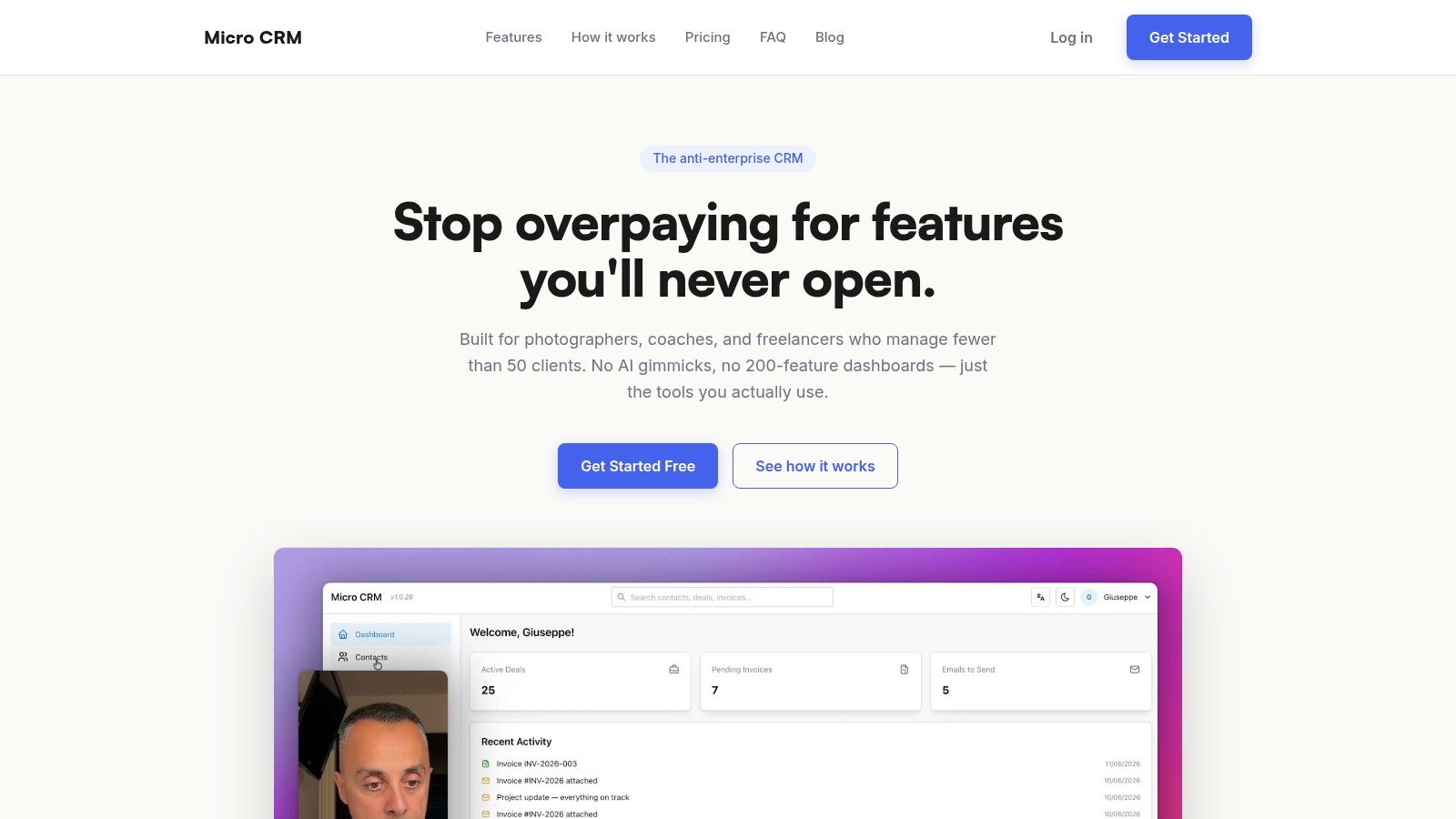
Micro CRM is the strongest fit when the dashboard needs to answer one question quickly: What needs my attention today, and what revenue is likely to follow? Its lightweight layout brings contacts, deal stages, invoices, email sequences, calendar activity, and reports into one workspace instead of separating them across spreadsheets and specialist apps.
The central visual is an intuitive Kanban pipeline. Dragging a deal between stages gives a freelancer a direct view of opportunities in progress, while revenue and activity KPIs provide context around what is moving and what is stalled. The dashboard can also surface pipeline value, recent activity, client statistics, growth trends, transactions, reminders, and lead information, which gives a small operator enough context without requiring enterprise-level configuration.
What this layout prioritizes
Micro CRM prioritizes workspace fit over feature volume. A photographer can connect an inquiry to a booking, invoice, payment follow-up, and appointment. A consultant can track a proposal, schedule a meeting, send a templated email, and review active engagements from the same client record. A designer can move a project through discovery, proposal, approval, delivery, and billing stages.
Its practical strengths include:
- Centralized client records: Searchable contacts, tags, and interaction history reduce the need to reconstruct a relationship from different apps.
- Visible deal movement: The Kanban view makes stage progression easier to review than rows in Excel.
- Faster billing: Professional invoices can be created, exported as PDFs, and sent by email, with multi-currency support.
- Consistent follow-up: Email templates and sequences reduce reliance on memory, while the calendar keeps appointments visible.
- Simple review cycles: Revenue, deal, and activity reports help a solo operator review the business without building a custom analytics system.
The trade-off is deliberate simplicity. Micro CRM isn't intended for large client volumes, deep integrations, advanced AI features, or complex enterprise automation. That narrower scope is useful for freelancers, coaches, creative professionals, and agencies managing a modest client base, but a larger sales organization may need a broader reporting model.
Practical rule: Choose the dashboard you can update reliably. A small set of accurate client, deal, invoice, and activity signals is more useful than a sophisticated view built on incomplete records.
Micro CRM offers a free plan with no credit card required, so a freelancer can test the workflow before committing to a paid plan. It also supports account pausing with data preserved, which suits businesses with seasonal work. For teams that want a lightweight alternative to Excel and complex CRMs, Micro CRM is the most replicable layout in this list.
2. HubSpot CRM Reporting and Dashboards
A manager reviewing revenue in the morning, a sales lead checking conversion by channel, and a service owner monitoring unresolved tickets need different views of the same business. HubSpot supports that arrangement through dashboards that combine marketing, sales, revenue, and service data. Templates and a drag-and-drop editor let teams shape each view around a role rather than force everyone into one screen.
Its value lies in the decisions that cross team boundaries. An owner can compare revenue trends with lead sources. A sales manager can examine pipeline distribution and conversion. Scheduled sharing by email or Slack turns those reports into part of a recurring review process, while role-based visibility limits each user's view to relevant information.
The decision this layout supports
HubSpot is designed for the question, where should the business focus across teams and channels? Cross-object reporting can connect contacts, deals, tickets, and custom objects, so a team can relate sales activity to service workload or marketing sources instead of reviewing each area separately.
The trade-off is configuration. The interface may suit a small business at first, but dashboards become harder to govern as teams add hubs, users, permissions, and paid capabilities. A freelancer or tiny agency can end up maintaining reports that answer no regular business question. The layout therefore fits small teams only when someone defines ownership for each metric and removes unused views.
A practical HubSpot-style dashboard for a small team could use three compact zones:
- Revenue row: Open pipeline, won revenue, and invoice status.
- Funnel row: Lead-to-opportunity movement and opportunity-to-close progression.
- Action row: Unanswered leads, overdue tasks, and upcoming meetings.
This arrangement prioritizes management decisions over feature coverage. Consultants can replace invoice status with proposal value, photographers can track booking stages and upcoming shoots, and designers can monitor active projects alongside unpaid work. The same structure is replicable in a Micro CRM-style workspace, provided the team records only the signals it reviews consistently.
For guidance on choosing a compact KPI set, compare these sales reporting templates. HubSpot's flexibility helps when several roles require distinct views, but a micro-business should begin with each person's recurring question before selecting a chart. Review HubSpot CRM reporting and dashboards for current reporting options.
3. Pipedrive Insights
A consultant reviewing the week's proposals needs three answers quickly: which deals are active, where progress has stopped, and whether current results support the target. Pipedrive's Insights module organizes those questions around sales activity. Interactive charts, tables, goals, filters, sharing, exports, and mobile access keep deal progression and performance visible without turning the dashboard into a general operations hub.
The layout favors revenue visibility and pipeline movement. Users can examine open deals by stage, spot opportunities that have remained still, and compare progress with a goal. A small sales team can filter by owner, pipeline, or period during a review, preserving one shared view while adapting it to different responsibilities.
A funnel built for decisions
The useful relationship is between pipeline movement and action. A pipeline chart shows more than the current distribution of deals. It prompts a practical diagnosis: are opportunities advancing, collecting in one stage, or failing to reach a decision? That makes the funnel a prioritization device rather than a decorative summary.
Its limitation is equally clear. Pipedrive's sales orientation suits teams that primarily need deal and activity KPIs. Businesses combining sales with marketing, service, invoicing, or wider client operations may require additional tools or workflows. Package differences can also affect dashboard limits and report creation, so teams should confirm which capabilities their plan includes.
For a consultant, a compact Pipedrive-style view could track:
- Active proposals by stage, showing prospects that need a decision.
- Meetings booked and completed, connecting activity with progression.
- Win and loss reasons, exposing recurring objections.
- Goal progress, tying the review to an outcome.
Photographers can adapt the same logic to inquiries, consultations, and bookings. Designers can use stages for briefs, proposals, and signed projects. A lightweight CRM can reproduce the structure with a Kanban pipeline, contact history, and a short report row. Micro CRM fits when that sales view also needs invoices, calendar scheduling, and follow-up sequences in one workspace. Review Pipedrive Insights, then compare its sales metrics approach with these sales metrics dashboard examples.
4. monday sales CRM Dashboards and Widgets
A creative studio may track leads, projects, invoices, and delivery on separate boards. monday sales CRM brings selected signals from those boards into one dashboard, using widgets rather than a single fixed sales report. That makes the layout useful for teams that need to review workspace visibility alongside revenue activity.
The key question is practical: can a manager see the work that needs attention without opening every board? Status indicators, numbers, charts, progress widgets, and rollups can combine pipeline, workload, and billing information. Dashboards can also be presented, shared, exported to PDF, and viewed on mobile, supporting regular progress reviews with clients or colleagues.
The trade-off sits underneath the visual layer. Cross-board reporting depends on consistent fields, stage names, owners, and dates. If one board labels a stage “Proposal” and another uses “Quoted,” the combined view may conceal a data mismatch. Flexible widgets do not correct inconsistent operating rules.
A small team can test the approach with four focused views:
- Status widget: Deals requiring attention today.
- Number widgets: Open opportunities, overdue invoices, and booked meetings.
- Chart widget: Stage distribution or monthly revenue movement.
- Progress widget: Movement toward a defined sales or billing goal.
This arrangement prioritizes coordination over specialized sales analysis. It fits a studio or consultancy whose customer work spans several connected boards, while a solo professional may find the setup slower if they want an immediate, preconfigured dashboard. A Micro CRM-style version could use one board for contacts and opportunities, a few status fields, and widgets for follow-ups, invoices, and scheduled work. The simpler structure preserves the same workspace view without requiring extensive board design.
Review monday sales CRM dashboards to assess how its dashboard and widget model matches the way your team already organizes work.
5. Freshsales Analytics Dashboards
A small sales manager opening Freshsales sees a guided starting point rather than an empty canvas. Its Analytics area combines starter dashboards, standard reports, personal and team dashboards, and widgets covering conversion, attribution, and win-loss trends. That structure prioritizes revenue visibility and funnel diagnosis before extensive customization.
The first decision is practical: which part of the sales funnel deserves attention first? Managers can review conversion trends, trace where leads originated, and compare won with lost business in the same reporting environment. Sample data and knowledge-base guidance reduce the setup burden for teams without a dedicated analytics owner.
Where the guided layout fits
Freshsales suits a small sales team with enough activity to need recurring analysis, but limited time to build reports from scratch. A manager can spot a conversion change on the team dashboard, then examine whether lead source, stage progression, or follow-up explains it.
Its trade-off is reporting depth. The layout covers common SMB sales questions efficiently, while teams with unusual data models or specialist business intelligence requirements may need a more configurable environment. Advanced analytics and add-ons can also vary by plan, so the relevant test is whether the required weekly reports are available at the team's chosen level.
For a small agency, a Freshsales-inspired Micro CRM dashboard could organize decisions around four views:
- Lead-source performance, showing where opportunities begin.
- Stage conversion, identifying where interest declines.
- Win-loss trends, revealing recurring reasons behind outcomes.
- Team activity, connecting outreach with pipeline movement.
This arrangement favors guided review over workspace flexibility. It can help a small consultancy or creative agency establish a repeatable sales rhythm, while a solo photographer or designer may prefer fewer fields and a direct follow-up view. A compact version would retain lead source, stage, outcome, and next activity, giving each niche a usable pipeline without recreating every report.
Defaults matter because they determine what a team reviews first. Compare its reporting approach with sales analytics software and the available Freshsales Analytics capabilities.
6. Copper Google Workspace Reporting Dashboards
A photographer can finish a client email in Gmail, check the next consultation in Google Calendar, and update the opportunity without opening a separate sales workspace. Copper builds its reporting around that routine. Filters, sharing, exports, and custom fields keep the dashboard connected to the records and activities a Google Workspace team already uses.
The layout answers a focused question: what customer work needs attention, and how is it affecting revenue? Email threads and meetings provide useful context, while opportunity stages, bookings, and invoice status prevent activity volume from becoming the only measure of progress. That balance matters because a full calendar can coexist with stalled deals.
Copper's main trade-off is reporting range. Its approach can suit a small team that wants accessible KPI setup and limited administration, but teams with unusual data models or advanced analytics needs may require a more configurable system. Some reporting functions also depend on the selected plan, so buyers should test whether the weekly views they need are available at that level.
A practical Copper-inspired Micro CRM dashboard for a photographer might use four compact panels:
- New inquiries from email, with the source and response status visible.
- Upcoming shoots and consultations, linked to the calendar.
- Bookings by stage, from inquiry to confirmed project.
- Invoices awaiting action, keeping billing visible after delivery.
This arrangement favors workspace fit over analytical breadth. A consultant working mainly in Gmail and Calendar may gain a clear daily operating view, while a designer with several service lines may need more dimensions than Copper's lighter reporting model provides. A freelancer should keep only the fields tied to a decision, such as next activity, stage, booking status, and payment follow-up.
Review the available Copper sales reporting capabilities before treating email or meeting counts as performance indicators. The strongest version of this dashboard connects communication context to pipeline outcomes.
7. Zoho CRM Dashboards and Analytics
A growing agency may need one dashboard to connect leads, deals, activities, custom modules, and revenue. Zoho CRM supports that model through configurable filters, chart types, KPI snapshots, scheduled delivery, and email sharing. Its layout prioritizes cross-object visibility, rather than a quick view of pipeline stages alone.
The practical question is whether those connections change a decision. A team could compare lead quality with deal progress, inspect overdue activities, and relate custom project records to revenue. If CRM data needs heavier analysis, Zoho can extend the reporting environment into Zoho Analytics. That flexibility creates a broader reporting system, but it also requires clearer definitions for fields, stages, and ownership.
A useful Zoho-style dashboard can be organized around four decisions:
- Revenue visibility: Which work has been won, invoiced, or paid?
- Pipeline movement: Which leads and deals are progressing, and which have stalled?
- Daily activity: Which follow-ups are overdue or unassigned?
- Service risk: Which projects or engagements need attention?
The trade-off is setup time and visual density. A small team with several service lines may gain meaningful detail from custom groupings and filters, while a freelancer with a simple pipeline could spend more time maintaining the dashboard than using it. Scheduled reports help people who do not work in the CRM every day, but they are useful only when the selected metrics lead to a recurring action.
For a photographer, a Micro CRM version might track inquiries, shoot stages, unpaid invoices, and upcoming sessions. A consultant could add engagement status and follow-up deadlines. A designer might separate branding, web, and retainer projects, provided those categories support decisions rather than merely adding fields.
Zoho fits a growing agency that has someone responsible for reporting rules. Review Zoho CRM dashboards and analytics before choosing a configuration-heavy layout, especially if advanced capabilities require a higher tier or Zoho Analytics.
Top 7 CRM Dashboard Comparison
| Product | 🔄 Implementation complexity | ⚡ Resource requirements | 📊 Expected outcomes | 💡 Ideal use cases | ⭐ Key advantages |
|---|---|---|---|---|---|
| Micro CRM | Very low, near-zero onboarding, plug-and-play | Minimal, single users/freelancers; low-cost plans (free → Pro) | Centralized contacts, fast invoicing, basic KPIs | Freelancers, solo entrepreneurs, creatives managing ~50 clients | Simplicity, speed, low price, production-grade security |
| HubSpot CRM (Reporting & Dashboards) | Medium‑high, admin setup for permissions and templates | Moderate→High, paid tiers for advanced reports and seats | Enterprise‑grade, cross-object reporting and scheduled shares | SMBs/enterprises needing polished multi‑team dashboards | Deep reporting depth, templates, granular sharing |
| Pipedrive (Insights) | Low‑medium, sales‑first UX; quick to configure | Low, subscription tiers; some features plan‑gated | Interactive pipeline dashboards, goals tracking, quick insights | Sales teams focused on pipeline health and quota tracking | Clean visuals, low setup, AI‑assisted report generation |
| monday sales CRM | Medium, no‑code widget config but cross‑board design needed | Medium, multiple boards and possible higher tiers for advanced widgets | Flexible visual dashboards, executive rollups, exports | Teams who map workflows across boards and need flexible layouts | Highly flexible widgets, presentation mode, PDF export |
| Freshsales (Analytics dashboards) | Low, starter dashboards and sensible defaults | Low‑medium, core analytics in product; add‑ons for advanced | Fast time‑to‑value with standard sales analytics and team views | SMBs wanting out‑of‑box sales analytics without BI tools | Prebuilt reports, quick setup, team dashboards |
| Copper (Google Workspace–native) | Low, minimal admin; Gmail/Calendar native flow | Low, best for Google Workspace customers | Inbox‑linked dashboards and pipeline visibility | Small teams embedded in Google Workspace workflows | Tight Gmail/Calendar integration, approachable setup |
| Zoho CRM | Medium‑high, highly configurable, more setup required | Medium→High, may need Zoho Analytics for heavy BI | Deep cross‑module reporting and scheduled delivery | Organizations with complex data models and custom modules | Very configurable reporting and broad ecosystem extensibility |
Build the Dashboard You Will Actually Use
The seven layouts point to a more useful selection method than comparing feature counts. Start with the decision your dashboard must support, then choose the smallest visual hierarchy that answers it.
Choose revenue-first widgets when billing visibility is the main concern. Your first screen should connect open opportunities with invoices, recent transactions, and outstanding follow-ups. This suits a freelancer who needs to know not only what may close, but also what has already been delivered and still needs payment.
Choose pipeline views when deal movement is the bottleneck. A Kanban board or funnel should show where prospects sit, how long they have remained there, and what action comes next. Pipedrive and Micro CRM make this approach especially easy to understand because the pipeline remains the primary operating view.
Choose activity panels when follow-up discipline is the problem. Calls, emails, meetings, completed tasks, and response time are useful only when they lead to a decision or a next step. A dashboard that reports activity without connecting it to stage progression can reward busyness instead of progress.
Choose a minimal layout when one person owns the entire workflow. A solo photographer, consultant, or designer doesn't need separate executive, manager, and rep dashboards. One clear view of clients, deals, invoices, appointments, and follow-ups is usually easier to maintain.
Practical recommendations by niche
- Photographers: Connect inquiries, bookings, appointments, invoices, and follow-up sequences. The dashboard should make the path from first contact to confirmed shoot visible.
- Consultants: Emphasize active engagements, proposals, meetings, and next actions. Keep project status close to the commercial pipeline so a proposal doesn't vanish after the call.
- Designers: Prioritize project stages, approvals, delivery milestones, and billing. A client record should preserve the context behind each approval and invoice.
Don't copy every widget from the most attractive CRM dashboard examples. A high-performing dashboard should prioritize a small group of decision metrics. One expert guide recommends keeping the primary screen to 5 to 7 metrics, with pipeline velocity, stage conversion, lead response time, pipeline coverage, and forecast accuracy among the useful options, as described in this CRM dashboard guidance.
For small teams, clean data matters as much as visual design. Lead source, deal stage, next action, invoice status, and reason lost must be filled in consistently, or the dashboard will create false confidence. Another practical guide emphasizes starting with the question, tying the dashboard to a regular review cadence, and matching the view to the user's role, as explained in this CRM reporting and analytics guide.
Micro CRM keeps that principle practical by managing clients, deals, invoices, email sequences, calendar activity, and reports in one workspace. It gives photographers, consultants, designers, and small agencies a simpler way to replace scattered spreadsheets without adopting an enterprise system they won't use.
Manage clients, deals, and invoices in one platform.
Start for free. No credit card required.
Micro CRM combines contacts, a Kanban pipeline, invoicing, email follow-ups, calendar scheduling, and clear reports for freelancers and small teams. If your current CRM dashboard is spread across Excel, email, and separate billing tools, visit Micro CRM and build a simpler workspace you can review every day.