CRM for Service Based Business Explained Simply
You've finished a client call, opened your spreadsheet, and found three different versions of the same contact. The proposal is in your email, the appointment is on a separate calendar, and the invoice is buried in a folder. You meant to follow up yesterday, but the reminder never made it into your system.

A CRM for a service based business brings those relationship details into one working space. It isn't just a database of names. It helps you remember conversations, move opportunities through a pipeline, schedule appointments, send follow-ups, and connect completed work to billing. For freelancers, consultants, coaches, designers, photographers, and small agencies, that can make the difference between a calm client experience and constant administrative searching.
Table of Contents
- Why Service Businesses Outgrow Spreadsheets and Inboxes
- How Service Based CRM Differs from Sales Focused CRM
- Must Have Features That Keep Service Work Flowing
- How to Choose the Right CRM for Freelancers and Micro Businesses
- Getting Started Without the Setup Headache
- Common Pitfalls That Stall Service Businesses and How to Avoid Them
- Bringing It All Together and Taking the Next Step
Why Service Businesses Outgrow Spreadsheets and Inboxes
A spreadsheet works well when you're tracking a short list of names and a few basic details. It becomes harder to trust when every client has a different history, timeline, proposal, appointment, and payment status. One row might show a client's phone number, while the important context sits in an email thread, a calendar note, or a handwritten reminder.
The problem isn't that Excel is badly designed for tables. The problem is that service businesses manage ongoing relationships, not isolated records. A spreadsheet creates snapshots, but it doesn't naturally preserve a timeline showing who spoke with a client, when the conversation happened, or what was agreed. This explanation of spreadsheet CRM problems describes why interaction histories are central to relationship management and why spreadsheets often leave that context scattered.
Practical rule: If you need to search three places before answering a client, your workflow is already fragmented.
Consider an independent designer handling a brand project. The client asks for a revision by email, books a review call through a calendar, approves the scope in a document, and waits for an invoice after delivery. None of those steps is difficult on its own. The friction appears when you need to connect them quickly and remember the next action without relying on memory.
What a service CRM actually does
A service CRM gives each client a working record. That record can include contact information, notes, past communication, open deals, appointments, tasks, and billing activity. Instead of asking, “Where did I save that?” you can ask, “What does this client need next?”
This is why CRM adoption has spread beyond traditional sales departments. A Freshworks CRM statistics roundup reports that 32% of CRM users come from the service industry and that 71% of small businesses used CRM software in 2024. The same source connects CRM use with sales-goal performance, revenue gains reported after implementation, and weekly time savings, but the practical lesson for a small service firm is simpler: client history, response speed, and consistent follow-up now matter enough to justify a dedicated operating system.
A lightweight platform such as MicroCRM can sit between a spreadsheet and a complex enterprise suite. It gives you contact and deal management, a visual pipeline, invoicing, email sequences, and a calendar without asking a solo operator to build a large customized system. You can also explore process streamlining for small businesses when deciding which manual steps should leave your spreadsheet first.
How Service Based CRM Differs from Sales Focused CRM
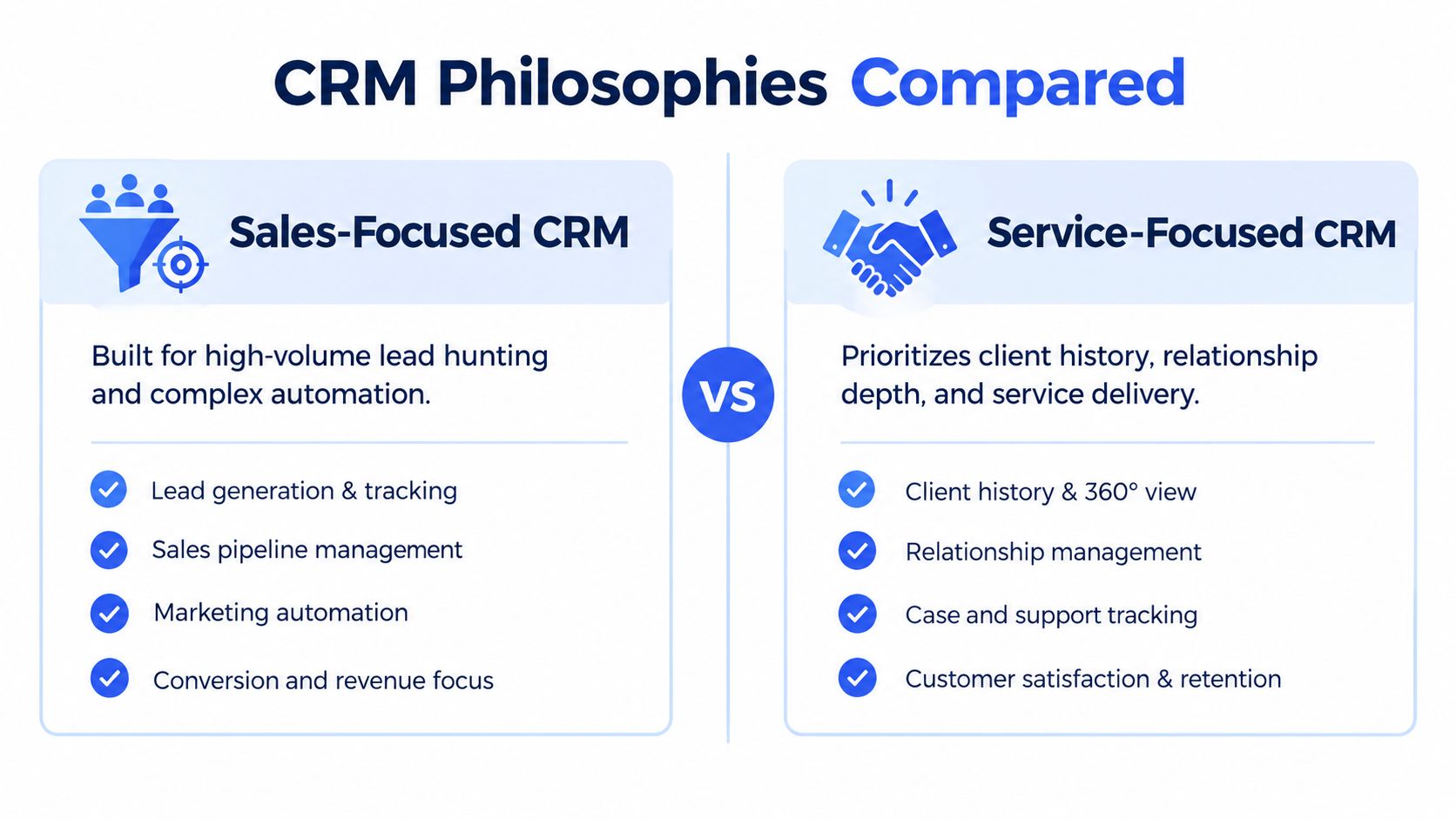
A sales-focused CRM is designed for a team sorting many opportunities. It captures leads, qualifies prospects, assigns ownership, automates campaigns, forecasts revenue, and coordinates several salespeople. That approach fits a company whose main task is deciding which opportunities deserve attention first.
A service-focused CRM organizes the relationship after interest becomes real work. Its central question is: What does this existing or prospective client need, and what must happen next? The record connects client history with delivery, appointments, requests, renewals, follow-ups, and billing. The CRM becomes a lightweight operating system for the relationship, rather than a machine built mainly to push people through a sales funnel.
Two different operating assumptions
A sales CRM works like an airport control tower. It monitors many incoming opportunities, routes them, and applies rules to keep activity moving. A service CRM works more like a studio planner or treatment-room schedule. It must connect the client's history, agreed work, next meeting, outstanding request, and billing status.
| Sales-focused CRM | Service-focused CRM |
|---|---|
| Emphasizes lead volume and qualification | Emphasizes client history and continuity |
| Often uses complex campaign automation | Uses practical reminders and follow-up sequences |
| Tracks sales activity across many representatives | Connects communication with delivery and appointments |
| Forecasts a broad opportunity funnel | Shows current jobs, commitments, and next actions |
| May require extensive customization | Keeps the workflow focused and easier to adopt |
A photographer may use stages such as inquiry, discovery call, proposal sent, deposit received, shoot scheduled, editing, delivery, and follow-up. A consultant may need inquiry, assessment, proposal, active engagement, review, invoice, and renewal. These stages reflect the work itself, so the owner can see the client's position and the next responsibility without building a large outbound sales system.
Why simpler often fits better
Software can become another project when setup takes longer than the client work it is meant to support. AI assistants, elaborate automation builders, and endless custom fields may add options, yet they can also bury the few actions a solo operator repeats each week. With fewer than 50 clients, a dependable client record, clear scheduling, and a visible next step may matter more than lead scoring.
ServiceNow's CRM statistics overview describes cloud CRM's expanding role in customer interaction, support, and field service. For a micro-business, the practical benefit is centralized access to relationship, scheduling, delivery, and billing information without the infrastructure expected by a large organization.
A lightweight platform such as MicroCRM can occupy the space between a spreadsheet and an enterprise suite. It keeps the workflow small enough to adopt while bringing relationship details and business opportunities into one place.
Want to better organize your clients and business opportunities?
👉 Try MicroCRM for free
Must Have Features That Keep Service Work Flowing
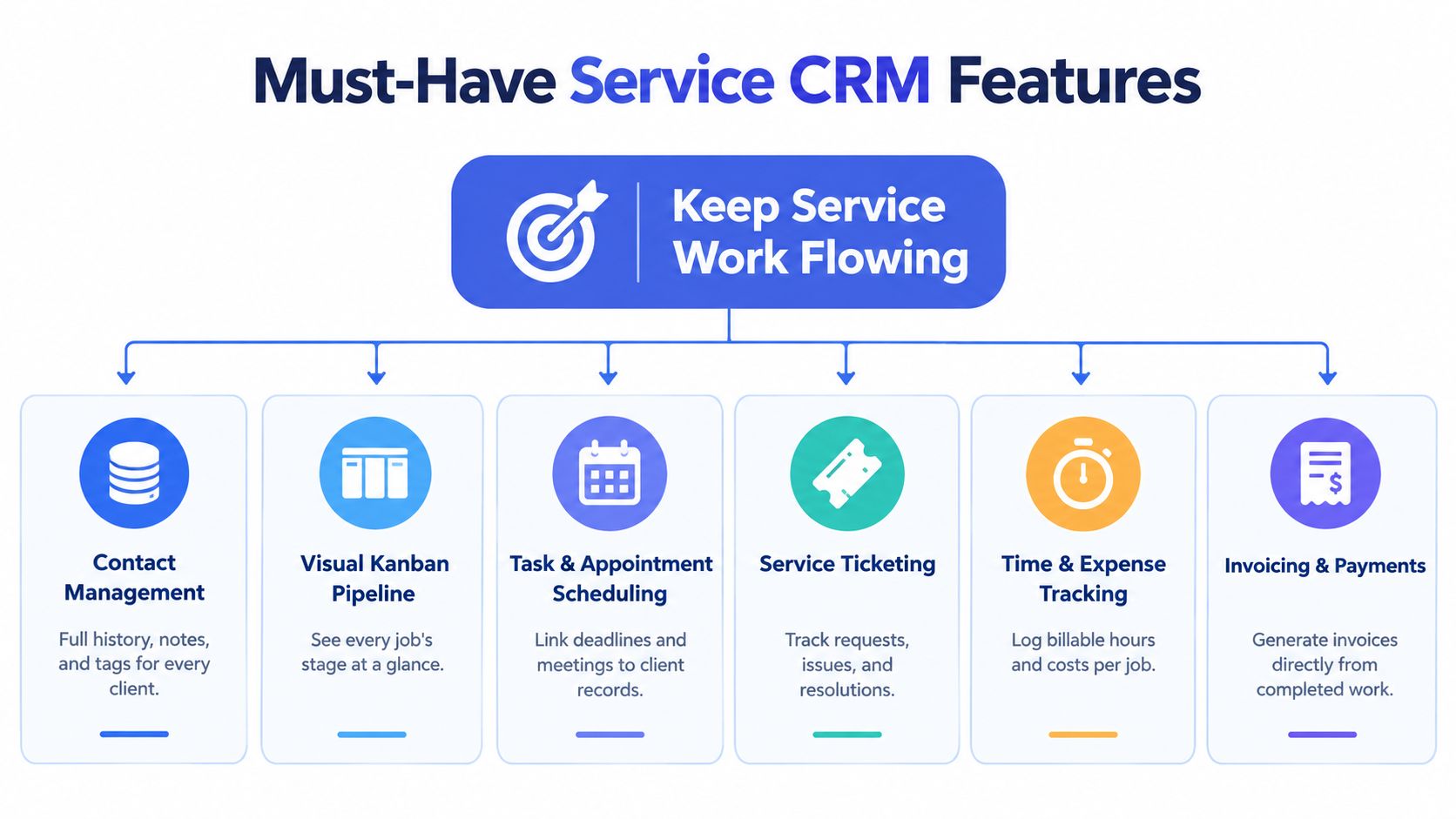
The right CRM should follow the way you already deliver work. Start with the moments that create risk: a new inquiry arrives, a proposal waits for a response, an appointment changes, a project reaches completion, or an invoice needs to go out. Each essential feature should remove a specific point of friction.
Contact management with history
A contact record should answer more than “Who is this person?” It should show the company, notes, previous conversations, preferences, open work, and relevant tags. A coach might tag clients by program or renewal status. A creative studio might distinguish active projects, past clients, referral partners, and prospects.
This history protects the client experience when you return to an account after several weeks. You won't need to reread every thread just to remember the last decision or promised deliverable.
A visual Kanban pipeline
A Kanban pipeline turns invisible work into visible stages. You can see which proposals need attention, which projects are active, and which completed jobs are ready for invoicing or follow-up. Dragging a deal from one stage to another is often easier than updating several spreadsheet cells.
For example, a consultant might use inquiry, consultation booked, proposal sent, accepted, active, and completed. Keep the stages aligned with real decisions in your workflow. If a stage doesn't trigger a useful action, it probably doesn't belong there.
Scheduling and appointments
A calendar should connect meetings to the client record rather than leave them as isolated events. Shared availability, reminders, and appointment details reduce the chance that a booking gets lost between email and a personal calendar. This guide to CRM-based appointment scheduling explains how self-service booking, confirmations, shared calendars, and centralized records can reduce manual coordination.
Email templates and follow-up sequences
You shouldn't rewrite the same confirmation, proposal reminder, or post-project message every time. Templates with variable placeholders keep communication personal while reducing repetitive work. A short sequence can remind a prospect about an unanswered proposal, confirm a session, or check in after delivery.
Automation should support your judgment, not replace it. Use it for predictable moments, then add a manual task when the situation requires a thoughtful response.
Invoicing and payments
Billing belongs near delivery because the two events are connected. When the CRM knows which client and deal are involved, you can create a professional invoice, generate a PDF, send it by email, and preserve the record alongside the engagement. This guide to invoice automation for small businesses reports that automation can cut processing costs by up to 80%, reduce billing time by several hours each month, and bring the cost per invoice to about $2 to $4.
For a service business, integrated invoicing also reduces the risk of finishing the work while forgetting the final administrative step. You can read more about CRM with billing when comparing separate accounting tools with a combined workflow.
Reporting that answers practical questions
Reports don't need to become a second job. A useful dashboard should show revenue, deal status, activity, overdue actions, and the movement of work through your pipeline. Ask questions such as:
- Which proposals are waiting for a reply?
- Which clients have upcoming appointments?
- Which completed jobs still need invoices?
- Which services create repeat engagements?
Integration matters because switching between contact records, calendars, billing systems, and email creates avoidable interruptions. SuperOffice's CRM statistics associates CRM integration with a 26% productivity improvement, reinforcing the value of keeping client information and next actions in one workflow rather than adding more disconnected automation.
How to Choose the Right CRM for Freelancers and Micro Businesses
A small business shouldn't choose a CRM by counting features. Choose it by testing whether the system makes your daily work easier. If you can't imagine using it after a busy client call, it's probably too complicated for your current needs.
Start with these questions:
- Can you begin without a setup project? You should be able to create an account, import contacts, and build a basic pipeline without a setup call or specialist.
- Does the pricing match your team? Check whether you pay for seats, contacts, emails, sequences, storage, or add-ons you won't use.
- Does it fit a modest client list? A freelancer managing fewer than 50 clients needs depth in each record, not an industrial lead engine.
- Can you pause when work slows down? A pause option that preserves data gives seasonal businesses more control.
- Can you trust the security model? Look for clear information about hosting, encryption, and authentication.
- Can you use it comfortably? Mobile access and language support matter when you work across locations or serve international clients.
A practical decision matrix
| Selection Criteria | Lightweight Service CRM | Enterprise Sales CRM |
|---|---|---|
| Setup | Quick sign-up and guided essentials | May require configuration and training |
| Main focus | Contacts, service work, appointments, follow-up, billing | Lead volume, complex sales operations, advanced customization |
| Pricing fit | Clear plans with free or flat-rate options | Often scales with seats, features, and add-ons |
| Client volume | Designed for relationship-heavy workflows | Designed for larger and more complex databases |
| Daily use | Fewer screens and focused actions | Broad workspace with many modules |
| Flexibility | Pause and adjust as needs change | Built for ongoing organizational expansion |
| Security review | Check hosting, encryption, and authentication details | Usually includes extensive enterprise controls |
Micro-business adoption remains uneven, which is why the selection question is less about whether CRM software exists and more about whether the tool creates enough value without adding admin work. This review of CRM market statistics and small-business needs highlights the tension between fragmented adoption and growing interest in simpler connected tools.
Micro CRM, for example, combines contact records, a Kanban deal pipeline, invoicing, email sequences, appointment scheduling, and reports. Its plans include a free option, a Starter plan, a Pro plan, and a limited-time Lifetime Deal, with limits varying by contacts, deals, emails, and sequences. It also supports pausing an account while preserving data, stores data on AWS, uses encryption at rest and in transit, and uses Amazon Cognito for authentication. Freelancers can use this CRM guide to compare those requirements with their own workflow.
Getting Started Without the Setup Headache
You don't need to migrate every historical document before a CRM becomes useful. Start with the information that supports current client work, then improve the system as you use it.
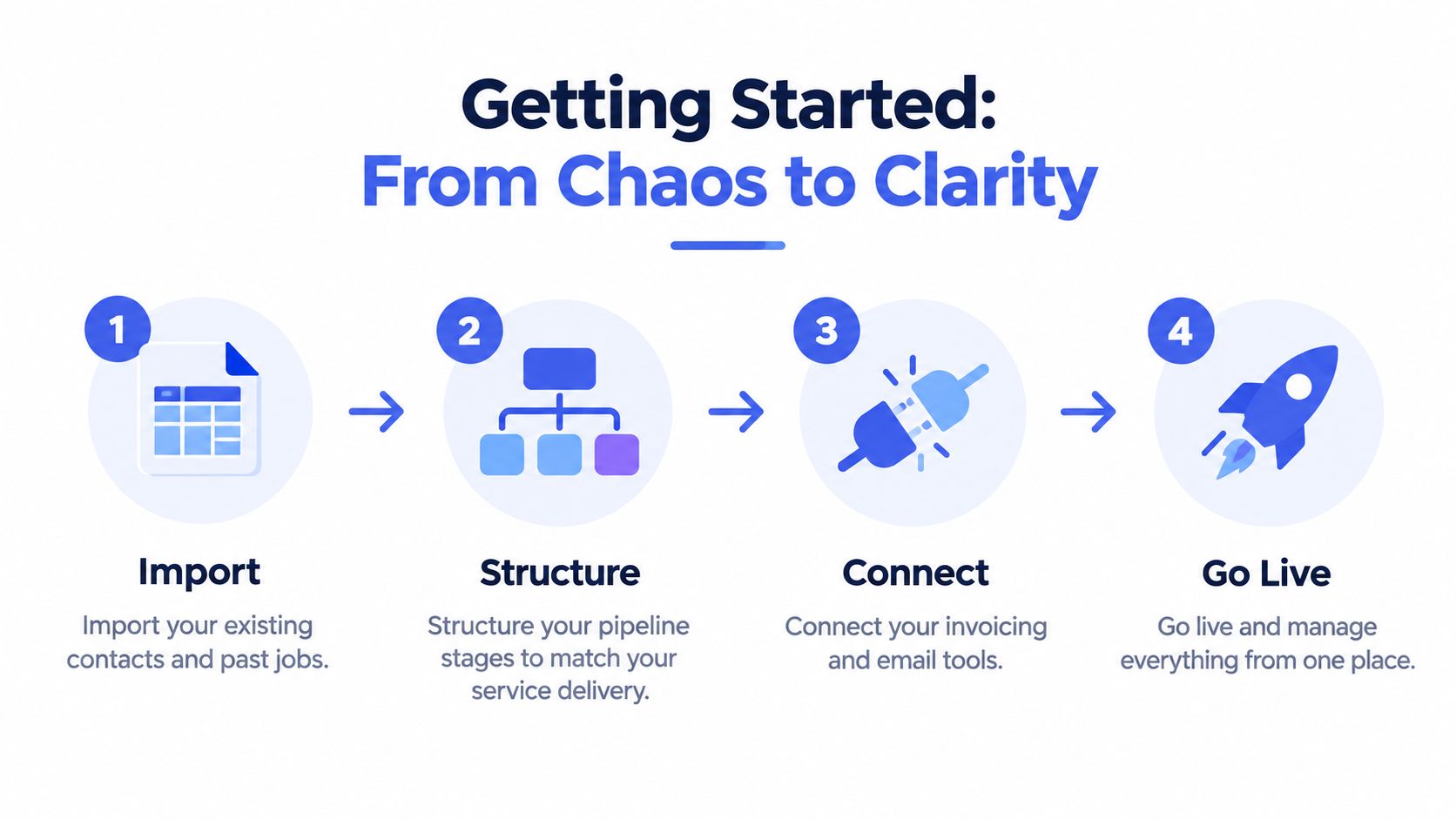
Step one is importing the working list
Bring in active clients, current prospects, and recent past clients you're likely to contact again. Clean duplicate names, standardize email addresses, and add a small number of useful tags. Don't recreate every column from your spreadsheet. Keep fields that help you make decisions or deliver service.
A useful contact record might include service type, current status, preferred communication method, next appointment, and the last meaningful interaction. If a field won't change how you work, leave it out.
Step two is building stages around real actions
Create pipeline stages that match your delivery process. A designer might use inquiry, consultation, proposal, approved, production, review, delivered, and follow-up. A photographer may need inquiry, date held, contract signed, session completed, editing, gallery sent, and repeat booking.
Each stage should answer two questions: What has happened, and what should happen next? If the answer is unclear, simplify the stage names.
Adoption test: If you can't explain the pipeline to a new collaborator in a few minutes, it has too many stages.
Step three connects communication and billing
Add your standard email templates for inquiry replies, proposal follow-ups, appointment confirmations, delivery messages, and payment reminders. Use placeholders carefully so the client's name, service, date, and next step appear correctly.
Connect invoicing to the point where work is approved or completed. Then connect appointments to the client record. The aim is not to automate every decision. It's to ensure that a completed action creates a visible next action instead of disappearing into an inbox.
Step four is going live with a small routine
MicroCRM is designed for sign-up in seconds, without setup calls or lengthy documentation. Its drag-and-drop workflow lets you begin with the essential records, then add email sequences, invoices, calendar details, and reports as they become relevant.
Use a simple daily routine:
- Morning check: Review appointments, overdue actions, and proposals awaiting replies.
- After each call: Add the key decision and next step to the contact record.
- After delivery: Move the deal, issue the invoice, and schedule the follow-up.
- Weekly review: Check revenue, open opportunities, activity, and stalled work.
The following video can help you visualize a simple workflow from client management to follow-up:
Common Pitfalls That Stall Service Businesses and How to Avoid Them
A CRM project usually stalls for practical reasons, not because the software lacks features. The owner imports too much data, creates too many fields, or chooses a platform that feels like a second occupation. The team then returns to email and spreadsheets, leaving the CRM incomplete.
Treating a spreadsheet as a complete relationship system
A spreadsheet can hold contact details, but it won't naturally automate follow-ups, centralize communication history, support real-time collaboration, visualize a pipeline, or trigger reminders. Nimble's comparison of CRMs and spreadsheets explains how manual updates increase the risk of errors and lost information.
Fix: Keep the spreadsheet as an import source, not the final operating system. Move active contacts into records with interaction timelines, next actions, and clear ownership.
Choosing complexity before proving the workflow
Some small firms select enterprise software because it offers every imaginable module. They later discover that configuration, training, and maintenance take attention away from billable work. Research on small businesses also notes that cost remains a barrier and that some teams change systems within two years because the chosen CRM was too complex, as summarized by CRM statistics for 2026.
Fix: Test the core path first: add a contact, move a deal, schedule an appointment, send a follow-up, and create an invoice. If that path feels slow, advanced features won't solve the underlying fit problem.
Ignoring the interaction timeline
A client's current request often depends on an earlier promise, concern, or preference. Without a usable history, you may ask the same question twice or make a recommendation that contradicts a prior conversation.
Fix: Log the outcome of every meaningful interaction, not every trivial message. Record the decision, the commitment, and the next action.
Leaving appointments and invoices outside the workflow
Manual scheduling creates back-and-forth communication, while delayed billing separates delivery from cash collection. Both problems become visible when a client asks for an update and you need to search several applications.
Fix: Attach meetings and invoices to the same client and deal record. Use reminders for predictable events, then review exceptions personally.
Bringing It All Together and Taking the Next Step
A CRM for a service based business should connect relationships, scheduling, delivery, and billing in one workspace. It works like a relationship operating system: you can review a client's history, see the current engagement, schedule the next interaction, follow up, and invoice completed work without searching separate tools.
Choose the smallest setup that fits your workflow. Start with contact history, a practical Kanban pipeline, appointment scheduling, email templates, invoicing, and useful reports. Check that pricing is clear, limits are manageable, account controls are flexible, and security practices are understandable.
Adopt it in stages. Import active contacts, define service stages, connect communication with billing, then review next actions each day. For a workflow with fewer than 50 active clients, this focused approach often serves better than enterprise complexity.
Micro CRM provides contacts, pipelines, invoicing, email follow-ups, and appointments in one platform. The free plan does not require a credit card.