Simple CRM System for Small Business: Practical Guide
71% of small businesses use CRM systems, and 65% adopt one within their first five years. For freelancers and small businesses, a simple CRM system is a practical, low-risk step away from spreadsheets, scattered inboxes, and forgotten follow-ups.
That adoption pattern reflects a straightforward reality. You don't need an enterprise platform to organize client relationships, but you do need one reliable place to record contacts, manage deals, schedule next steps, and track invoices. Research cited by Freshworks on CRM adoption supports the idea that CRM software is already relevant to small businesses, not a tool reserved for large sales departments.

The usual starting point looks familiar. A freelancer keeps names and email addresses in Excel, deal stages in memory, invoice details in another application, and follow-up tasks in a calendar or notebook. Each tool seems manageable alone. Together, they create enough friction for opportunities to disappear.
Table of Contents
- The Fragmented Workflow Problem
- What a Simple CRM Actually Means
- Excel, Complex CRMs, and Lightweight Options
- Essential Features and Implementation Checklist
- Real-World Results and Key Metrics
- Start Managing Clients Today
The Fragmented Workflow Problem
A client sends an inquiry on Tuesday. You reply from your phone, add the name to a spreadsheet later, and promise yourself you'll send a proposal after finishing another project. By Friday, the message is buried beneath unrelated email, the spreadsheet still shows the lead as “new,” and the invoice template sits in a separate folder with no connection to the client record.
This isn't a motivation problem. It's a workflow problem. When contacts, conversations, deal stages, appointments, and invoices live in different places, you become the system that connects them. Your memory fills the gaps, and memory is least reliable when several projects compete for attention.

Where the hidden cost appears
The visible cost of a fragmented workflow is manual data entry. The less obvious cost is context switching. You open a spreadsheet to check a phone number, search an inbox to find the latest conversation, open an invoicing tool to confirm whether a deposit was sent, and then return to the calendar to find a suitable appointment time.
That sequence creates predictable failure points:
- Follow-ups get forgotten: A lead may receive an enthusiastic first reply but no reminder when the next action is due.
- Records become inconsistent: One file uses a company name, another uses an individual contact, and a third contains an outdated email address.
- Deals lose momentum: You can't quickly see which proposals are waiting for a response and which opportunities need a decision.
- Reporting becomes guesswork: Revenue may exist in invoices, while expected revenue sits in a spreadsheet and activity history remains in email.
A unified workspace doesn't remove the need for judgment. It removes the need to remember where every piece of information lives. The relationship between CRM and workflow matters because a CRM only helps when it reflects the work you already do.
Practical rule: If an action is important enough to remember, it should be attached to a contact, deal, task, or calendar event.
For a photographer, that might mean linking a discovery call, proposal, booking status, invoice, and delivery date to one client record. For a small agency, it might mean moving a prospect through inquiry, qualified, proposal, and won stages while keeping the latest conversation visible. The system becomes useful when it shows what happened and what needs to happen next.
What a Simple CRM Actually Means
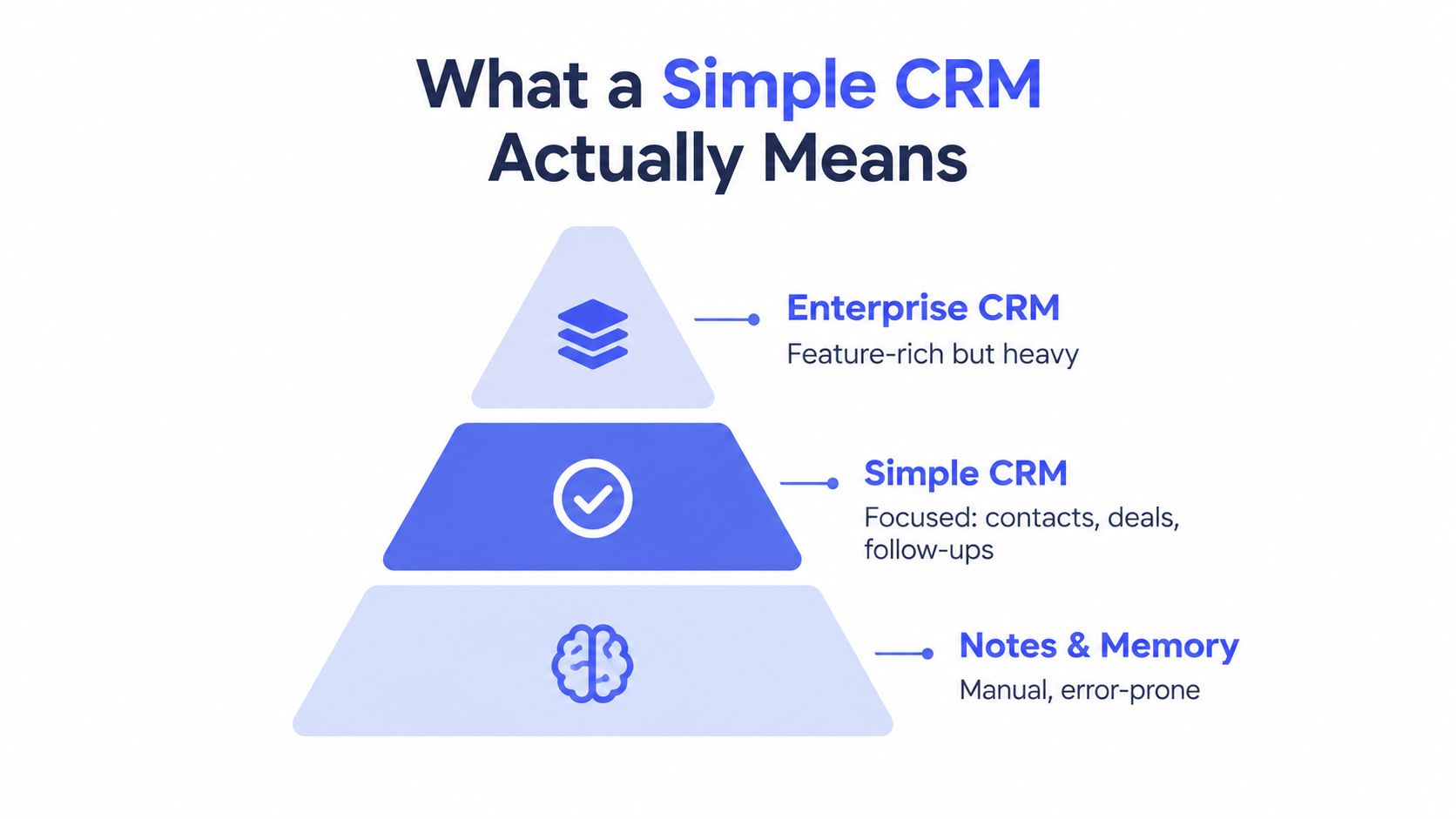
A simple CRM isn't a stripped-down version of an enterprise platform by accident. It's a deliberate choice to keep the daily workflow narrow enough that a freelancer or small team will actually use it.
The essential job is to maintain a dependable record of relationships and opportunities. That usually means contact management, deal tracking, follow-up reminders, basic reporting, and a connection between sales activity and billing. An appointment calendar and email templates can remove more friction without turning the product into a sprawling operations suite.
The useful middle ground
At one extreme, manual notes and spreadsheets offer flexibility but depend heavily on individual discipline. At the other, enterprise CRMs may provide extensive customization, modules, permissions, automation builders, and reporting options. Those capabilities can be valuable for larger organizations, but they also introduce setup work and training that a small business may not have the capacity to maintain.
A simple CRM should answer practical questions quickly:
- Who is this client?
- What did we discuss last?
- Which deals are active?
- What should happen next?
- Has the invoice been sent or paid?
- Which opportunities need attention today?
The strongest design principle is minimum useful structure. You want enough fields to keep records consistent, but not so many that users skip them. You want automation for repeatable actions, but not a complicated rule system nobody understands.
For a team handling a modest number of clients, a clear Kanban pipeline is often more useful than a dozen specialized dashboards. A visible stage such as “Proposal sent” tells you more about today's work than a complex report that requires several filters and a training session.
Excel, Complex CRMs, and Lightweight Options
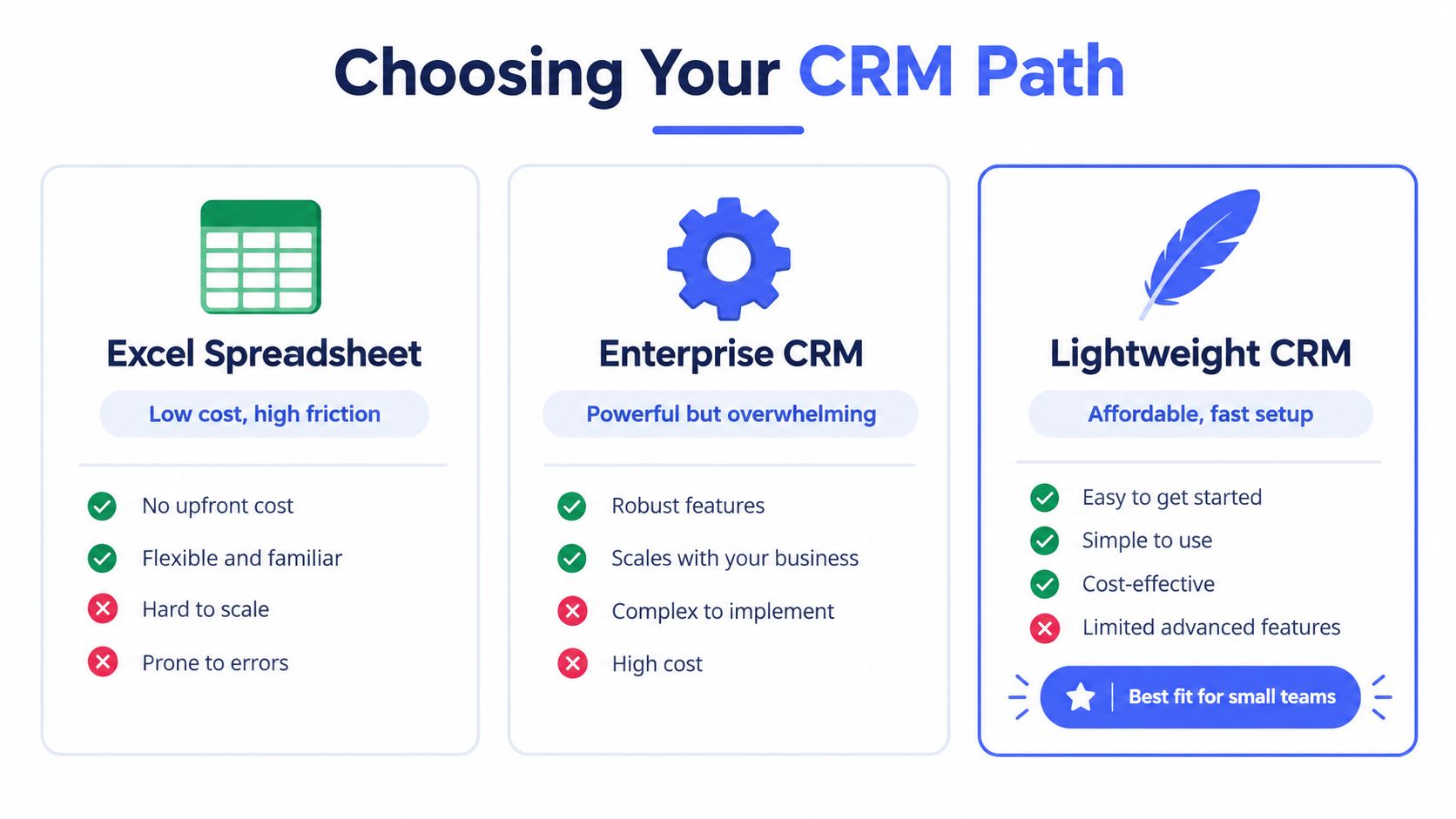
Excel remains useful for ad hoc analysis, imports, and small lists. It becomes fragile when several people edit client records, when deal stages change frequently, or when you need a reliable history of conversations and next actions. A spreadsheet can store information, but it doesn't naturally manage the workflow around that information.
Complex CRMs solve more problems, but they create trade-offs of their own. Configuration takes time, users need to learn the interface, and teams may spend energy maintaining fields and automations that don't affect daily revenue. A powerful platform can still fail if people avoid opening it.
A practical comparison
| Option | What works | Where it breaks |
|---|---|---|
| Excel spreadsheet | Familiar, flexible, and easy to start | Follow-ups, permissions, history, and shared updates require manual work |
| Complex CRM | Deep automation, customization, and advanced reporting | Setup and training can overwhelm a small team |
| Lightweight CRM | Faster adoption with contacts, deals, follow-ups, and billing in one place | Less suitable when the business needs complex departments or highly specialized workflows |
A lightweight option such as MicroCRM brings contact records, a Kanban pipeline, invoicing, email sequences, appointment scheduling, and reporting into one interface. That makes it suitable for freelancers, coaches, consultants, creative studios, and small agencies that want structure without a long implementation project.
The deciding factor isn't the number of features listed on a pricing page. It's whether the tool helps people record accurate information during normal work. The comparison of CRM alternatives is most useful when you judge each option against your actual workflow, not the workflow you hope to build someday.
A CRM with fewer features can produce better data when users understand it, trust it, and update it consistently.
Essential Features and Implementation Checklist
A small business CRM should remove repeated work before it adds new work. Start with the points where client details disappear, follow-ups get missed, or staff copy the same information between a spreadsheet, inbox, calendar, and billing tool. A lean system improves data quality when it fits the way people already handle client work.
Choose the core building blocks
- Contact management: Keep names, companies, email addresses, notes, tags, and interaction history in one searchable record. Make the fields useful enough for daily work, but limited enough that people complete them.
- Kanban pipeline: Use stages such as New inquiry, Qualified, Proposal sent, Won, and Lost. Each stage should describe a decision or a clear change in status.
- Invoicing: Create, send, and track invoices without re-entering client details in another application.
- Email sequences: Combine templates with timed delays, then stop the sequence when a contact replies. OnePageCRM explains how sequence-based follow-ups work, including how this setup reduces manual errors and keeps outreach consistent.
- Appointment calendar: Let clients arrange meetings while keeping availability and resulting tasks visible.
- Basic reports: Monitor open deals, revenue, activity, and overdue actions without commissioning a separate analytics project.
MicroCRM provides a concrete lightweight example by combining contact records, a Kanban pipeline, invoicing, email sequences, appointment scheduling, and reporting in one interface. That combination suits freelancers, coaches, consultants, creative studios, and small agencies that need structure without a long implementation project. It is less appropriate for organizations with complex departments or highly specialized approval processes, which is a trade-off worth accepting openly.
Set up the system in a sensible order
1. Define the minimum data set. Choose the fields every contact needs. For many freelancers, these include name, email, phone, company, source, status, and next action. Extra fields create maintenance work, so add them only when they support a real decision.
2. Clean the existing data. Export the spreadsheet, remove obvious duplicates, standardize names, and separate contacts from deals. Import active clients, current prospects, and relationships you expect to revisit rather than years of inactive records.
3. Build the pipeline around decisions. “Proposal sent” tells the team what happened and what response is due. “In progress” often says too little to guide the next action.
4. Add one automation at a time. Start with a proposal reminder, a task for a new inquiry, or a defined outreach sequence. Test it with a real contact before applying it broadly.
5. Connect email and calendar. Reduce duplicate entry rather than creating another inbox. Confirm that messages, meetings, and tasks attach to the correct contact or deal.
6. Review the dashboard weekly. Check for missing next actions, stalled deals, incomplete records, and invoices needing attention. A short review often improves data quality faster than adding another dashboard.
Review data protection before importing sensitive client information. AWS Cognito's data protection documentation describes encryption at rest for user pool and identity pool data, TLS 1.2 or higher for data in transit, and support for TLS 1.3. Also check user permissions and export policies.
Use this CRM selection checklist to assess fit with working habits, integrations, data requirements, and growth plans. Try a lightweight CRM for free and see whether it fits your workflow.
Real-World Results and Key Metrics
The true test of a simple CRM isn't whether it contains many functions. It's whether the business can answer operational questions with cleaner records and less manual effort.
Consider a small design studio with proposals in email and invoices in a separate billing tool. After moving active opportunities into a pipeline, the owner can see which deals are awaiting a response, which are ready for billing, and which have gone quiet. The improvement isn't “more automation” in the abstract. It's a reliable connection between client activity, commercial status, and the next task.
Metrics worth watching
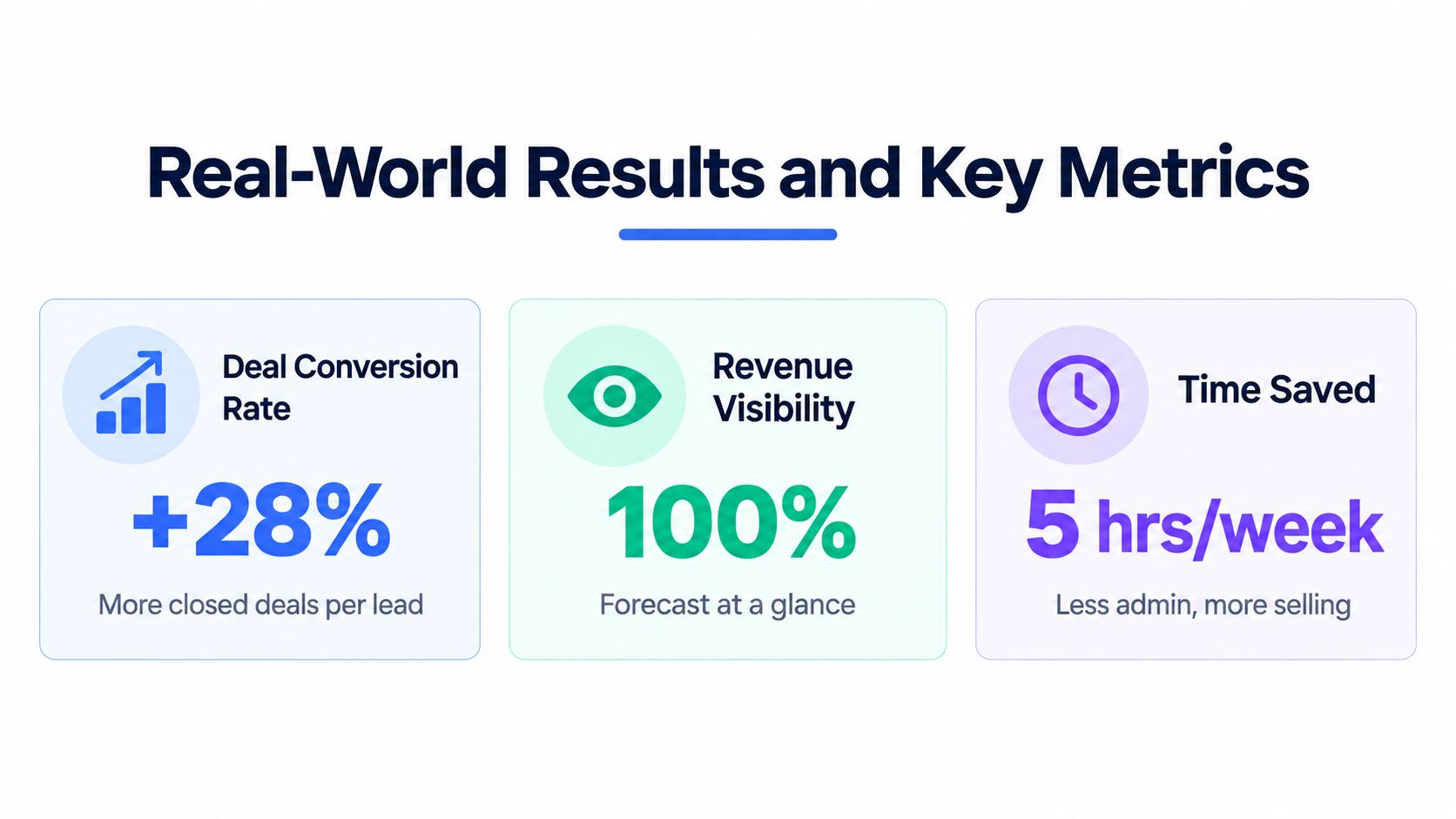
Conversion and deal management. One cited CRM industry source reports that CRM use can boost sales revenue by 29%, improve retention by 27%, and increase lead conversion by up to 300%. These figures come from CRM statistics compiled by SchedulingKit, and they should be treated as industry-reported benchmarks, not a promise for every business.
Response discipline. Follow-up timing deserves its own measure. ZipDo's sales follow-up data reports that customers are 72% more likely to buy when a business follows up within one hour, while only 18% of sales follow-ups receive a response overall. A lightweight CRM helps by making the next action visible and by triggering consistent sequences where appropriate.
Administrative time. Nutshell's CRM statistics reports that sales teams can save 4 to 5 hours per week by removing manual data entry and duplicate work, while CRM automation can reduce administrative tasks by up to 80%. For a solo operator, that recovered time can go toward client delivery or selling rather than reconciliation.
Measure data quality before chasing growth
A clean pipeline is more valuable than a crowded one. A 2024 survey of 145 companies identified missing data validation processes as the biggest trust problem, with incomplete data at 45.45%, limited real-time access at 40.50%, and difficulty analyzing data at 36.36%. The same source discusses practical checks such as duplicate rate, field completeness, accuracy spot-checks, and freshness.
For a small business, review those measures in plain language. Are every active deal's next steps recorded? Can you identify duplicate contacts? Do invoice and deal statuses agree? Does the pipeline reflect current conversations rather than old assumptions?
A simple CRM earns its place when its records support decisions. If the dashboard shows what needs attention today and the data can be trusted, the business gains visibility without building a reporting department.
Start Managing Clients Today
A spreadsheet may get a freelancer through the first few clients, then becomes the place where contacts, deals, appointments, emails, and invoices drift apart. Overbuilt tools add maintenance and weaken data quality. A smaller system is easier for a freelancer or small team to use consistently.
Begin with active contacts, a few meaningful pipeline stages, one follow-up sequence, and a clear invoice process. Review records regularly, delete fields nobody uses, and make the next action obvious. If the business changes direction, choose a platform that preserves data and lets you scale without rebuilding the workflow.
Test a simple CRM on a free plan before paying for advanced modules. No credit card is needed to begin. Let daily use show which capabilities earn their place.
Micro CRM combines contacts, deals, invoices, email follow-ups, and appointment scheduling in one focused workspace for freelancers and small businesses. Visit Micro CRM to start for free and organize your client workflow without unnecessary complexity.