Client Relationship Management Made Simple for Small Teams
You've just finished a client call, but the next action is already hard to find. The contact is in an Excel sheet, the conversation is buried in an email thread, the follow-up is written in a notebook, and the invoice is sitting in a folder with several similarly named files. Nothing is deliberately neglected, yet a promise gets missed, a lead goes cold, or a payment reminder arrives later than it should.
That's the everyday problem client relationship management is meant to solve. For a freelancer or small team, it doesn't need to mean a large sales department, complicated automations, or hours of configuration. It means keeping clients, conversations, commitments, deals, and payments together so you can act on the right information at the right time.

Table of Contents
- Why Spreadsheets and Scattered Inboxes Fail Solo Businesses
- What Client Relationship Management Means for a Micro-Business
- The Real ROI of Managing Client Relationships Well
- Essential CRM Features for Freelancers and Small Teams
- Practical Workflows for Follow-Ups, Scheduling, and Getting Paid
- Metrics and Reporting That Actually Matter
- Your Implementation Checklist and How Micro CRM Fits
- Start Managing Clients Without the Complexity
Why Spreadsheets and Scattered Inboxes Fail Solo Businesses
A freelance photographer might begin with a simple Excel contact sheet. One column holds names, another contains email addresses, and a third tracks whether someone has asked for a quote. Soon, the workbook has separate tabs for weddings, commercial shoots, deposits, and outstanding balances. Follow-ups live in a notebook because writing them down feels faster than opening the spreadsheet.
The inbox becomes the unofficial client database. A venue asks for availability in one thread. The client confirms the package in another. A late change appears in a text message. The invoice goes into a folder named after the project, while the payment date exists only in the photographer's memory.
This isn't a discipline problem. The photographer has created a system, but the system is split across places that don't share context. A name in Excel doesn't automatically show the last conversation, the agreed scope, the next action, or whether payment is due. Every time the photographer switches tools, they have to reconstruct the client's story.
Practical rule: If the next action depends on remembering which app contains the relevant detail, the workflow is already fragile.
Spreadsheets add another risk. A review of 88 spreadsheet studies reported errors in 94% of business spreadsheets, with a weighted average cell-error rate of 5.2% where cell-level data was available, according to the review of spreadsheet research. Those figures don't mean every workbook is unusable, but they do show why a carefully maintained tracker can still produce incorrect totals, stages, or dates.
A separate academic synthesis of spreadsheet errors also found errors in 94% of the spreadsheets examined, while reported cell-error rates varied according to how researchers defined and detected an error. The exact percentage changes by method, but the practical lesson is steady: client and invoice tracking shouldn't rely on duplicated rows, manually maintained formulas, and memory alone.
A structured system gives each client one record. The record can contain contact details, notes, deal status, follow-up dates, and invoice history. You still need to enter accurate information, but you no longer have to search four disconnected places before every conversation.
What Client Relationship Management Means for a Micro-Business
Client relationship management is the practice of keeping customer information and commitments organized so you can maintain a reliable relationship over time. Think of it as an external memory for your business. It remembers who the client is, what you discussed, what you promised, what happens next, and whether money is still outstanding.

An enterprise CRM may be built around multiple sales representatives, forecasting, account permissions, complex integrations, and extensive automation. A solo designer doesn't need to reproduce that environment. They need a searchable contact record, a clear view of active opportunities, reminders for promised actions, and a dependable way to connect delivery with invoicing.
A useful mental model
For a micro-business, client relationship management has four connected parts:
- Clients: Names, contact details, preferences, tags, and relevant history.
- Conversations: Notes from calls, emails, meetings, approvals, and changes.
- Commitments: Scope decisions, deadlines, next actions, feedback dates, and renewal points.
- Payments: Quotes, invoices, due dates, reminders, and payment status.
The value comes from the connection between these parts. If a coach knows that a client is considering a renewal, has requested a revised schedule, and still has an unpaid invoice, that information should be visible from the same relationship record. Searching through old messages to reconstruct the situation creates avoidable friction.
CRM adoption also reflects this tension between value and effort. Industry compilations report that approximately 91% of companies with more than 10 employees use CRM software, compared with roughly 50% of firms with fewer than 10 employees, as summarized in CRM adoption statistics. The contrast suggests that CRM becomes standard as organizations gain administrative capacity, while smaller firms may stay outside formal systems because tools feel expensive, complex, or time-consuming.
That doesn't mean small firms care less about relationships. A freelancer often needs organized client records before they can justify an enterprise platform. A lightweight system addresses the missing middle, enough structure to prevent dropped details without forcing a solo professional to become a CRM administrator.
For a practical example, see this guide to CRM for solo entrepreneurs. The basic principle is simple: capture information once, keep it attached to the right client, and make the next action visible.
The Real ROI of Managing Client Relationships Well
Client relationship management earns its place through continuity, not through impressive dashboards. A retained client may return for another project, renew a service, introduce someone else, or expand the work already agreed. A lost client can remove several expected transactions from a small monthly revenue base.
Research frequently attributed to Bain & Company and Harvard Business Review estimates that improving customer retention by 5% can increase profits by as much as 95%, as reported in this CRM statistics overview. The figure is a broad business benchmark, not a promise for every freelancer. Its importance lies in the underlying idea: protecting existing relationships can create disproportionate value because retained customers may need less reacquisition effort and may generate repeat business or referrals.
For a consultant, the failure might be a forgotten renewal conversation. For a designer, it might be an unreturned message after a proposal. For a photographer, it might be failing to check in with a past client before a seasonal event. None of these problems requires advanced artificial intelligence. They require a complete interaction history and a visible next step.
The cost of communication breakdown
Freelancers also carry a relationship risk that traditional sales-focused CRM advice often overlooks. The 2025 Leapers Mental Health in Freelancing Report found that 69.8% of surveyed freelancers experienced stress from poor client communication, 55.7% from insufficient feedback, and 48.5% from being ghosted before a project began. The report also found that 50% experienced a contract or payment dispute, while 39.4% experienced stress from working without a contract.
A CRM can't make every client communicate well. It can, however, preserve evidence of what was agreed, identify unanswered questions, and remind the freelancer when a polite follow-up is appropriate. That distinction matters. The tool supports a healthier process, but it doesn't replace judgment or a clear contract.
Good client management isn't about sending more messages. It's about making fewer commitments disappear.
The economic case is therefore practical. A modest client list deserves the same care as a large one because each relationship can represent a meaningful share of future work. A system that keeps approvals, deadlines, follow-ups, and payment status visible protects revenue and reduces the mental load of wondering what you might have forgotten.
Essential CRM Features for Freelancers and Small Teams
A freelancer opens an inbox before a client call and finds three different versions of the same request. One message contains the deadline, another contains approval, and a spreadsheet contains the payment status. The right CRM features bring those pieces into one working record without turning client management into a second job.

Centralized contact history
Each client needs one searchable record containing contact details, tags, notes, and interaction history. A designer can find the approved color palette without searching old email threads. A consultant can review earlier priorities before proposing the next piece of work.
Useful fields turn conversation into working context. Lead source, current stage, next follow-up date, deal value, and interaction outcome show what happened and what needs attention. The record becomes a shared memory for a solo business or a small team.
A visual pipeline
A Kanban pipeline gives every opportunity a clear position in the sales process. Common stages include New inquiry, Discovery, Proposal sent, Negotiation, and Won. Moving a deal between stages is easier to read than scanning rows of text for changed statuses.
The pipeline also reveals stalled relationships. A proposal sitting in one stage without a next action is a prompt to review the conversation, clarify the client's position, or decide that the opportunity is no longer active.
Invoicing connected to the relationship
Billing should sit beside the client and project history. Create an invoice from the relevant client or deal, generate a professional PDF, email it, and keep its due date visible with the rest of the relationship record. Multi-currency support can help consultants and agencies serving international clients.
Late payment deserves its own status and follow-up path. A 2025 QuickBooks survey cited in late-payment reporting found that 56% of surveyed U.S. small businesses were owed money from unpaid invoices. Affected businesses were waiting for an average of $17,500, and the same reporting stated that 47% had invoices more than 30 days overdue.
Templates and follow-up sequences
Templates reduce the work of writing recurring messages. Sequences help keep a promising inquiry from vanishing after the first reply. Write them in human language, and stop the sequence when the client responds. Automation should protect attention, not make the relationship feel like a mailing system.
Appointment scheduling
Availability management lets a client choose a suitable meeting time without a long email exchange. It helps coaches, photographers, and consultants whose projects begin with a conversation. A booking tool also reduces the chance of a confirmed time being lost in a separate calendar.
Simple reporting
A small business needs a quick view of revenue, active deals, recent activity, and invoice status. Dozens of charts create maintenance work when nobody uses them. A useful report answers a practical question, such as which opportunities need attention or which invoices remain open.
A micro-business can usually start without every AI add-on, automation wizard, or configuration option. Fewer features often mean faster adoption and clearer records. MicroCRM for free can be considered when the priority is organizing client relationships without adopting a heavyweight system.
A spreadsheet may still suit a very small, stable client list. A lightweight CRM becomes more useful as follow-ups, approvals, scheduling, and payments begin crossing paths.
Practical Workflows for Follow-Ups, Scheduling, and Getting Paid
Features become useful when they shape repeatable habits. These three routines work for photographers, designers, coaches, and consultants because they focus on the moments where work commonly slips.
Responding to a new lead
Lead-response research reported that contacting an inbound lead within five minutes made the lead approximately 100 times more likely to be reached and 21 times more likely to be qualified than waiting 30 minutes. The analysis covered more than 15,000 leads and 100,000 call attempts over three years, according to this lead follow-up research summary. Treat those figures as directional benchmarks, but take the operational lesson seriously.
- Capture the inquiry immediately. Add the person, service requested, source, and essential context to the CRM.
- Respond during working hours as quickly as you reasonably can. A photographer might confirm the event date and offer a discovery call.
- Create the next task. If the lead doesn't reply, schedule a short, respectful follow-up sequence.
- Record the outcome. Note whether the lead qualified, postponed, declined, or became a booked project.
Scheduling a meeting
A consultant can replace calendar ping-pong with a simple booking routine:
- Share your booking link. Publish only the time windows you can honor.
- Confirm automatically. Include the meeting type, duration, location, and preparation request.
- Send a reminder the day before. Give the client an easy way to reschedule if necessary.
- Log the result. Add the main decision, commitment, and next date to the client record.
A summary of Calendly's 2024 State of Meetings research reported that 43% of respondents spent at least three hours per week scheduling meetings, as reported in this small-business scheduling statistics summary. For a solo professional, reducing repeated coordination can return meaningful working time, even if the exact saving varies by calendar and workload.
Getting paid without damaging trust
Payment reminders work best when they follow an agreed process rather than appearing as an anxious surprise.
- Capture the terms before work starts. Record the deposit, due date, currency, and responsible payer.
- Send the invoice when the work is delivered. A designer shouldn't leave the final invoice in a draft folder.
- Remind before and after the due date. Keep the language polite, specific, and consistent.
- Log every payment interaction. Preserve the message, promised payment date, and escalation point.
- Mark the invoice paid. Close the financial loop so the next client review reflects reality.
The 2025 State of Freelance Work reported that 85% of freelancers had invoices paid late at least some of the time, while 15% reported always being paid on time. It also said 49% of companies use internal tools such as spreadsheets to manage freelancer contracts and billing. A separate Leapers report found that 67.5% of freelancers experienced late payment, 81.2% of those affected said it caused stress, and 43.4% encountered payment terms of 60 days or more.
A reminder can't fix a procurement process or a client who refuses to pay. It can make your own records, timing, and escalation consistent.
Before sending your next reminder, learn how to follow up with clients without turning the relationship into a series of awkward chases.
Metrics and Reporting That Actually Matter
A weekly review should answer a few useful questions, not produce a wall of vanity metrics. Can you see which deals need attention? Did new inquiries receive a timely response? Which invoices are still open?
The most valuable fields are often the least glamorous. Lead source, pipeline stage, next follow-up date, deal value, and invoice status let you compare activity with outcomes. A contact list becomes a small knowledge base when you can see not just who someone is, but how the relationship is progressing.
A short weekly review
Set aside a consistent review period and check:
- Pipeline value: What work is active, and where is each opportunity?
- Stage distribution: Are proposals accumulating without decisions?
- Follow-up timeliness: Are inquiries answered within hours rather than days?
- Activity consistency: Which planned calls, emails, or check-ins remain incomplete?
- Invoice status: Which invoices are sent, due, overdue, or paid?
| Metric | What It Tells You | Action If It Slips |
|---|---|---|
| Pipeline value | Whether upcoming work is visible | Review each open deal and add a next action |
| Stage distribution | Where opportunities are slowing down | Contact stalled prospects or revise the stage |
| Follow-up timeliness | Whether new inquiries receive prompt attention | Add alerts and simplify lead capture |
| Activity consistency | Whether planned relationship work is happening | Reduce the task list and assign clear dates |
| Invoice status | Which payments require attention | Send the appropriate reminder and record it |
Reporting only works when entering information takes little effort. If logging a call feels like a separate administrative project, people will postpone it and the dashboard will become fiction. A simple system with complete records is more useful than a complex system filled with gaps.
For a focused view of income and deal movement, use this guide to revenue tracking. The aim isn't to measure everything. It's to notice the few signals that change your next decision.
Your Implementation Checklist and How Micro CRM Fits
You don't need to redesign the whole business before adopting client relationship management. Start with the work already in front of you.
Build the first useful version
- Enter current contacts. Add active clients and open opportunities first. Apply tags such as photography, coaching, referral, renewal, or agency.
- Match the pipeline to reality. Use stages that describe your actual process, not a generic sales diagram.
- Write two or three templates. Prepare a first-response email, a proposal follow-up, and a payment reminder.
- Define follow-up cadences. Decide when you'll respond, when you'll check in, and when you'll close or pause an opportunity.
- Connect availability. Make it easy for qualified clients to book without exchanging repeated messages.
- Send the next invoice from the system. Test the full path from invoice creation to email delivery and payment status.
A tool such as Micro CRM maps directly to this checklist through centralized contacts and deal history, a visual Kanban pipeline, integrated invoicing with multi-currency support, email templates and automated sequences, appointment scheduling, and clear reporting. Its free plan requires no credit card, so you can test whether the workflow fits before committing to a paid plan.
The alternatives have clear trade-offs. Excel is familiar and flexible, but it remains disconnected from email, appointments, and invoice history, and spreadsheet research shows why manual formulas deserve caution. Enterprise CRMs can support large teams, but a freelancer managing fewer than 50 clients may spend more time configuring permissions, fields, and automation than serving customers.
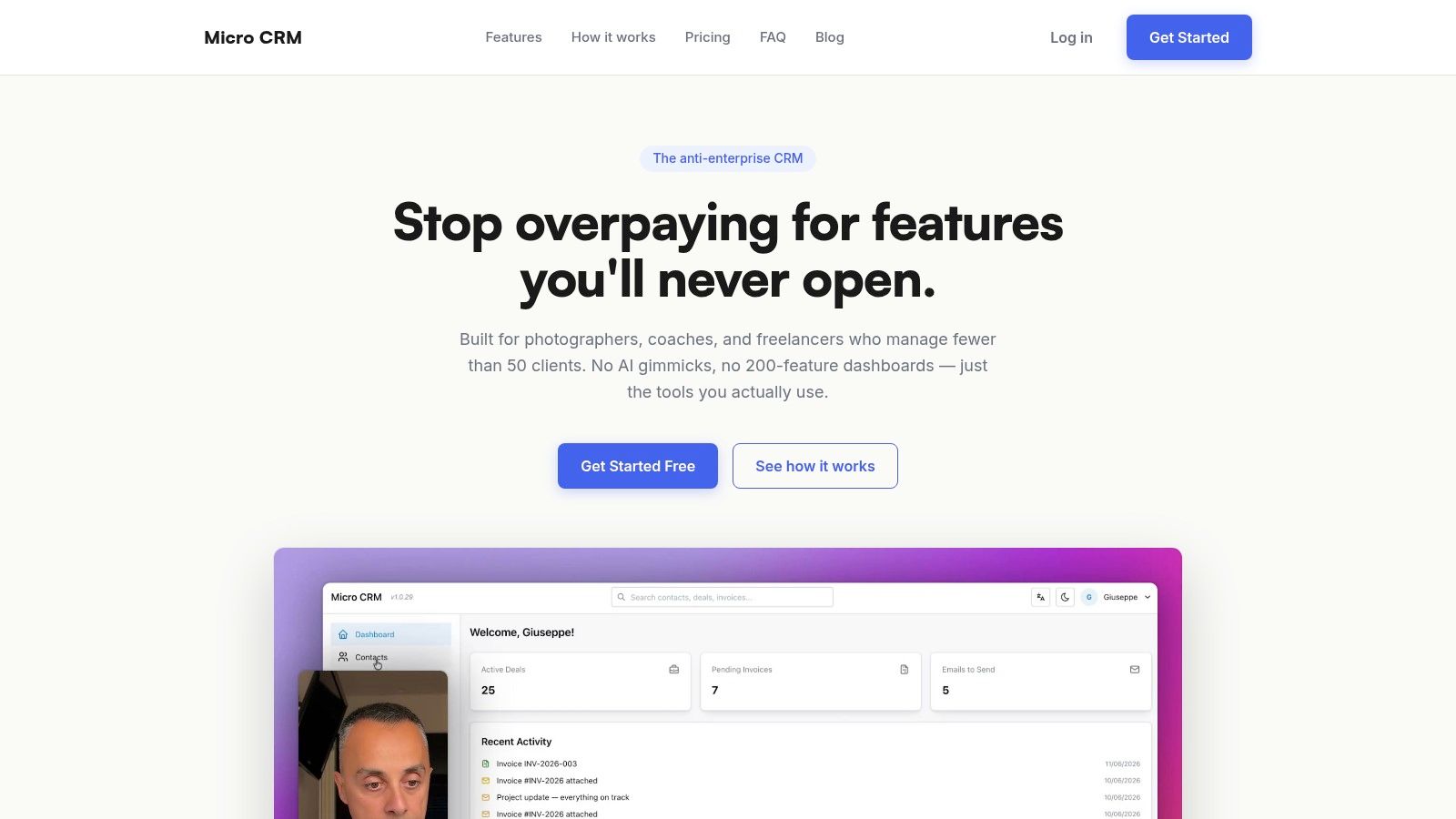
Micro CRM's intended trade-off is a focused workspace rather than an enormous feature catalog. That means less configuration overhead, a shorter learning curve, and a closer fit for solo professionals and small agencies that need their client records, opportunities, invoices, messages, and appointments in one place.
Start Managing Clients Without the Complexity
A missed reply, an undocumented promise, or an unpaid invoice can weaken a freelancer's client relationship. Client relationship management creates continuity: each conversation, commitment, follow-up, meeting, and payment status has a clear place.
Spreadsheets and inboxes may work briefly, but scattered records make client history difficult to rebuild. A lightweight CRM provides structure without the setup burden of a heavyweight system, helping you establish reliable workflows quickly.
Micro CRM combines contacts, deals, invoices, email follow-ups, calendar scheduling, and reporting for freelancers and small teams. Visit Micro CRM to start free with no credit card required, and give each conversation a recorded next step.