
10 CRM Best Practices for Freelancers

Stop Letting Client Work Live in Spreadsheets
Client details sit in Excel. Meeting notes are buried in email threads. A promising lead gets a proposal, then disappears because the follow-up reminder was in a notebook you stopped checking. When the project finishes, creating and sending the invoice becomes another separate administrative task.
This scattered workflow is common for freelancers, consultants, photographers, designers, coaches, and small agencies. A spreadsheet can store names, but it can't give you a reliable view of the relationship, the next action, the deal stage, and the payment status in one place.
MicroCRM is designed as a lightweight workspace for contacts, deals, emails, invoices, calendar scheduling, and reporting. It focuses on quick setup and daily usability instead of forcing a small business to configure an enterprise system. There's also a free plan with no credit card required.
The following CRM best practices follow the complete client workflow, from clean records and focused outreach to pipeline management, follow-ups, appointments, billing, and reporting. The goal isn't to collect more software. It's to make one system useful enough that you return to it every day.
Want to better organize your clients and business opportunities?
Table of Contents
- 1. Centralize All Client Information in One Place
- 2. Tag and Segment Clients to Prioritize Outreach
- 3. Review and Clean Up Your Data Regularly
- 4. Use a Visual Kanban Pipeline to Track Deals in Real Time
- 5. Set Clear Pipeline Stages and Move Deals Deliberately
- 6. Automate Email Follow-Ups with Sequences and Templates
- 7. Schedule Appointments with an Integrated Calendar
- 8. Create and Send Professional Invoices Instantly
- 9. Maintain a Single Source of Truth for Client Interactions
- 10. Generate Simple Reports to Track Key Metrics
- 10-Point CRM Best Practices Comparison
- Turn Good CRM Habits into a Simple Weekly System
1. Centralize All Client Information in One Place
A CRM becomes valuable when it answers a simple question quickly: what do I need to know before I contact this client? Store contact details, interaction history, project context, preferences, and next steps in one searchable record instead of distributing them across Excel, email, notes apps, and folders.
A freelance photographer might record a client's preferred portrait style, color grading preferences, previous project outcomes, and important delivery details. A consultant can open a client profile before a follow-up meeting and see the engagement history without searching through old messages.
Start with the records you actively use. Import existing contacts, review duplicates before relying on the database, and decide which information belongs in a standard field rather than a private note.
Build records that support action
Use tags consistently, such as photography-wedding or status-lead, so you can find related contacts without creating multiple versions of the same person. Add custom fields for information that affects decisions, including budget, deadline, service type, or preferred communication channel.
A useful contact record should make the next action obvious. If you have to open three other apps to understand the client's situation, the CRM hasn't become your working system yet.
Practical rule: If a detail could change your next email, proposal, meeting, or invoice, keep it attached to the client record.
MicroCRM combines contact search, tags, and interaction history so freelancers and small teams can replace scattered client files with one usable source of context.

2. Tag and Segment Clients to Prioritize Outreach
Not every contact deserves the same message at the same time. A past client, a new enquiry, a referral partner, and an inactive prospect may all be valuable, but they need different next steps. Tags let you separate those groups without maintaining a new spreadsheet for every campaign.
Keep your tagging system small enough to remember. Useful categories include relationship status, service type, industry, commercial value, and outreach priority. A consultant might use tags such as potential-referral-source and high-margin. A creative studio might combine project-type-branding with budget-large to identify suitable prospects for a particular offer.
Make tags predictable
Use one naming convention, such as lowercase words joined by hyphens. Don't create High Value, high-value, and priority-client for the same idea. Inconsistent tags make filters less useful and gradually recreate the disorder you were trying to remove.
Review tags during your regular pipeline check. Remove labels that no longer describe the relationship, especially after a prospect becomes a client or a project type changes.
- Filter before writing: Select the relevant segment before drafting an outreach message.
- Combine useful signals: A service tag and a relationship tag often produce a more useful list than either alone.
- Use tags with sequences carefully: Automation should support a clear reason for contacting someone, not send a generic message to everyone.
- Keep the vocabulary limited: More tags don't automatically create more insight.
A Kanban pipeline can show where opportunities sit, while tags explain which contacts deserve attention within those stages. That combination is more useful than treating every name as an identical lead.
3. Review and Clean Up Your Data Regularly
A freelancer opens a client record before a call and finds three profiles for the same company. One contains recent emails, another holds the phone number, and the third shows an old proposal. Duplicate records, stale details, and missing fields create false confidence and weaken searches, campaigns, and reports.
Use MicroCRM to search for duplicate names, email addresses, and companies before changing anything. Merge records that belong to the same person or organization, keeping the useful interaction history. Update current contact details, archive inactive prospects instead of deleting them, and check email and phone fields before sending outreach.
One agency might find a client listed under several versions of its company name. A consultant may uncover old prospect records that never converted and now distract from active opportunities. Cleaning the database improves decision-making more than adding another field or importing more contacts.
Set a recurring review date, such as quarterly or twice a year, so maintenance has a clear place in the workflow. Before a major merge or archive task, export a backup. Then work through this order:
- Find duplicates first: Match identical email addresses, similar names, and repeated company records.
- Update active records: Start with current clients and open deals, then review older contacts.
- Archive thoughtfully: Keep historical context available without letting inactive records fill everyday views.
- Check campaign fields: Confirm consent, communication preferences, and contact details before outreach.
- Review failed imports: Fix formatting problems caused by spreadsheets or other contact sources.
A short weekly check can catch problems before the scheduled cleanup. Look for bounced addresses, incomplete client profiles, and records with recent activity stored under the wrong company or person.
Clean data supports reliable reporting and better follow-up. 47% of CRM users say satisfaction is significantly affected by data-quality issues, while 74% say their CRM improves access to customer data, according to a summary of CRM statistics. Better access helps only when the records behind it remain accurate.
4. Use a Visual Kanban Pipeline to Track Deals in Real Time
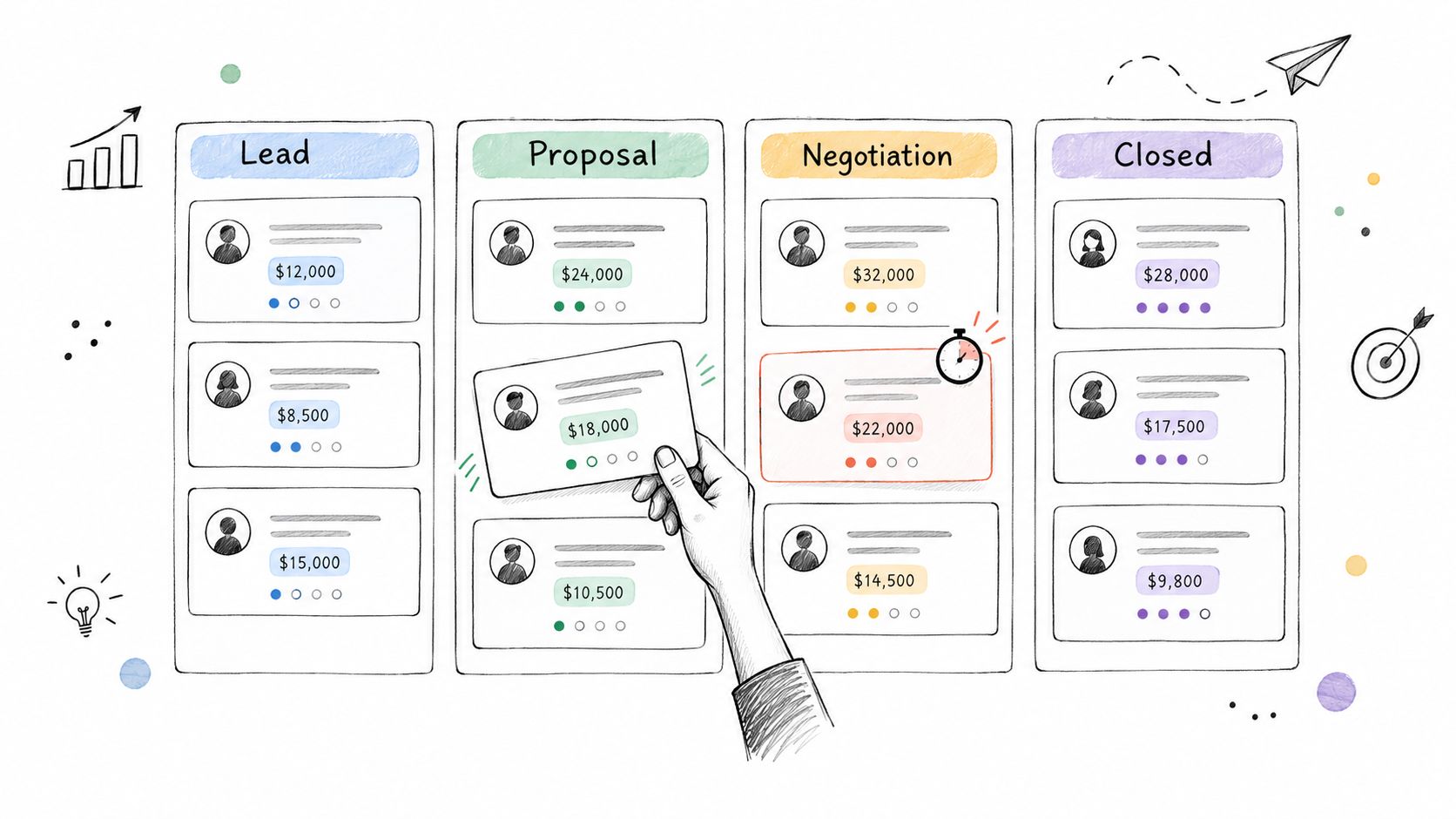
A spreadsheet can list opportunities, but it doesn't give you the same immediate sense of movement. A visual Kanban pipeline shows which deals are new, which need action, and which have stalled. Dragging a deal card from one stage to the next also makes pipeline maintenance part of the work rather than a separate reporting exercise.
A design agency might notice several proposals sitting in negotiation and decide to contact each client with a specific question. A coach can use the same view to see which onboarding processes need a check-in. The board becomes a practical daily view, not a decorative dashboard.
Keep movement tied to evidence
Define what must happen before a card changes stage. “Proposal sent” should mean the proposal has reached the client. “Approved” should mean you have a clear acceptance, not just a positive conversation. This prevents optimistic pipeline updates from hiding work that still needs attention.
Review the board briefly each week. Look for cards that haven't moved, deals without a next task, and opportunities with no recent interaction. Add labels for urgent or high-priority work, but don't use color as a substitute for a clear next action.
For a practical example of structuring this view, see these Kanban workflow examples.
MicroCRM provides a visual Kanban pipeline with drag-and-drop stages and probability calculations, helping small teams see deal status without maintaining a separate forecast sheet.
After you've reviewed the board, use the deal history to decide whether each opportunity needs a message, a meeting, a revised proposal, or a deliberate close-lost decision.
5. Set Clear Pipeline Stages and Move Deals Deliberately
A pipeline only works when each stage has a shared meaning. If one person uses “proposal sent” for a draft and another uses it only after delivery, the board stops describing reality. Freelancers face the same problem even when they work alone, because vague stages make it harder to know what to do next.
A designer might use Lead, Brief Received, Proposal Sent, Approved, Project Active, Invoice Sent, and Closed. A consultant may need Prospect, Discovery Call Scheduled, Proposal Delivered, Contract Signed, and Project Started. The labels can differ, but each should represent an observable event.
Write the rule behind every stage
Add a short description to each stage. Then move a deal only when that condition is true. A client saying “this sounds good” may justify a follow-up task, but it doesn't necessarily justify moving the opportunity to approved.
Keep the pipeline short. A small business usually needs enough detail to guide action, not a stage for every email. If a deal hasn't changed for a reasonable period, decide whether to follow up, revise the offer, pause it, or close it as lost.
A pipeline is not a record of optimism. It's a record of completed client actions.
Review the stages against real work as your services evolve. If cards frequently sit between two stages because the distinction is unclear, rewrite the definitions. If one stage never changes your behavior, remove it or combine it with another.
The best pipeline is the one that tells you what deserves attention today. More stages don't create more control if they only create more maintenance.
6. Automate Email Follow-Ups with Sequences and Templates
A proposal can disappear from a freelancer's attention as soon as active project work begins. Set up the next contact before sending the proposal, so the opportunity remains part of the workflow rather than another item in a spreadsheet or inbox.
Start with templates for outreach, proposal follow-ups, thank-you messages, feedback requests, and re-engagement. In MicroCRM, keep the repeatable structure in the template, then personalize the sentence that shows you understand the client's situation. Too many variables make an email sound like a database export, so leave space for a specific observation or useful answer.
Let the sequence handle timing
A consultant might send one proposal follow-up after a short pause and a later message that addresses a common objection. A designer could insert the client and project name automatically into a feedback request, then add a note about the work delivered. The sequence keeps the task visible while the sender remains responsible for judgment.
Campaigns with three to five follow-up steps reach an 8.3% reply rate, compared with 4.1% when there are no follow-ups, and 42% of replies arrive on a follow-up step, according to sales follow-up statistics from Fluid CRM. Use that finding as a reason to create a thoughtful sequence, not permission to send repeated low-value messages.
Before activating it, Test on yourself first to check formatting, links, variables, and timing. Set an exit condition so the sequence stops after a reply, booking, or decline. Use relevant triggers such as a sent proposal or agreed follow-up date, rather than adding an arbitrary contact list. Review responses and adjust subject lines or copy based on real conversations.
MicroCRM supports templates, variable placeholders, and automated sequences. These email follow-up automation examples can help you structure consistent follow-up without making every message identical. Record the outcome in the client record, then use the next pipeline action, such as scheduling or billing, to keep the workflow moving.
7. Schedule Appointments with an Integrated Calendar
A coach can send a discovery-call link that shows only available slots, while a designer can check the week before accepting a kickoff meeting. The booking should fit around existing project work, including preparation time and other client commitments.
Use MicroCRM to connect the appointment with the contact record and project context. Set separate rules for each meeting type. A discovery call may need a short window, while a kickoff requires more time and preparation. Add buffer time between meetings so one delayed call does not disrupt the rest of the day.
Configure the calendar around four practical controls: Sync calendars to keep personal and team availability aligned; Ask useful questions about goals, budget context, or the service under consideration; Send confirmations with meeting details and a clear rescheduling option; and Record the outcome by attaching notes, decisions, and next steps to the contact.
Review availability before sharing a booking link. This prevents a convenient slot from creating an unrealistic day of back-to-back calls. It also gives you time to prepare the right questions or review the client's previous interactions.
After the appointment, update the contact record immediately. Calendar history should show whether the meeting happened, what it covered, and which action was promised. That context makes the next follow-up specific, rather than leaving a vague reminder such as “call client.”
8. Create and Send Professional Invoices Instantly
Billing should follow the commercial workflow, not require a separate reconstruction of what happened. When a deal reaches the correct stage, you should be able to create an invoice from the relevant client and project information, apply clear terms, send it, and monitor its status.
A photographer can send an invoice shortly after delivering a finished project. An international consultant can invoice a United States client in USD while maintaining a different home currency. The important connection is between the deal, the client record, the invoice, and the follow-up task.
Net 30 gives a client 30 days from the invoice date to pay, while due-on-receipt terms are also common for smaller transactions and one-off services, as explained in this guide to invoice payment terms. Choose terms that fit the engagement and state them clearly.
Make payment expectations easy to follow
Set up your invoice template once with your branding, payment instructions, numbering convention, and standard terms. Include the due date, a clear description of the work, and the preferred payment method. Review open invoices regularly so overdue accounts don't disappear from your working view.
Xero reports that invoices with one-week terms are settled in about two weeks on average, while the average client takes 28 to 29 days to pay, which supports the value of creating and tracking invoices inside the same workflow through invoice payment timing guidance.
MicroCRM includes invoice creation, PDF generation, email delivery, and multi-currency support. Its simple invoicing software guide explains how billing can stay connected to client and deal records.
9. Maintain a Single Source of Truth for Client Interactions
The most useful CRM record tells the story of the relationship. Log calls, emails, meetings, decisions, and next steps where the client record lives. This prevents duplicated outreach and saves you from asking a client to repeat information they've already provided.
An agency benefits when any team member can see the project brief, revision history, recent communication, and outstanding task. A consultant can review notes before a follow-up call and remember a personal detail or concern discussed months earlier. Even solo operators benefit because future-you is effectively another team member who wasn't in the original conversation.
Capture the useful minimum
Don't turn every interaction into a transcript. Summarize the outcome, the client's concern, the decision made, and the next action. Add the note the same day while the details are still clear.
Assign tasks directly to contacts and deals. A note that says “follow up soon” creates ambiguity. A task that says “send revised brand proposal after client confirms deliverables” gives you a concrete action and a reason for it.
Before every client call, scan the interaction history. Check the last contact date, open tasks, current deal stage, recent invoice status, and any unresolved question. This preparation helps you avoid repeating questions, making contradictory promises, or sending a message that ignores the client's latest update.
For small teams, a single source of truth also protects handovers. If someone is unavailable, another person can continue the relationship without searching through private inboxes or asking the client to explain the entire situation again.
10. Generate Simple Reports to Track Key Metrics
A Friday review should answer a practical question: what needs attention next week? A freelancer needs visibility into revenue, active opportunities, deal movement, client activity, and unpaid work. A small agency may also compare service types, spot weak pipeline stages, and decide where outreach deserves time.
Set up only the measures that can change a decision. In MicroCRM, create a compact report view for current pipeline value, open deal count, revenue by service type, invoices awaiting payment, and recent activity. Review it weekly, on a fixed day, so reporting becomes part of the workflow rather than an emergency task.
The value comes from the action that follows. If the forecast weakens, contact suitable past clients or revive relevant prospects. If one project type moves through the pipeline more reliably than another, an agency can adjust its marketing focus. A report that produces no decision is probably tracking too much.
Use these checks during the review:
- Track trends: Compare recent periods rather than judging one isolated result.
- Separate activity from progress: A busy inbox does not prove that deals are advancing.
- Inspect the pipeline: Find stalled stages, missing next actions, and opportunities without recent contact.
- Keep the dashboard readable: Remove widgets you never use, especially if they slow down weekly review.
- Share only relevant views: Give collaborators the context they need to act, not every internal number.
CRM adoption is now widespread in major markets. A 2026 compilation reports that 91% of companies with more than 10 employees use CRM systems, with adoption at 99% in enterprises and 71% among small businesses. It identifies North America as the largest regional market and Europe as the second-largest, according to CRM adoption statistics. A micro-business does not need an enterprise reporting system. It needs a small set of MicroCRM reports that can be maintained consistently and reviewed often enough to guide work.
10-Point CRM Best Practices Comparison
| Practice | 🔄 Implementation Complexity | ⚡ Resource Requirements | 📊 Expected Outcomes | ⭐ Ideal Use Cases | 💡 Key Advantages |
|---|---|---|---|---|---|
| Centralize All Client Information in One Place | Medium, initial data migration and adoption | Moderate, time to import, tag, and train | Faster context switching; fewer duplicates; consistent records | Freelancers, consultants, growing client bases | Eliminates lost details; tip: clean duplicates before importing |
| Tag and Segment Clients to Prioritize Outreach | Low–Medium, needs tagging strategy and discipline | Low, time to tag and maintain; automation recommended | Improved response rates and targeted campaigns | Teams doing personalized outreach at scale | Enables precise targeting; tip: define 3–5 core tag categories |
| Review and Clean Up Your Data Regularly | Medium, periodic audits, careful merges | Moderate, time for dedupe, validation, backups | More reliable reports, better deliverability, cleaner segmentation | Organizations with legacy or degraded data | Preserves data quality; tip: export a backup before major cleanup |
| Use a Visual Kanban Pipeline to Track Deals in Real Time | Low–Medium, set stages and keep cards updated | Low, mostly UI use and occasional training | Instant deal visibility; faster bottleneck detection; better forecasting | Sales teams and agencies tracking pipelines | Real-time overview of deals; tip: run a weekly 5‑min pipeline review |
| Set Clear Pipeline Stages and Move Deals Deliberately | Medium, map process, document criteria, train team | Low–Moderate, time to document and enforce rules | Reduced ambiguity, fewer stalled deals, improved forecasting | Teams needing consistent sales process discipline | Aligns team actions; tip: keep 5–7 stages max |
| Automate Email Follow-Ups with Sequences and Templates | Medium, create templates and sequences | Low–Moderate, time to craft and monitor templates | Consistent timely follow-ups; fewer missed leads; time saved | High-volume outreach and proposal follow-ups | Scales personalization; tip: test sequences and use variables sparingly |
| Schedule Appointments with an Integrated Calendar | Low, sync calendars and define availability | Low, initial setup; handle time zones for international clients | Less scheduling friction; fewer double-bookings; tracked history | Coaches, consultants, client-facing services | Reduces admin overhead; tip: block buffers and sync team calendars |
| Create and Send Professional Invoices Instantly | Low, template setup; optional gateway integration | Low, template creation; payment processor may be needed | Faster invoicing; clearer payment tracking; improved cash flow visibility | Service providers issuing frequent invoices | Speeds billing process; tip: use consistent numbering and reminders |
| Maintain a Single Source of Truth for Client Interactions | Medium, enforce logging discipline and auto-logging | Moderate, enable integrations and train staff | Fewer miscommunications; faster onboarding; consistent client experience | Teams collaborating on shared clients or handoffs | Ensures full history access; tip: log client-facing notes same day |
| Generate Simple Reports to Track Key Metrics | Low, set dashboards and KPIs | Low, time to choose metrics and review regularly | Quick visibility into business health; data-driven decisions | Small businesses and solo operators needing fast insights | Eliminates manual spreadsheets; tip: monitor 3–4 core metrics weekly |
Turn Good CRM Habits into a Simple Weekly System
The strongest CRM best practices aren't isolated features. They form a connected operating rhythm. You capture complete contact records, keep the data clean, define what each pipeline stage means, move deals when real actions happen, and create a follow-up task before an opportunity can go quiet.
The rest of the workflow should follow the same logic. Schedule appointments from a shared calendar, attach meeting outcomes to the contact record, invoice as soon as the commercial milestone is reached, and keep payment status visible beside the client and deal. Then inspect a small set of KPIs so you can see where attention is needed before the pipeline becomes difficult to recover.
A lightweight CRM is often a better fit for a freelancer or small team than a feature-heavy platform. CRM adoption is reported at roughly 71% to 74% among small businesses, and about 65% of firms adopt CRM within their first five years, according to this small-business CRM statistics summary. The practical implication is clear. A system has to create value quickly, because early friction can prevent consistent use.
Don't begin by configuring every possible field, workflow, and automation. Import your active contacts, remove obvious duplicates, create a straightforward pipeline, and review the board during your next weekly planning session. Add tags only when they answer a real question, such as which past clients are suitable for a new service or which proposals need attention.
Retention is another reason to build these habits early. A widely cited historical finding says that a 5% increase in customer retention can raise lifetime customer profits by 50% on average, and by up to 90% in some sectors such as insurance, as summarized in this customer relationship management overview. You don't need a complicated loyalty machine to act on that principle. Remembering commitments, following up on time, invoicing clearly, and delivering a consistent client experience are practical retention work.
The right amount of automation depends on your workflow. Automate reminders and repeatable messages, but don't automate conversations that require judgment. A simple system with complete records and reliable next steps will usually serve a small team better than a complex CRM that nobody updates.
MicroCRM brings contacts, deals, Kanban stages, email sequences, appointments, invoices, and reports into one interface for freelancers and small businesses. It offers a free plan without a credit card, so you can test whether a centralized workflow reduces the administrative gaps that spreadsheets and disconnected apps leave behind.
Manage clients, deals, and invoices in one platform. 👉 https://microcrm.xyz Start for free. No credit card required.
MicroCRM gives freelancers and small businesses one place for contact history, deal stages, follow-up emails, appointment scheduling, invoicing, and essential reports. Put these CRM best practices into a weekly routine without taking on unnecessary configuration, then visit MicroCRM to start for free with no credit card required.