8 Kanban Workflow Examples for Small Businesses

Spreadsheets start out innocent. One tab for leads, one tab for projects, one tab for invoices. A few weeks later, follow-ups live in email, meeting dates sit in a calendar, invoice status is in another file, and nobody can answer a simple question like, “What needs attention today?”
Good Kanban workflow examples fix that by showing the path work takes. Not a fake three-column board. Not a bloated enterprise setup. A useful board mirrors how a client moves from first contact to paid work, review, delivery, and billing. That matters because Kanban didn't begin as a software board at all. Toyota developed it as a production-control system in the late 1940s and early 1950s, then adopted its kanban management system at all plants in 1963. Toyota describes kanban as the tool that made just-in-time production possible by indicating which and how many parts are used where and when, which is why modern boards work best when they make flow visible instead of just listing tasks (Toyota kanban timeline and description).
For freelancers and small teams, that usually means a lighter setup. MicroCRM is one practical option when you want contacts, deals, pipeline movement, invoices, email follow-ups, and appointments in one place without wrestling with a large CRM. The eight examples below show how to map actual work into stages, swimlanes, card fields, and simple automations so the board helps you finish work, not just document it.
Table of Contents
- 1. Freelance Design Studio Project Pipeline
- 2. Coaching and Consulting Client Onboarding Journey
- 3. Photography Studio Booking and Session Management
- 4. Sales Pipeline for B2B Service Agencies
- 5. Freelance Content Creator and Writer Editorial Calendar
- 6. Recruitment and Talent Acquisition Pipeline
- 7. SaaS Trial-to-Customer Conversion Funnel
- 8. E-Commerce Product Development and Launch Roadmap
- 8 Kanban Workflow Examples Comparison
- Choose the Workflow That Matches Your Work
1. Freelance Design Studio Project Pipeline
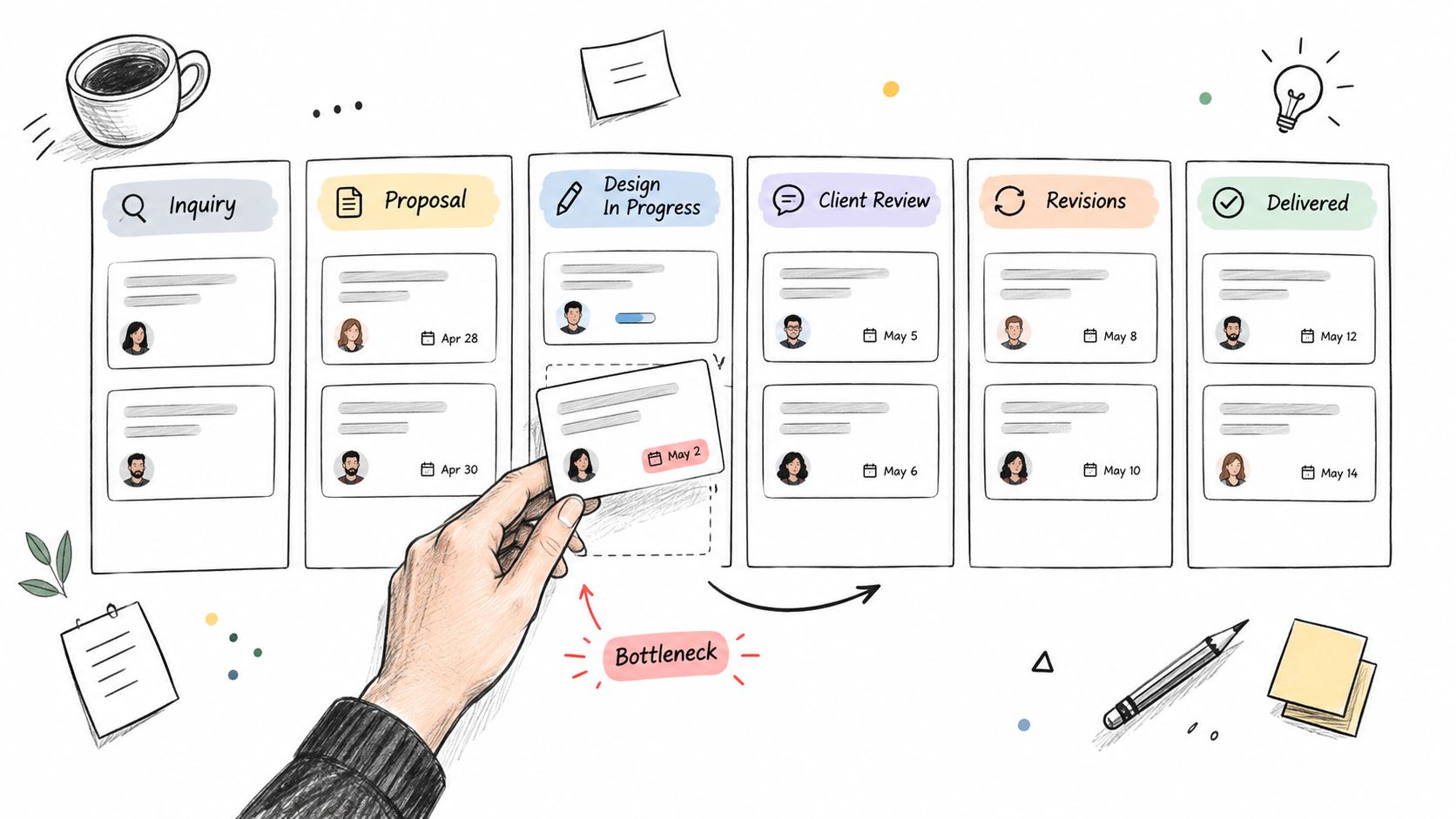
A design studio board should follow the client journey, not the designer's wish list. For most freelance UX, branding, and web design work, that means stages such as Inquiry, Proposal Sent, Scheduled, Design in Progress, Client Review, Revisions, Ready to Invoice, and Delivered.
That extra detail matters. “In Progress” on its own hides too much. If work is stuck waiting for client comments, the designer can't solve that by working faster. The board should expose the wait.
A board shape that works
Use one card per client project. Put the project name first, then include a few fields directly on the card:
- Client contact: Link the person, company, and latest email thread.
- Scope summary: Note the agreed deliverables, not the whole proposal.
- Deadline and next handoff: Keep both visible so review work doesn't disappear.
- Invoice status: Mark whether deposit, milestone, or final invoice is pending.
For swimlanes, split by designer if several people share a client base. If you're solo, split by service line such as Logo Design, Web Design, and Branding. That makes capacity problems easier to see than one long mixed board.
Practical rule: If Client Review keeps filling up, your bottleneck isn't design. It's handoff, approval, or unclear revision policy.
Where small teams usually get this wrong
Too many studios keep proposal tracking in one tool, project tracking in another, and invoices somewhere else. That creates handoff mistakes. A lighter system like MicroCRM works better when the same card can hold deal context, client details, and the billing step that follows delivery.
A few useful operating habits:
- Tag project type: Use labels such as Logo Design, Web Design, or Branding so you can filter quickly.
- Trigger review emails: Send a client notification when a card enters Client Review so feedback doesn't depend on memory.
- Link billing to delivery: When the card reaches Ready to Invoice, attach the related invoice record.
- Review the board every morning: Prioritize blocked approvals, revision requests, and projects waiting on you.
2. Coaching and Consulting Client Onboarding Journey
A coaching lead says yes on a call, then sits in email limbo for a week because the proposal, contract, invoice, and first-session scheduling all live in different places. That is where onboarding starts to leak revenue and trust.
A Kanban board fixes that only if the columns match the real client journey. For a coach or consultant, a practical flow is: New Inquiry, Discovery Call Booked, Discovery Completed, Proposal Sent, Decision Pending, Agreement Signed, Deposit Requested, Onboarding in Progress, Active Engagement, Renewal Check, and Closed. That structure separates selling from onboarding, which matters because the work usually stalls after verbal agreement, not during delivery.
If you do fixed-scope consulting, add a Waiting on Client column between Proposal Sent and Decision Pending. If you sell recurring coaching packages, keep Renewal Check visible instead of burying it in notes. The board should reflect how you get paid and start work.
Configure each card around the handoff
Use one card per client engagement, not one card per person forever. A client who buys executive coaching and later books a team workshop should usually become two cards. That keeps the scope, billing, and next step clear.
Fields worth showing on the front or in the first card view:
- Primary contact and company: Include the person who signs and the person who attends, if those are different.
- Service line: Leadership coaching, career coaching, strategy consulting, workshop facilitation, or retainer advisory.
- Offer or package: Useful for filtering by pricing model or delivery format.
- Next scheduled session or kickoff date: This is the date that tells you whether onboarding is moving.
- Agreement status: Draft sent, signed, or waiting on edits.
- Deposit or invoice status: Requested, paid, overdue, or included in retainer.
- Last conversation summary: Keep it to a few lines. Decision points matter more than full call notes.
- Client goal: The outcome they hired you for, in their words if possible.
Swimlanes should solve a capacity question. For a solo consultant, use swimlanes by service line so you can see whether workshops are crowding out advisory work. For a small firm, use consultant name if each person owns their own book of business. If onboarding work is shared by an operations assistant, a lane for onboarding owner can also work.
Bottlenecks show up fast on this board
The common failure point is not lead generation. It is the stretch between signed agreement and first value delivered.
Watch three spots closely:
- Proposal Sent filling up means deals are not getting a clear yes or no. Tighten proposal turnaround and add an expiry date.
- Deposit Requested stacking up means cash collection is slowing work down. Decide whether kickoff can happen before payment, then apply that rule consistently.
- Onboarding in Progress growing wider than Active Engagement usually means questionnaires, intake forms, or scheduling are too manual.
If cards sit in Agreement Signed for days, the board is telling you the next action is unclear. Add a simple rule: a signed client does not stay in that column. The card moves immediately to Deposit Requested or Onboarding in Progress, depending on your payment policy.
Lightweight CRM actions that save admin time
This workflow does not need an enterprise CRM. It needs reminders, visible client context, and a clean handoff from sale to delivery. That is where a simple system beats Excel. Spreadsheets can list prospects, but they do a poor job of showing who is blocked by paperwork, who has paid, and who still needs a kickoff date.
A few automations are worth setting up:
- Follow-up task after discovery call: Create it automatically so warm leads do not disappear into your inbox.
- Tag by niche or engagement type: Founder coaching, career transition, team workshop, advisory retainer.
- Create invoice step after signature: The billing action should follow the contract, not rely on memory.
- Prompt for kickoff checklist: Intake form, scheduling link, shared folder, and welcome email.
- Flag stalled onboarding: If a card sits in Onboarding in Progress too long, review whether the delay is yours or the client's.
For teams comparing lighter tools with traditional consultant CRMs, MicroCRM's CRM setup for consultants shows the kind of workflow this board supports without forcing you into a heavyweight sales process.
The practical goal is simple. Make it obvious who is ready to start, who is waiting on payment, and who needs a nudge before the relationship cools.
3. Photography Studio Booking and Session Management
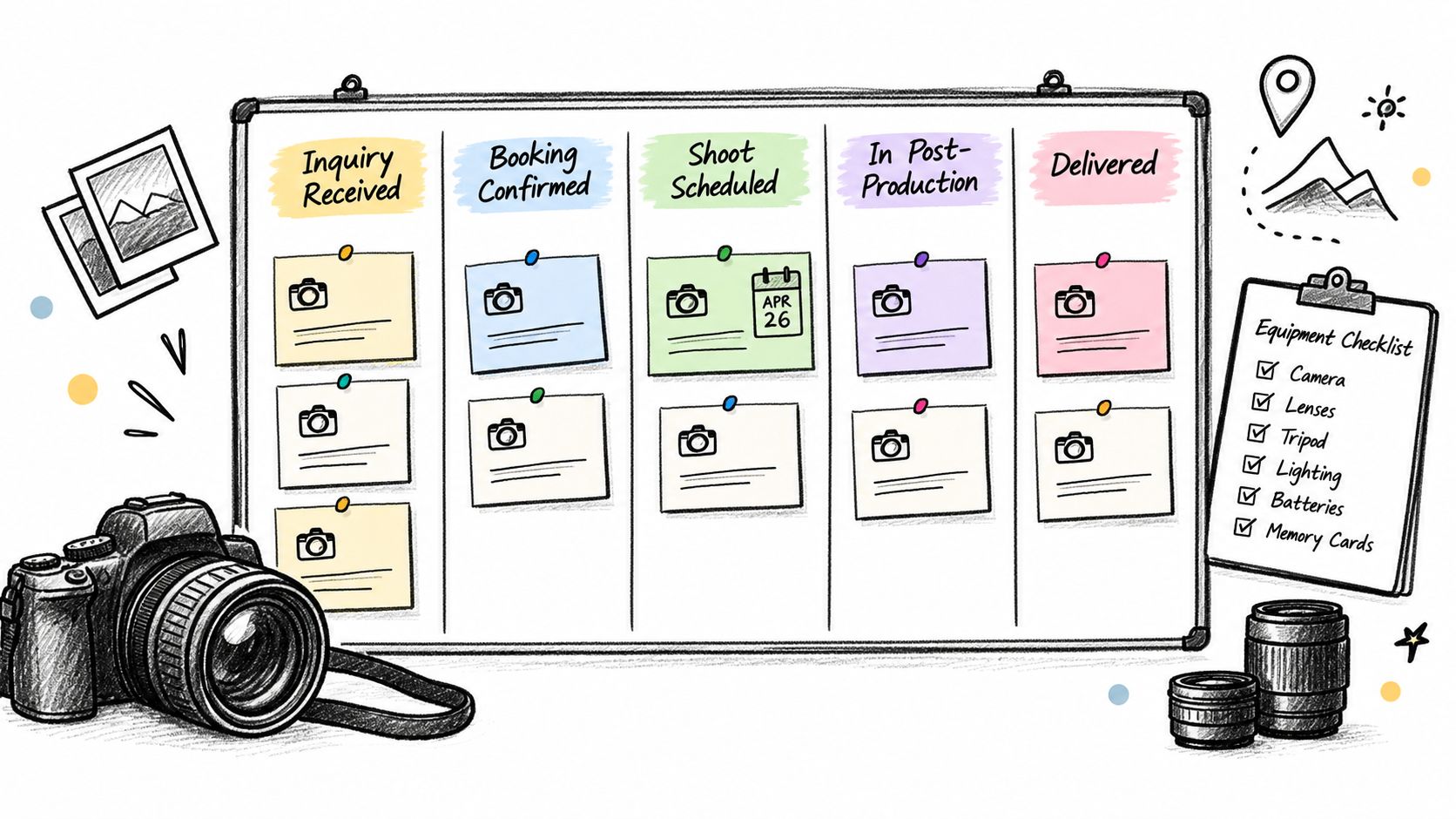
Photography work looks simple from the outside. Inquiry comes in, session happens, gallery goes out. In practice, the messy part sits between those points. Deposits, questionnaires, date changes, assistant coordination, edit queues, and delivery approvals all create drag.
A solid board for a photography studio often uses Inquiry Received, Deposit Requested, Booking Confirmed, Pre-Shoot Consultation, Shoot Scheduled, Waiting for Shoot, In Post-Production, Client Selection or Proofing, Final Edits, Delivered, and Archived.
The fields that save you from double-booking
Each card should include client contact details, session type, shoot date, location, package, payment status, and special requests. If you shoot weddings, events, portraits, and product work, label them clearly so a single board doesn't become noise.
For swimlanes, use either photographer name or month of delivery. Photographer lanes help with staffing. Month-based lanes help with deadline pressure and seasonal surge.
Waiting columns are not optional for photography work. If a card is waiting for a deposit or client image selections, that's different from active editing.
Lightweight CRM actions that fit this workflow
A practical setup inside MicroCRM or a similar simple system might include:
- A deposit checkpoint: Keep Deposit Requested separate from Booking Confirmed so unpaid bookings don't blend with committed ones.
- Email sequences: Send booking confirmation, pre-shoot questionnaire, reminder, editing update, and delivery notice from one system.
- Calendar sync: Put shoot dates in the same place you track the client record. MicroCRM's calendar scheduling software article shows the kind of scheduling workflow that fits this use case.
- Invoice linking: Attach the final invoice to the delivered session for easier monthly reconciliation.
- Rush tags: Mark work such as Rush Delivery or Drone Coverage so production planning stays realistic.
This is also a good example of why Excel breaks down. A spreadsheet can list dates, but it can't show blocked bookings, editing bottlenecks, and follow-up history with the same clarity as a visual board tied to contact records.
4. Sales Pipeline for B2B Service Agencies
Agency sales rarely move in a straight line. A prospect asks for pricing, disappears, returns with procurement questions, then wants a revised scope. If your board only shows New, Open, and Closed, you lose the middle where most deals stall.
A better board for a small B2B service agency uses stages like Cold Lead, Qualified, Discovery Complete, Proposal Sent, Follow-Up Due, Negotiation, Verbal Yes, Contract Pending, Won, and Lost. That may look more detailed than a simple pipeline, but each stage maps to a real action.
Configure the pipeline around decision points
On each deal card, show:
- company and main contact
- service type
- expected close date
- proposal version
- next follow-up date
- invoice or contract status after close
Swimlanes can work by salesperson, service line, or lead source. A small agency owner who sells everything often does best with service-line swimlanes because strategy retainers, websites, and ad management deals tend to move at different speeds.
The strongest lesson from real Kanban case studies is that visual flow plus WIP control changes delivery behavior. One software organization reported lead time dropping from 42 days to 19 days, average WIP falling from 18 items to 8 items, throughput rising from 12 items per month to 20 items per month, and flow efficiency increasing from 24% to 49% after introducing flow tracking and WIP control (Agile Bible Kanban case study).
What works better than “follow up sometime”
For agencies, good CRM hygiene is simple and repetitive:
- Set stage-based follow-ups: Proposal Sent should always create the next touchpoint.
- Flag stalled deals: If a card sits in Negotiation too long, the owner needs a clear next move.
- Tag by industry: That helps you spot which segments are worth more attention.
- Link won deals to billing: Closing shouldn't create a manual re-entry task.
MicroCRM fits this pattern because it combines a drag-and-drop pipeline with invoicing and follow-up tracking. If you need a closer look at that use case, see its sales pipeline management overview.
5. Freelance Content Creator and Writer Editorial Calendar
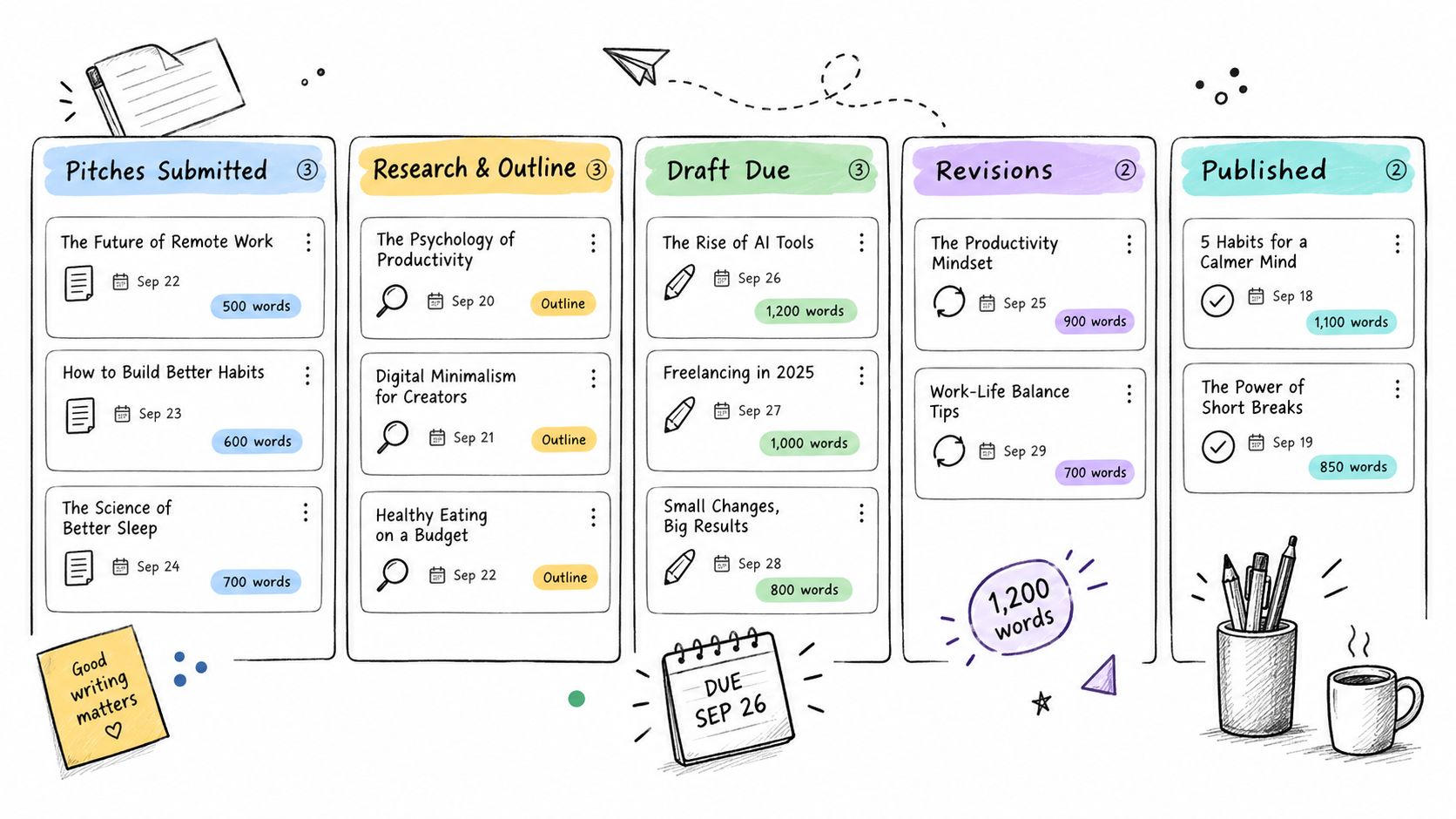
Writers and content creators usually manage several workflows at once. Pitching. Drafting. Waiting on editor feedback. Chasing approvals. Sending invoices. That mix makes editorial work a strong fit for Kanban, but only if the board distinguishes active writing from waiting.
One useful setup is Pitches Submitted, Pitch Accepted, Research and Outline, Draft in Progress, Submitted to Editor, Revisions Requested, Final Approved, Published, and Invoiced.
Separate the work by relationship type
If you write for both publications and brand clients, split them. Different client types behave differently, and a single board usually hides that. Create one board for media pitches and another for retainer or branded content.
Card fields should stay practical:
- client or editor name
- deadline
- fee
- word count or deliverable type
- invoice status
- notes on revision rounds
A systematic mapping of Kanban in software engineering identified 382 studies published between 2006 and 2016, which shows how widely the method moved into digital knowledge work. In one applied example, a team reduced average cycle time from 40.72 days to 18.76 days, lowered the 85th percentile from 62 days to 36 days, and increased throughput from 13.33 to 21.25 items per month, a 59% increase (systematic mapping and example data). The lesson for editorial work is straightforward: fewer active pieces and clearer handoffs usually beat trying to advance everything at once.
Small details that make the board useful
- Date-driven filters: Surface pieces due soon so urgent work doesn't get buried.
- Complexity tags: Mark items such as SEO-Focused, Research Intensive, or Rush Fee.
- Editor email templates: Save common responses for pitch follow-ups and revision acknowledgments.
- Invoice linkage: Move approved work directly into billing so revenue tracking stays tied to delivery.
This is one of the easiest places to see the difference between a board that organizes tasks and a board that manages flow. If too many cards sit in Submitted to Editor, the bottleneck probably isn't your writing speed.
6. Recruitment and Talent Acquisition Pipeline
Recruitment boards fail when they track openings but not candidate movement. A hiring manager sees ten applicants and thinks progress is happening. The recruiter sees six cards stuck between interview scheduling and feedback.
A clear recruitment pipeline often looks like Sourced, Resume Reviewed, Phone Screen Scheduled, Phone Screen Completed, Interview 1, Interview 2, Reference Check, Offer Extended, Accepted, Hired, and Rejected. That may seem long, but hiring has real waiting states, and they need to be visible.
Candidate cards need operational detail
Keep the card simple but complete. Include role, candidate contact information, availability, salary expectation, source, interview notes, and the next scheduled step.
Swimlanes work well by department or role family. Sales candidates move differently from engineering or operations candidates. If one lane slows down, you can address the issue without blaming the whole hiring process.
A recurring problem in many Kanban workflow examples is that they stop at generic To Do, In Progress, and Done boards, even though practical guidance increasingly emphasizes boards that mirror the process and use explicit WIP limits plus flow metrics such as cycle time, throughput, blocked time, aging WIP, and cumulative flow (Atlassian's Kanban guidance). Hiring is a good example of why that matters. “Interviewing” as one column hides whether candidates are waiting on scheduling, feedback, or approval.
Where automation helps
- Interview reminders: Send candidates and interviewers a reminder before scheduled calls.
- Skill tags: Filter by experience or specialty without searching notes.
- Rejection history: Keep a Rejected column with context so strong candidates aren't forgotten.
- Urgency colors: Mark critical roles separately from low-pressure searches.
Good recruiting boards don't just show pipeline volume. They show where decision-making is slow.
For small businesses, this kind of board often works better in a lightweight CRM-style system than in a heavyweight applicant tracking tool, especially when the same person also handles vendor calls, admin, and client work.
7. SaaS Trial-to-Customer Conversion Funnel
Trial conversion work is part sales, part support, part customer success. That's why a simple lead board usually breaks under it. Trial users aren't just prospects. They're interacting with the product, and their next step depends on behavior.
A practical board for this workflow might include Trial Started, Welcome Email Sent, Trial User Active, Needs Human Follow-Up, Demo Scheduled, Upgrade Offer Sent, Conversion Delay, Converted, and Churned.
Use service classes, not one-size-fits-all follow-up
Not every trial user deserves the same response. Create swimlanes or labels for high-touch demos, self-serve trials, partner referrals, and reactivation attempts. That keeps your follow-up policies explicit.
On the card, track trial start date, user type, activation milestone, engagement notes, owner, and next contact date. If you can't define what counts as “active,” the board won't help much.
Another real-world case study reported median lead time improving by 65%, dropping from 12 weeks to 4 weeks, backlog size shrinking by 91%, from over 800 tasks to 75 ready items, and one request category improving by 86%, from one week to one day after clearer visualization and queue control (practical Kanban case study). Trial conversion isn't identical to product request flow, but the principle carries over. Make readiness visible, reduce queue clutter, and treat follow-up stages as measurable work.
A practical follow-up pattern
- Behavior-based sequences: Inactive users get education. Engaged users get demo prompts or upgrade messaging.
- End-of-trial dates: Flag cards nearing expiration so the owner acts before the window closes.
- Industry tags: Segment follow-up by company type if your product has several use cases.
- Delayed conversions: Keep a separate lane for users who need timing, procurement, or internal approval.
A small SaaS team can run this well in MicroCRM if they want one place for outreach, deal movement, and appointments without a large sales stack.
8. E-Commerce Product Development and Launch Roadmap
Product launch boards often collapse because they mix ideas, sourcing, approvals, and supplier communication into one giant backlog. The answer isn't a bigger tool. It's a board that reflects the actual production path.
Use stages such as Idea Submitted, Approved for Development, Design and Sourcing, Prototype in Review, Testing, Production, Pre-Launch Assets, Ready to Go Live, and Live. If you also manage wholesale or restock runs, consider a separate board rather than stuffing both into the same flow.
A short visual example helps before the finer details.
Build cards around supplier and launch risk
Each card should include product name, supplier contact, expected retail price, target launch date, current blocker, and the next external dependency. If one person owns product, sourcing, and launch operations, those fields matter more than elaborate task hierarchies.
Swimlanes usually work best by product category or launch month. If supplier delays are common, add a blocked status with a required reason so your board doesn't hide external bottlenecks.
Recent commentary on smaller-team Kanban use points to a gap in examples for cross-functional, remote or hybrid, integration-heavy, and AI-assisted work. It notes a shift toward automation-first workflows and unified work hubs, while many examples still ignore how one person may own sales, admin, billing, and client communication at once (discussion of current Kanban tooling trends). That's exactly why e-commerce boards should include service policies and supplier communication, not just design tasks.
Good guardrails for this board
- Risk labels: Mark cards green, yellow, or red based on delivery risk.
- Milestone reminders: Set notifications for sourcing approval, production start, quality checks, and shipment updates.
- Supplier history: Keep communication attached to the same card instead of scattered across inboxes.
- Buffered deadlines: Work backward from your target go-live date to absorb delays.
This is another place where a simple tool often wins. If your operation is modest, you need visibility and follow-up discipline more than you need enterprise product management software.
8 Kanban Workflow Examples Comparison
| Workflow | 🔄 Implementation Complexity | ⚡ Resource Requirements | 📊 Expected Outcomes | Ideal Use Cases | ⭐ Key Advantages / 💡 Tips |
|---|---|---|---|---|---|
| Freelance Design Studio Project Pipeline | Low, simple Kanban stages, drag-and-drop; no subtasks | Low, solo or small teams (1–4), basic calendar & invoicing | Visual workload balance, fewer stalled projects, basic revenue forecasting | Freelance designers, small studios managing ~8–12 projects | ⭐ Easy to adopt and maintain. 💡 Use tags, daily board review, link invoices |
| Coaching and Consulting Client Onboarding Journey | Low–Moderate, stage flow plus calendar and email sequences | Moderate, appointment calendar, templates, automation for 15–30 clients | Consistent follow-up, clearer revenue pipeline, reduced admin overhead | Executive coaches, consultants managing dozens of clients | ⭐ Calendar + automation reduces no-shows. 💡 Flag high-value prospects, automate reminders |
| Photography Studio Booking and Session Management | Moderate, multi-stage booking → post-production workflow | Moderate, calendar sync, scheduling, invoicing; needs shoot logistics | Prevents double-booking, clearer post-production timelines, better prep | Wedding/portrait/event photographers, studios with weekly shoots | ⭐ Strong scheduling and invoicing fit. 💡 Add "Deposit Received" stage, label session types |
| Sales Pipeline for B2B Service Agencies | Moderate, deal-value tracking, multi-contact records, probability calc | Moderate, sales reps, templates, regular pipeline reviews | Improved revenue forecasting, clearer conversion visibility, fewer neglected deals | Small B2B agencies (marketing, web dev, consulting) tracking 20–35 deals | ⭐ Pipeline totals and probability forecasting. 💡 Color-code priorities, automate follow-ups |
| Freelance Content Creator and Writer Editorial Calendar | Low, editorial stages from pitch to publish | Low, calendar, deadlines, invoicing for per-piece or retainer work | Fewer missed deadlines, organized workload and income visibility | Freelance writers, bloggers, content creators with multiple editors | ⭐ Keeps deadlines and client relations tidy. 💡 Use separate boards by client type, date flags |
| Recruitment and Talent Acquisition Pipeline | Moderate, multi-interview stages plus scheduling and notes | Moderate, interviewers, calendar sync, candidate tracking; limited at high volume | Reduced time-to-hire, improved candidate experience, clearer pipeline health | In-house recruiters, boutique firms, startups scaling hiring | ⭐ Automates interview scheduling and updates. 💡 Use role-specific boards, set interview reminders |
| SaaS Trial-to-Customer Conversion Funnel | Moderate, email triggers and manual feature-usage notes; needs segmentation | Moderate, marketing/sales collaboration, email automation for cohorts | Higher trial conversion, early at-risk user detection, clearer trial velocity | SMB SaaS with 50–100 trials/month, niche software vendors | ⭐ Timely, behavior-driven outreach boosts conversions. 💡 Define conversion triggers, flag trials ending soon |
| E‑Commerce Product Development and Launch Roadmap | Moderate–High, many stages, supplier communications and timelines | Higher, supplier coordination, stakeholders, launch timelines; no inventory integration | Fewer launch delays, improved supplier handoffs, clearer time-to-market | Small e‑commerce brands launching multiple SKUs quarterly | ⭐ Centralizes supplier contacts and launch milestones. 💡 Set buffer deadlines, color-code risk levels |
Choose the Workflow That Matches Your Work
The best Kanban workflow examples don't begin with a template library. They begin with a real process. How does work enter your system, when is it started, where does it wait, who needs to act next, and what counts as finished? If your board can't answer those questions at a glance, it's decoration.
Across the examples above, the strongest pattern is simple. Useful boards make waiting visible. Design work needs separate review and revision stages. Coaching and consulting need a clean handoff from lead to signed client to billed engagement. Photography needs booking, deposit, and post-production checkpoints. Agency sales needs proposal and negotiation stages that force follow-up discipline. Editorial work needs clear distinction between active drafting and waiting on editors. Hiring needs real interview states, not one vague “interviewing” column. SaaS trial funnels need behavior-based follow-up. Product launch boards need supplier and launch-risk visibility.
A board also works better when each card carries a small set of high-value details. Contact, next action, deadline, billing status, and blocker are usually enough. Once cards become mini databases, people stop updating them. Once they become too thin, the team goes back to email and spreadsheets to find context.
Metrics matter too, but only if they stay connected to day-to-day work. Kanban's core operational metrics include lead time, cycle time, throughput, cumulative flow, and WIP. Flow efficiency is the ratio of active working time to total lead time, and one published example shows 48 hours of active work spread across 8 days produces 25% flow efficiency. Another guide notes that many teams operate in the 10% to 20% range, illustrated by 2 days of active work across 10 elapsed days equaling 20% (Kanban Tool's flow efficiency guide). For small businesses, that usually points to a practical lesson: reduce active work, shorten waiting, and review blocked items often.
If invoicing is part of your workflow, the operational gap between manual and automated handling is large. One 2026 industry summary reports average manual invoice processing costs of $12.88 to $19.83 per invoice, compared with about $2.36 to $2.78 for best-in-class automated processing. The same summary says average processing time drops from 14.6 days manually to 3.1 days with automation, and nearly 39% of invoices contain at least one error (invoice automation benchmarks). For a freelancer or small business, that's a strong case for keeping billing tied to the same workflow where delivery happens.
Start with one board. Keep the stages few but meaningful. Add swimlanes only if they reveal something useful. Review the board on a schedule, not only when things feel chaotic. If you want your contacts, deals, invoices, follow-ups, and appointments in one place instead of spread across Excel and disconnected tools, MicroCRM is one practical way to run that setup.
Manage clients, deals, and invoices in one platform. 👉 MicroCRM Start for free. No credit card required.
Micro CRM gives freelancers and small teams a lightweight way to run the kind of Kanban workflows in this article without splitting client records, pipeline tracking, invoicing, emails, and appointments across separate tools. If you want a simple system that's easier to manage than spreadsheets or a large CRM, visit Micro CRM and see whether its free plan fits your workflow.