How to Build Sales Pipeline for Freelancers
You've probably lost a promising lead in a spreadsheet this week. The contact is there, the conversation was positive, and then client work took over. A few days later, you remember the opportunity only after the prospect has gone quiet.
A sales pipeline fixes that problem when it stays simple enough to use every day. MicroCRM gives freelancers and small businesses one place for contacts, deals, invoices, email follow-ups, and appointments, without forcing a solo operator to maintain an enterprise system. The aim isn't to collect more software. It's to make the next sales action obvious.

Table of Contents
- Why Spreadsheets Fail and Complex CRMs Overwhelm
- Designing a Lightweight Kanban Pipeline
- Mastering Follow-Up Timing and Persistence
- Automating Sequences and Calendar Handoffs
- Connecting Closed Deals to Invoicing and Retention
- Tracking KPIs to Diagnose Pipeline Bottlenecks
Why Spreadsheets Fail and Complex CRMs Overwhelm
Excel is a reasonable starting point. It's familiar, flexible, and useful when you're tracking only a small number of opportunities. The trouble begins when a row needs to hold the contact, deal value, last conversation, next step, proposal status, invoice details, and follow-up date. A spreadsheet can store that information, but it won't naturally tell you what deserves attention today.
That creates a familiar failure pattern. A designer receives an inquiry, adds the name to a sheet, sends a proposal, then spends the next week delivering another project. The prospect doesn't receive a reminder because the follow-up date is buried in a cell or exists only in the owner's memory. The problem isn't a lack of effort. It's a system that doesn't turn information into action.

The usual reaction is to buy a complex CRM. That can replace spreadsheet chaos with configuration chaos. You may get advanced permissions, elaborate automation builders, custom objects, dashboards, and integrations that make sense for a large sales department but slow down a freelancer managing a modest client list.
A better middle ground is a visual, centralized pipeline with only the fields and actions you really use. The CRM alternatives guide is useful if you're comparing options, but the practical test is simple: can you add a lead quickly, see its current stage, record the last interaction, and identify the next action without consulting a manual?
Practical rule: If updating the CRM feels like separate administrative work, you'll eventually stop updating it.
For a solo agency owner, the right tool should reduce context switching. Contacts, deals, email history, appointments, and invoices should connect naturally. That's more valuable than a long feature list because a pipeline only works when it reflects the way you already sell.
Designing a Lightweight Kanban Pipeline
A Kanban board works because it turns an abstract sales process into visible movement. Each card represents a real opportunity, and each column answers a practical question: what has happened, and what must happen next? Established pipeline examples commonly use stages such as New, Qualified, Meeting, Proposal, Negotiation, Closed Won, and Closed Lost, with the structure adapted to the company's actual process. Close's sales pipeline overview provides a useful reference for that model.
For a freelancer, start with these stages:
New and Qualified
New means an inquiry or prospect has entered your world, but you haven't confirmed whether the work is suitable. Record the person's name, contact details, source, service they're asking about, and the next response you owe them.
Move the card to Qualified only after you've confirmed a sensible fit. That might mean the prospect has a relevant problem, understands the type of service you provide, has a plausible timeline, and can involve the right decision-maker. Don't use “Qualified” as a synonym for “seems interested.” It should represent evidence.
Meeting and Proposal
Meeting means a discovery call or consultation has been booked, not merely suggested. The exit criterion is a completed conversation with documented needs, scope, timing, and agreed next steps.
Proposal means you've sent a defined offer. Include the deliverables, assumptions, timing, price, payment terms, and a clear response path. A deal shouldn't remain in this column just because you feel optimistic. Move it forward only when the prospect accepts the proposal, requests a revision, schedules a decision conversation, or confirms another concrete milestone.
The Kanban pipeline explanation can help you adapt the board to your service model without adding unnecessary columns.
Negotiation and outcomes
Use Negotiation when the prospect is actively discussing terms, scope, timing, or objections. This stage should have a next action attached, such as revising the scope or confirming the contract.
Closed Won means the client has committed according to your definition, usually through a signed agreement, accepted proposal, or confirmed payment. Closed Lost means the opportunity won't proceed now. Add a short reason, such as budget, timing, fit, or a competitor, so your future review produces useful information.
MicroCRM's visual pipeline supports drag-and-drop stages and automatic probability calculations. Those probabilities are useful for a quick forecast, but they shouldn't replace judgment. A small pipeline with accurate stage movement is more valuable than a large board full of stale cards.
Mastering Follow-Up Timing and Persistence
Most small businesses don't have a lead shortage. They have a follow-up consistency problem. Research summarized by HubSpot's sales statistics reports that about 80% of successful sales require five or more follow-up attempts, while roughly 44% of salespeople stop after one follow-up and about 48% never follow up at all.
That gap explains why a smaller, better-qualified pipeline can outperform broad prospecting. If you contact everyone once, you create activity without building momentum. If you respond quickly to suitable prospects and follow up with a relevant reason, you give timing and trust a chance to align.
Speed matters at the first touch
The first response should happen while the inquiry is still active in the prospect's mind. The same HubSpot research stream reports that leads contacted within an hour were 60 times more likely to qualify than leads contacted after 24 hours. It also emphasizes the value of calling within five minutes when a phone call is appropriate.
A freelancer doesn't need a call center to apply this principle. Set up a short first response that confirms receipt, gives a useful next step, and offers a meeting link. Then qualify the opportunity rather than sending a generic sales sequence to every contact.
Build a cadence you can maintain
A practical follow-up sequence might look like this:
- Immediate response: Confirm you've received the inquiry and ask one useful qualifying question.
- After the conversation: Send a concise recap, the agreed deliverable, and the next decision point.
- A few days later: Follow up with a specific observation, clarification, or answer to an unresolved concern.
- After the proposal: Ask whether the scope fits and identify what needs to change before approval.
- Final active follow-up: Give the prospect an easy way to pause, decline, or choose a later date.
The exact schedule should match your buying cycle. Instantly's follow-up analysis notes that campaigns with 4 to 7 emails achieved about a 27% reply rate, compared with 9% for 1 to 3 emails, and summarizes evidence that a first follow-up after about three days can outperform next-day outreach by 31%. Treat those figures as directional benchmarks, not guarantees. Relevance still matters more than repetition.
Follow-up isn't chasing someone who said no. It's making it easy for a qualified prospect to make a decision.
Automating Sequences and Calendar Handoffs
Automation should remove repetitive administration, not replace your judgment. Sales automation commonly covers data entry, follow-up sequencing, lead routing, and CRM updates, allowing sellers to spend more time on conversations and less time on manual work, as described in ZoomInfo's sales automation overview.
Start with a small workflow that follows the way a real inquiry moves:
Capture the lead
Create a contact and deal as soon as a prospect makes a meaningful inquiry. Add the source, service requested, context from the message, and a next action. Avoid creating deals for every casual social interaction. A crowded board makes urgent opportunities harder to see.
Trigger the first response
When the deal enters New, send a short confirmation email. Use variable placeholders for the prospect's name, service, and booking link so the message feels personal without requiring you to rewrite it every time. Keep this email functional. Confirm receipt, set expectations, and offer the next step.
Hand off to the calendar
When the prospect is qualified, invite them to book a discovery appointment. A calendar should show your real availability, include the meeting format, and collect a small amount of context before the call. The booking should update the deal or create a task, so you don't manually copy details between your inbox, calendar, and CRM.
Create human checkpoints
After a meeting, automation can create a proposal task and a follow-up reminder. When a proposal is sent, schedule a carefully written follow-up sequence. If the prospect replies, stop or pause the automated messages and take over personally.
CRM automation tools can trigger emails when a deal reaches a stage or when a new deal is created, while other workflows create tasks and alert you when action is needed, as outlined in Pipedrive's automation documentation. The principle is the same for a solo business: automate the handoff, not the relationship.
Don't build a sequence for every possible situation. A few dependable triggers are easier to maintain than a maze of conditions that sends the wrong message.
Connecting Closed Deals to Invoicing and Retention
A signed proposal isn't the end of the commercial relationship. It's the point where sales information must become delivery information. If the scope, payment terms, start date, and client expectations stay inside email, you'll spend time reconstructing the deal after the client has already said yes.
Use Closed Won as an operational trigger. Confirm the agreed service, create the invoice, send the client the payment instructions, and record the delivery start date. A connected workflow reduces the risk of selling one set of terms and delivering another.
For freelancers working with international clients, multi-currency invoicing matters because the invoice should match the agreed commercial arrangement. Professional PDF generation and email delivery also make the handoff easier for the client and simpler to archive. The freelancer invoicing guide covers the practical connection between winning work and getting paid.
Add the stages after the sale
A healthy pipeline can include more than new business:
- Onboarding: Confirm the kickoff, required assets, access, and primary contact.
- Active client: Track delivery conversations and opportunities for additional work.
- Renewal: Revisit the relationship before the current engagement ends.
- Reactivation: Contact previous clients when a relevant need may have returned.
- Referral: Ask satisfied clients for an introduction when the timing is appropriate.
This model changes how you think about pipeline health. You're not constantly replacing every client through cold outreach. You're also maintaining relationships that already contain context and trust.
Retention deserves a formal place in the workflow because acquisition effort doesn't stop mattering after the close. A former client who understands your work may need a new service later, refer someone else, or return for a recurring engagement. A simple reminder and a useful check-in can protect that opportunity better than a complicated loyalty system.
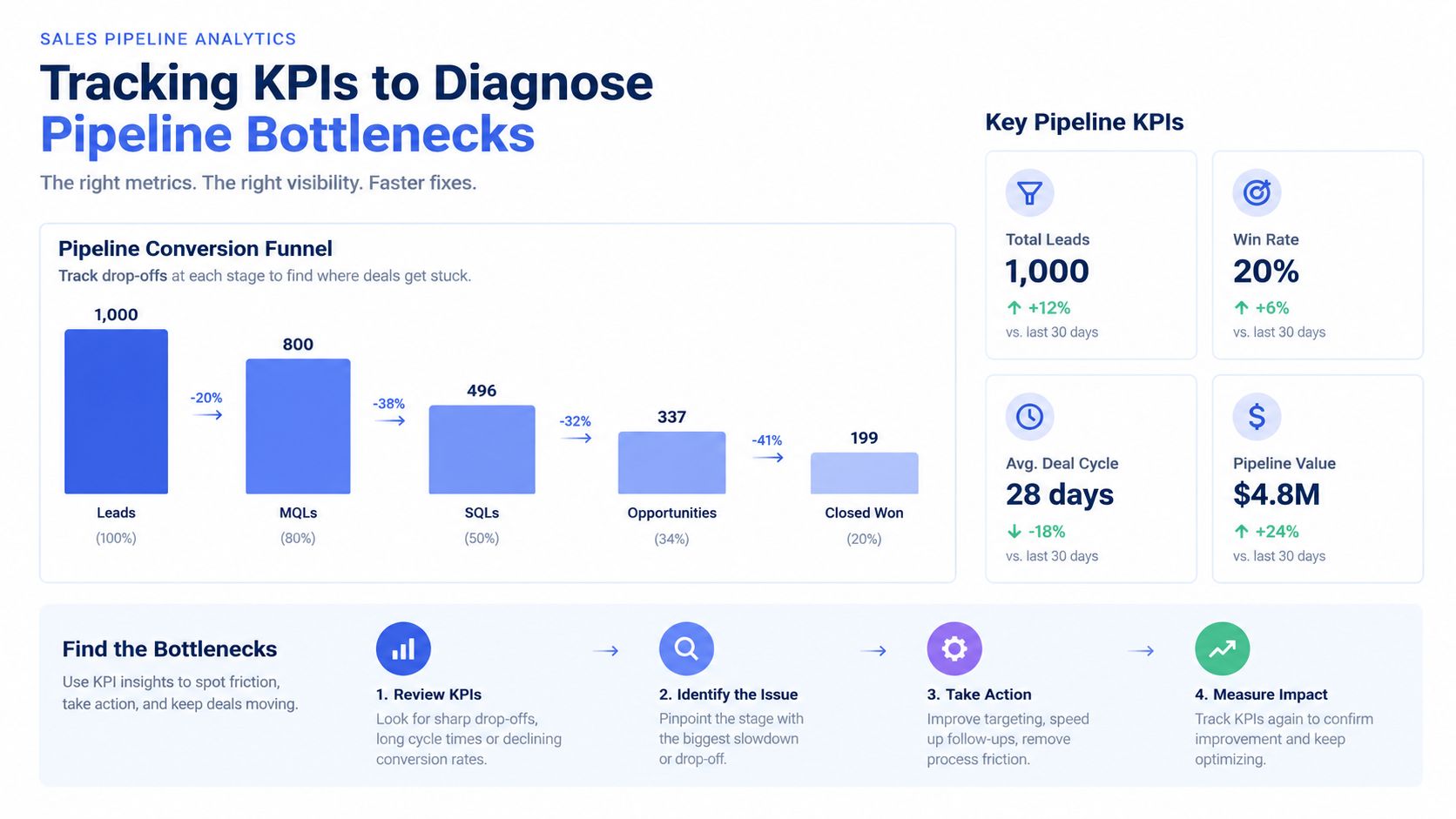
Tracking KPIs to Diagnose Pipeline Bottlenecks
A pipeline should answer more than “how many deals are open?” It should show where opportunities enter, where they stall, and which handoff needs attention. For a small business, a short monthly review is usually more useful than a dashboard filled with metrics you never act on.
Track stage-to-stage conversion, time spent in each stage, active opportunities with no next action, source quality, and closed-lost reasons. The objective isn't to judge yourself by one month of results. It's to distinguish a lead-quality problem from a process problem.
Read the conversion pattern
Benchmark summaries from Outreach's pipeline conversion research place typical B2B lead-to-customer conversion at roughly 2% to 5%, MQL-to-SQL conversion at 25% to 45%, and opportunity-to-close conversion at 25% to 50% across many segments. The same source describes SMB B2B SaaS top-funnel conversion around 32% to 39% and mid-funnel conversion around 39% to 46%, while financial services can reach roughly 35% to 46% and 35% to 50% in comparable stages.
Those figures aren't targets for every freelancer. Service businesses have different offers, sales cycles, and qualification standards. Use them as a prompt to inspect movement rather than as a promise of what your business should achieve.
Field-sales benchmarks cited by the same source suggest that a conversion rate below 10% can indicate weak lead quality, while a rate above 30% may signal over-qualification and insufficient pipeline volume. A very high close rate can look impressive while hiding the fact that too few opportunities ever reach the board.
Use a monthly diagnosis
Ask these questions:
- New to Qualified: Are inquiries a genuine fit, or are you adding too many low-context contacts?
- Qualified to Meeting: Are prospects seeing a clear reason to talk, and can they book without friction?
- Meeting to Proposal: Did discovery produce enough information to define a useful offer?
- Proposal to Won: Are scope, price, timing, and decision authority clear?
- Won to Retained: Did delivery and follow-up create a reason for repeat work?
Look for cards that have stayed in one stage without a scheduled action. Mark them for a direct follow-up, move them to nurture, or close them as lost. Stale opportunities inflate confidence while consuming attention.
MicroCRM's reports provide a concise view of revenue, deals, and activity, while its Kanban board keeps stalled cards visible. That combination is enough for a lightweight review. You don't need an elaborate forecasting department to improve your pipeline. You need accurate stages, clear next actions, and the discipline to remove opportunities that no longer deserve active attention.
Micro CRM brings contacts, Kanban deals, email sequences, appointments, invoicing, and practical reporting into one lightweight workspace for freelancers and small businesses. Visit Micro CRM to organize your pipeline, start on the free plan, and begin without a credit card.