Kanban Explained for Small Teams and Freelancers
Kanban is a visual workflow method that uses boards and cards to make work visible, limit what you do at once, and pull new tasks only when you have capacity. It originated in Toyota factories in the late 1940s and is now essential for small teams managing client pipelines.
You may recognize the problem immediately. A spreadsheet contains client names, proposal dates, invoice notes, and a few cells highlighted in yellow, but it doesn't tell you what needs attention today. An email thread contains the details of a promising project, while a sticky note reminds you to follow up with another client, assuming you can still find it. Kanban gives that scattered work a visible flow, and a lightweight CRM can connect the flow to contacts, deals, invoices, appointments, and follow-ups.
Table of Contents
- Why Freelancers Drown in Spreadsheets
- What Kanban Means Beyond Sticky Notes
- How Visual Pipelines Control Your Workload
- Kanban Boards versus CRM Pipelines
- Designing Stages That Actually Work
- Managing Clients and Deals Without the Chaos
Why Freelancers Drown in Spreadsheets
A typical Monday starts with good intentions. You open Excel to review prospects, scan your inbox for unanswered questions, check your calendar for meetings, and search your accounting folder for an unpaid invoice. By the time you've gathered the information, the morning has already become a series of administrative repairs.
The problem isn't laziness. A spreadsheet can store a client name, but it doesn't naturally show whether that person is a new lead, waiting for a proposal, reviewing a contract, or ready for an invoice. You can add columns for every detail, but the sheet gradually becomes harder to read and easier to ignore.
A photographer might have one row for a wedding inquiry, another for a portrait session, and a third for a referral. The next action could be hidden in a comment, an email, or a personal reminder. A designer may remember that a prospect asked for a revised quote, yet fail to follow up because the request lives in a different application from the contact record.
The hidden cost of invisible work
Unorganized client work creates several small gaps:
- Forgotten follow-ups: A warm prospect receives no reply because the reminder stayed in an inbox.
- Unclear priorities: You start a new proposal while several existing deals are waiting for a decision.
- Scattered context: Contact details, meeting notes, invoices, and messages sit in separate places.
- Delayed billing: You finish the work but don't have a clear prompt to create and send the invoice.
- Reactive scheduling: Appointments get arranged through long email chains instead of a shared view of availability.
Each gap makes the business feel busier without making progress easier to see. You may be working hard, but the workflow remains hidden inside applications, memory, and unfinished notes.
Kanban starts with a simple correction: make every active piece of work visible. When a client opportunity appears as a card in a pipeline, its stage and next action are easier to understand. That visual structure doesn't replace judgment, but it removes the need to reconstruct the state of your business from scattered clues.
What Kanban Means Beyond Sticky Notes
Kanban is often reduced to a board with columns named “To Do,” “In Progress,” and “Done.” Those columns are useful, but they aren't the method by themselves. Kanban is a way to control the movement of work, make policies visible, and improve the flow continuously.
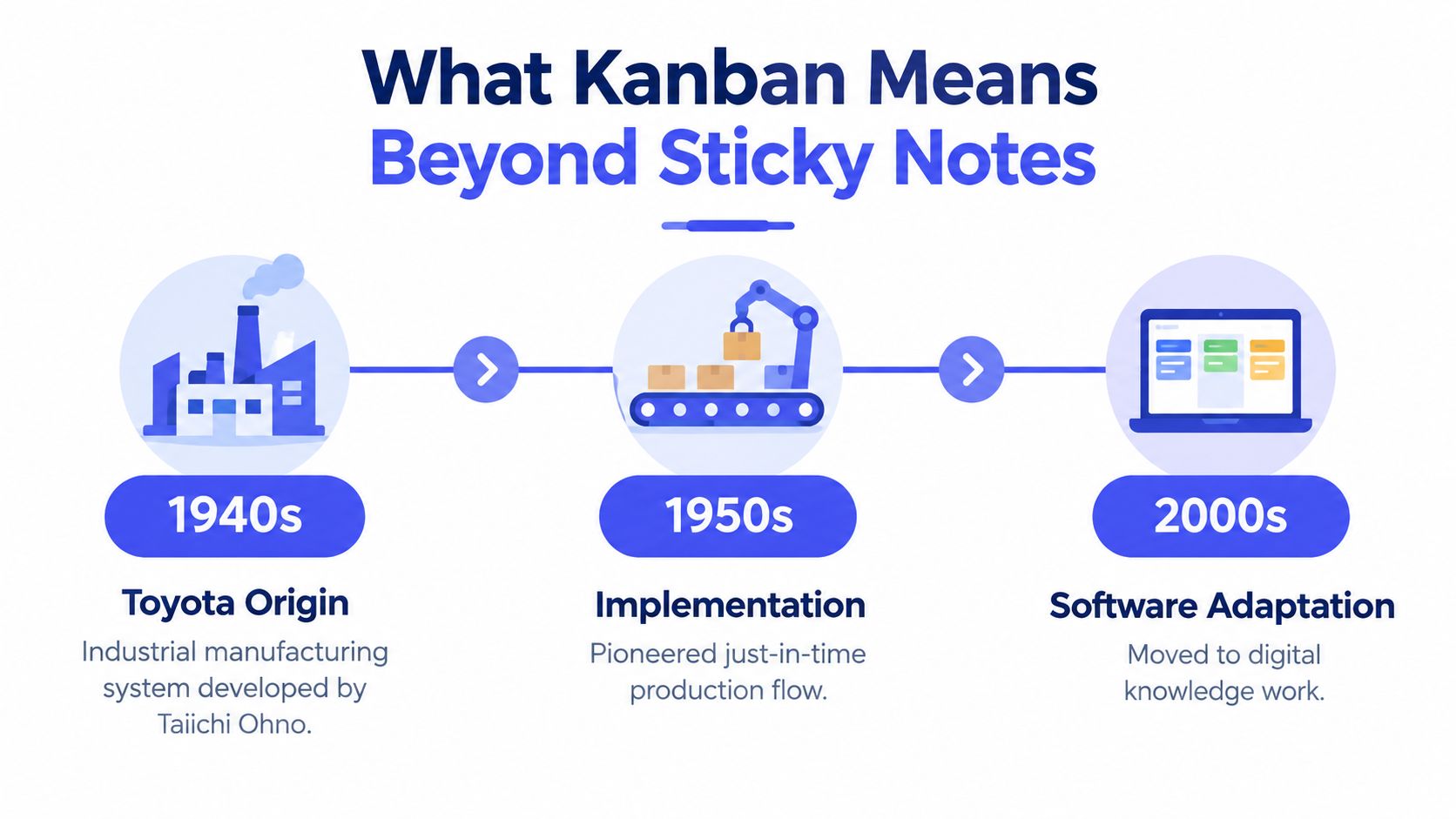
Kanban originated at Toyota in Japan in the late 1940s, where industrial engineer Taiichi Ohno developed it as part of the Toyota Production System. Toyota had adopted the kanban management system across all plants by 1963, and it was also used to retrieve parts from suppliers by 1965, according to this history of Kanban from Toyota's factory floor. That background matters because Kanban didn't begin as a software board or a personal productivity trick. It began as a production-control method for coordinating demand, capacity, and material flow.
The principle that makes the board useful
A modern client pipeline applies the same logic to opportunities and service work. A card might represent a potential consulting engagement. Moving it from New Inquiry to Discovery, Proposal, Negotiation, and Won shows where the work stands. But the team also needs rules for when a card may move and how many cards can occupy an active stage.
That is the difference between a visual operating system and a decorative task list. If a team keeps accepting new proposals while existing proposals wait for review, the board only records the queue. If the team makes the queue visible and agrees how much active work it can handle, the board helps coordinate decisions.
Practical rule: If work happens outside the board, the board isn't the shared operating picture.
Small businesses often create unofficial workflows without meaning to. A client question stays in direct messages, an invoice request lives in a notebook, and a new lead is remembered rather than recorded. Organizational resistance isn't always dramatic. Sometimes it looks like people maintaining a second list because the official board doesn't reflect how work happens. Weak enforcement, excessive lanes, and unclear ownership can make the same thing happen in a solo business.
Kanban is therefore a discipline of making work visible and socially managed. The software can display cards, but the owner still has to record the work, update its stage, and respect the capacity rules.
How Visual Pipelines Control Your Workload
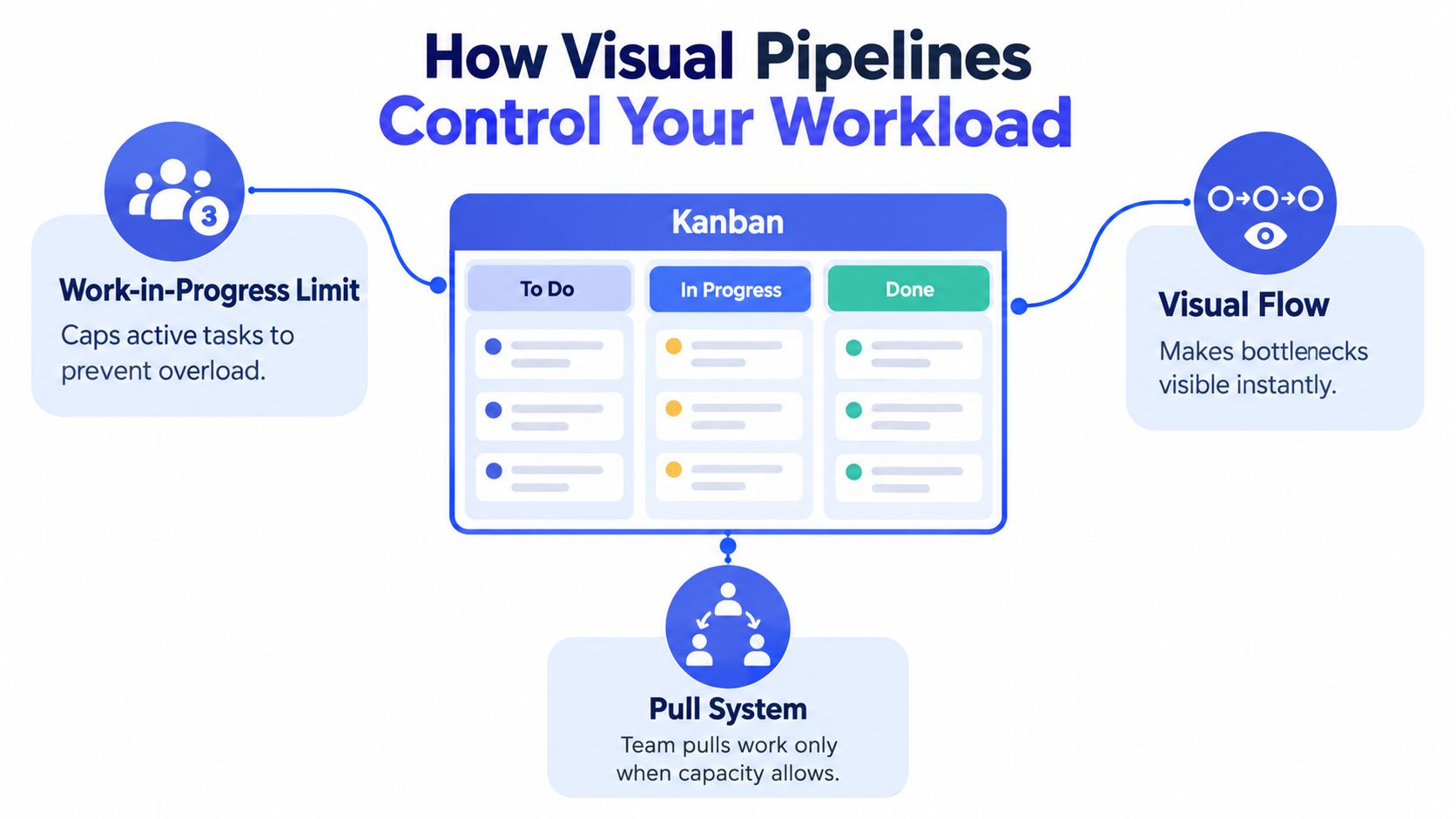
The central control mechanism is the work-in-progress limit, usually shortened to WIP limit. It caps the number of cards allowed in an active stage. When a column reaches its limit, no new card moves into it until a current item moves forward, as described in the Official Kanban Guide.
That rule creates a pull system. The next stage pulls work only when it has capacity, instead of receiving more work because someone upstream wants to push it forward. In a CRM pipeline, this might mean that a proposal stage has room for another deal only after an existing proposal has been sent, approved, rejected, or deliberately paused.
Read the board as a flow system
Suppose three deals sit in Proposal Review while one person handles every review. Adding more deals won't create more review capacity. It will create a larger waiting line, more context switching, and more uncertainty for clients.
WIP limits encourage the team to finish existing work before starting something new. With fewer items competing for constrained capacity, teams typically reduce multitasking and context switching, while cycle time and lead time can shorten. The point isn't to keep everyone busy with many cards. The point is to help work reach completion.
The most useful measures distinguish waiting from active work:
- Lead time measures the end-to-end delay from a request arriving until delivery.
- Cycle time measures the time an item spends actively in progress.
- Throughput shows how much work the system completes.
- WIP shows how much work remains active at a given point.
The gap between lead time and cycle time reveals waiting. If a client receives a slow response even though the actual proposal writing is quick, the delay may sit in a queue between stages. The Kanban guidance from Atlassian explains these metrics as ways to understand flow rather than as pressure for people to work faster.
A short cycle time doesn't automatically mean a healthy pipeline. A long waiting period can still make the client experience slow.
Treat each pipeline stage as a capacity policy, not a passive status label. For a practical example of applying these mechanics to client work, see Kanban workflow examples for small teams.
Kanban Boards versus CRM Pipelines
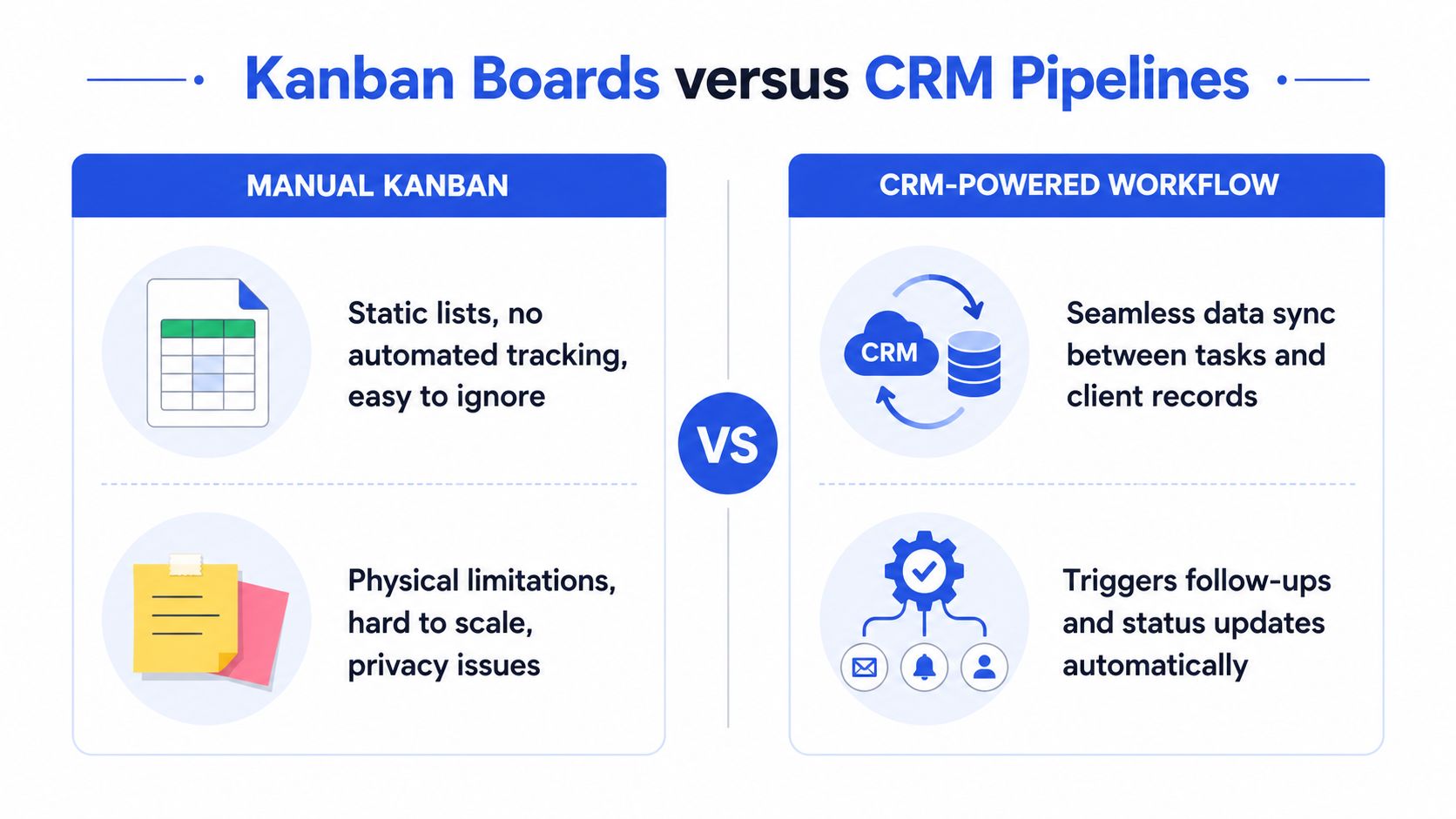
A manual Kanban board can be enough for a small personal workflow. You can write a client name on a card, move it between stages, and see which work is active. The weakness appears when the card needs to connect with information that matters to the business.
| Manual Kanban board | CRM-powered pipeline |
|---|---|
| Records a task or deal stage | Connects the deal with a contact history |
| Requires separate reminders | Can support automated emails and follow-ups |
| Needs another tool for billing | Keeps invoicing alongside client work |
| Shows position visually | Can calculate deal probability and show pipeline context |
| Depends on manual updates | Uses drag-and-drop movement with structured records |
A spreadsheet can imitate columns, but it won't naturally behave like a coordinated client workspace. You may still need to check email for the latest conversation, open a calendar to confirm availability, and search an invoicing application before deciding what to do next.
Where automation earns its place
Automation should remove repetitive coordination, not make the workflow harder to understand. A CRM-powered pipeline can attach a contact record to a deal, preserve interaction history, trigger a follow-up sequence, and connect a completed engagement to an invoice. That reduces the number of places a freelancer must check before taking the next action.
MicroCRM is one example of a lightweight CRM with a visual deal pipeline, drag-and-drop stages, automatic probability calculations, contact management, invoicing, email sequences, and appointment scheduling. Its focused feature set is designed for freelancers and small businesses that want client and deal management without configuring an enterprise system.
The important distinction is operational. A manual board tells you that a deal is in Proposal. A connected CRM can also help you answer:
- Who is the contact?
- What happened during the last conversation?
- What follow-up is due?
- Has an invoice been created?
- Is a meeting scheduled?
- What other active work is competing for attention?
A board still requires discipline. Automation can't rescue a process that nobody updates, and it shouldn't encourage you to create more stages than the business can maintain. The board remains the visible coordination surface, while the CRM supplies the surrounding client context. For a closer look at how the two ideas fit together, read CRM and workflow management.
Designing Stages That Actually Work
The best pipeline stages describe decisions and handoffs that really occur. They don't describe every thought in your head, and they shouldn't copy a generic sales funnel if your business works differently.
A freelance photographer might use New Inquiry, Qualified, Date Check, Proposal Sent, Booked, and Completed. A consultant could use New Lead, Discovery Scheduled, Scope Confirmed, Proposal Sent, Negotiation, and Won. A design studio may need Brief Approved, Drafting, Client Review, Revisions, and Ready to Invoice.
Start with the work you can observe
Write down the path a client or deal follows today. Look for moments where someone must make a decision, complete an action, or wait for another person. Those moments usually make better columns than vague labels such as “Working” or “Almost Done.”
Then add a clear definition for each stage:
- New Inquiry: The contact has expressed interest, but qualification hasn't happened.
- Proposal Sent: The offer is with the client and needs a dated follow-up.
- Client Review: The team is waiting for feedback or approval.
- Ready to Invoice: The agreed work is complete and billing can begin.
The stage definition should tell you what the card means and what action comes next. If everyone interprets “In Progress” differently, the column will hide more than it reveals.
Put capacity rules where people can see them
A WIP limit is a number written at the top of a column that caps how many cards that stage can hold. When the column is full, the team doesn't move another card into it. It finishes, forwards, pauses, or reclassifies an existing item first, following the explanation in this guide to WIP limits and pull systems.
Don't assume a lower limit is always better. Research on real-world WIP limits found no single optimal limit in published case data, with mixed effects across lead time and productivity. That uncertainty is useful for a small business because it means you should treat the initial limit as a working policy, then adjust it based on your own flow, capacity, and idle time. The study registration on WIP limits supports this more cautious view.
If a stage remains full, don't immediately tell people to work faster. Check whether the stage has a review bottleneck, unclear approval criteria, or work that should have been split earlier. If a person regularly has no card to pull, examine whether the upstream policy is too restrictive. The right response is to improve the system, not to treat every delay as an individual failure.
Avoid excessive lanes and unofficial side lists. A small team needs a board it can update during normal work, not a second administrative project. Review lead time, cycle time, throughput, and WIP together so you can adjust stages and policies with evidence rather than intuition. The Kanban University guidance on setting WIP limits reinforces the pull principle, capacity must exist before new work enters the next stage.
Managing Clients and Deals Without the Chaos
Kanban works for client management when it connects three habits: make work visible, limit active work, and pull new work only when capacity exists. A CRM pipeline makes those habits practical by keeping contacts, deals, follow-ups, invoices, and appointments close to the work itself.
For freelancers and small teams, that structure can replace the daily search through spreadsheets and email threads. You can see which opportunities need attention, identify where work is waiting, and maintain a clearer path from first contact to payment. Explore this CRM approach for freelancers when you're deciding how much structure your business needs.
The board isn't the goal. A calmer, more dependable client workflow is the goal, and the board is the shared surface that makes it possible.
Manage clients, deals, and invoices in one platform with Micro CRM, including a visual pipeline, automated follow-ups, invoicing, and an appointment calendar. Visit Micro CRM to start for free, with no credit card required.