CRM Comparison for Small Business: A Practical Buyer's Guide
You've got a spreadsheet open, a client's details in an old email, and a follow-up you meant to send last week. A proposal is somewhere in the pipeline, but nobody can say whether the client has seen it. Adding another app may help, but only if it makes the work simpler rather than creating another place to update.

A useful CRM comparison for small business shouldn't reward the product with the longest feature list. For a freelancer or a small team, the better test is whether you can build a usable pipeline quickly, afford the first-year cost, and keep your client history if you need to pause or leave.
| CRM approach | Time to first useful pipeline | Workflow coverage | First-year cost risk | Pause and exit |
|---|---|---|---|---|
| Spreadsheet plus bolt-ons | Quick to begin, manual to maintain | Split across tools | Hidden time and app costs | Depends on file and account practices |
| Mid-market platform | Can require setup and training | Broad, often expandable | Add-ons, seats, and implementation can accumulate | Check export and cancellation terms |
| Lightweight specialist | Designed for a short path to daily use | Core client tasks in one workspace | Fewer setup demands, but check plan limits | Check pause, export, and archive options |
Table of Contents
- Why Most Small Businesses Pick the Wrong CRM
- The Five Criteria That Actually Decide the Winner
- Matching CRM Archetypes to a Small Business
- Total First-Year Cost, Not the Sticker Price
- The One-Week Test Drive That Beats a Demo
- Which CRM Fits Your Small-Business Persona
- The Question Most Comparisons Forget, Can You Leave
- Your Decision Checklist and First 30 Days
Why Most Small Businesses Pick the Wrong CRM
A familiar Monday starts with an Excel sheet open beside an inbox and a calendar. The client's phone number is in one place, the latest conversation is in another, and the proposal status lives in a note that hasn't been updated. Before the day's work begins, someone has to reconcile records and decide which follow-up is overdue.
The trouble isn't that a spreadsheet is automatically wrong. It's that small businesses often keep adding workarounds until the spreadsheet, email, calendar, and invoice tool together become a fragile system. A lead can be entered twice, a deal stage can go stale, and an invoice can get separated from the conversation that explains what was agreed.
A review of published spreadsheet audits reported that 94% of spreadsheets contained at least one error, with a weighted average cell-error incidence of 94% (spreadsheet audit literature review). That doesn't mean every spreadsheet error causes a bad business decision. It does mean a workbook that carries client details, deal stages, and revenue figures deserves scrutiny before it becomes the only operating record.
The buying mistake is asking, “Which CRM has the most features?” The useful question is, “Which system will I still use on a Tuesday afternoon when I have ten minutes to log a call, update a deal, and send the next follow-up?”
Practical rule: If a CRM needs a consultant before you can track an ordinary client conversation, it's probably the wrong first system for a very small business.
That's why a sound comparison ranks time to first useful pipeline, total first-year cost, and reversibility above the length of a product's feature list. A tool that simplifies everyday work can be a better fit than a larger platform whose configuration becomes a project of its own.
The Five Criteria That Actually Decide the Winner
For a team of one to ten, compare CRMs by how quickly they produce a useful pipeline, what the first year really costs, and whether you can pause without losing your history. A feature matters only if it helps someone complete real work without creating extra setup or data entry.
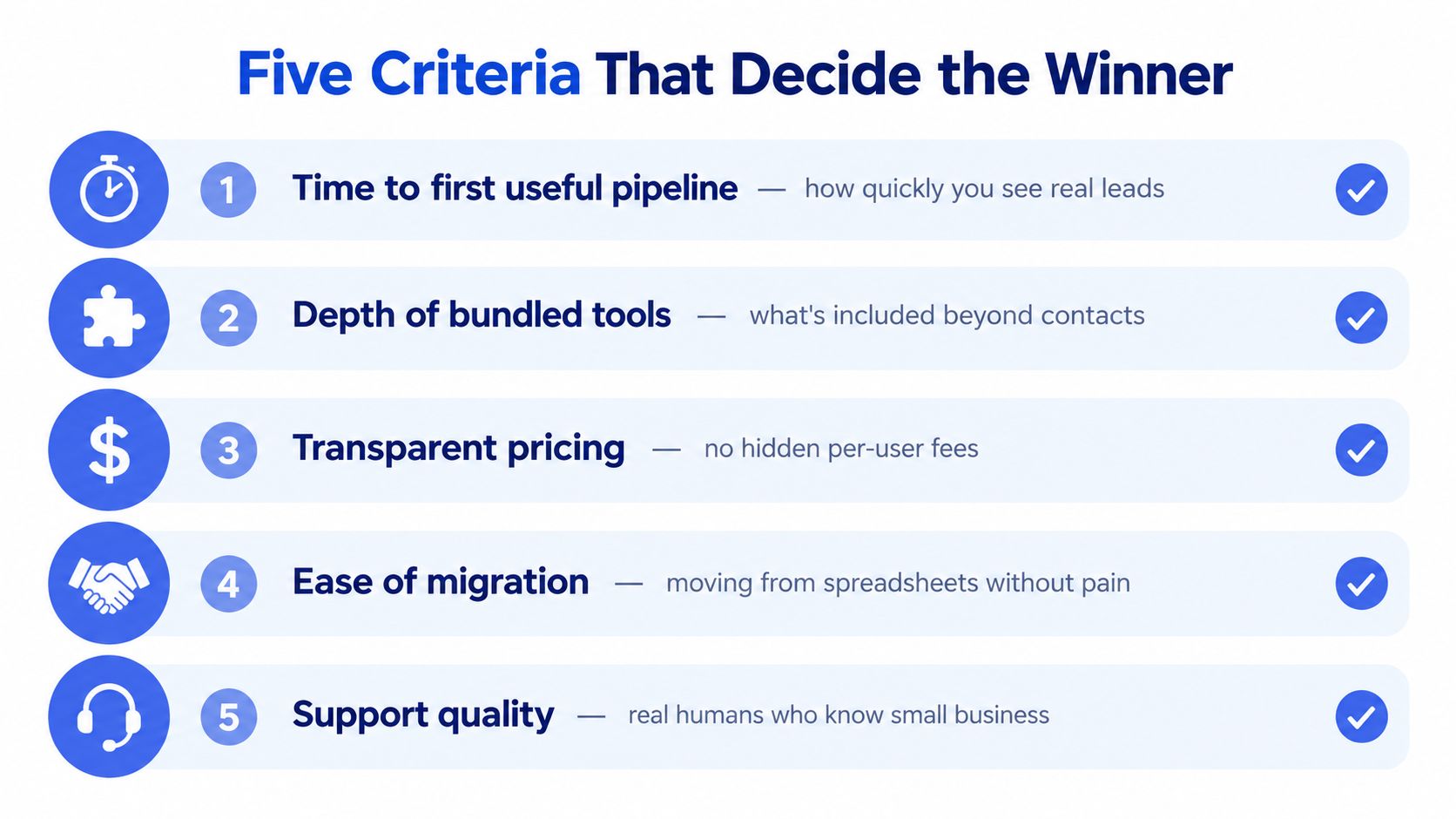
Time to first useful pipeline
Time the path from adding a real contact to creating a deal, moving it through stages, and seeing the next action. A long setup flow, required custom fields, or confusing navigation can stall adoption before the team builds a daily habit. Test this with an actual client record, not a polished demo account.
Workflow coverage, not feature volume
Check whether contact history, deals, follow-ups, scheduling, and invoicing fit the work your business does. If staff must copy client details into an invoice app and then update a spreadsheet, the CRM is adding steps. Choose a tool that removes repeated work, rather than one whose feature list looks impressive.
Total first-year cost
Count the subscription, setup, data migration, training time, integrations, payment processing, and seats or features you will not use. A low advertised price can hide an expensive rollout when specialist help or regular maintenance is needed. Include your own team's setup hours in the calculation.
Reversibility and continuity
Before signing up, confirm what data you can export, what remains accessible after cancellation, and whether pausing preserves your records and configuration. A freelancer with uneven revenue needs clear answers before committing. If a slow month means losing access to client history, that cost belongs in the comparison.
Security and ownership
Ask how the provider protects stored data, who can access it, and what happens to your records if your account changes. Look for security details you can assess, not broad assurances. Make sure you can retrieve client history in a usable format.
CRM adoption research identifies limited technical expertise and financial resources as recurring barriers for small and midsize businesses (systematic review of CRM adoption in SMEs). Keep the evaluation practical: choose a system your team can set up, use consistently, and maintain without turning CRM administration into another job.
For a quick look at everyday CRM workflows, this video offers a starting point:
Matching CRM Archetypes to a Small Business
A CRM comparison should come down to what helps your team start using a useful pipeline quickly, what the first year costs after setup work, and whether you can pause without losing your history. These three archetypes suit different operating needs. Choose the one that fixes your current workflow without adding work your team cannot maintain.
| Criterion | Spreadsheet plus bolt-ons | Mid-market platform | Lightweight specialist |
|---|---|---|---|
| Time to first useful pipeline | Quick to start, but updates and structure remain manual | Configuration and onboarding may delay everyday use | Often built around starting core tracking quickly |
| Workflow coverage | Contacts, billing, and scheduling may be split across apps | Broad capabilities, sometimes spread across modules | Groups a focused set of client workflows |
| First-year cost | Low subscription costs can be offset by staff time and separate apps | Setup, training, integrations, and seats can add up | Narrower scope can limit spending on unused features |
| Reversibility | Depends on keeping files complete, current, and backed up | Export, cancellation, and pause terms vary | Check the actual terms for pausing, exporting, and access |
| Security and ownership | Access and file handling depend on your own practices | Check user roles, exports, and data handling | Verify security practices and usable export options |
Spreadsheet plus bolt-ons
Keep this setup if one person can maintain straightforward client records and the work rarely changes. It stops being simple when follow-ups, scheduling, and invoicing each live in a different app. Someone has to remember where every detail belongs, and mistakes become harder to spot.
Mid-market platform
Choose a configurable platform when established processes, advanced reporting, or cross-department integrations are part of daily work. Skip it if nobody owns setup and your team mainly needs client records, deal stages, and next actions. Flexibility that no one configures is wasted capacity, not an advantage.
Lightweight specialist
A focused CRM is usually the practical choice for freelancers and small businesses that need one reliable place for contacts, deal stages, and routine client work. Judge it by how well those tasks fit together and how quickly the team can use the pipeline, not by how closely it resembles an enterprise system.
Small businesses often have limited technical expertise and financial resources to support CRM adoption. That makes the choice straightforward: match the system's scope to the workflow. If maintaining the CRM takes more effort than maintaining client relationships, choose a simpler archetype.
Total First-Year Cost, Not the Sticker Price
A CRM's subscription is only one line in its first-year cost. Count migration, setup, training time, integrations, payment processing, and the work required to maintain fields and workflows. Then include unused seats and features. An affordable plan can become expensive if it needs substantial configuration before it handles ordinary work.
Estimates suggest that implementation, migration, training, and customization can add 52–87% to an advertised subscription price during the first year. The same estimates place small-business implementation at $2,000–$8,000, and first-year costs at $8,000–$25,000 for implementations involving 1–20 users (CRM implementation and cost estimates). Those ranges describe conventional implementation work, not the unavoidable price of every self-serve CRM. Use them as a warning to investigate setup requirements, not as a bill you should assume you'll receive.
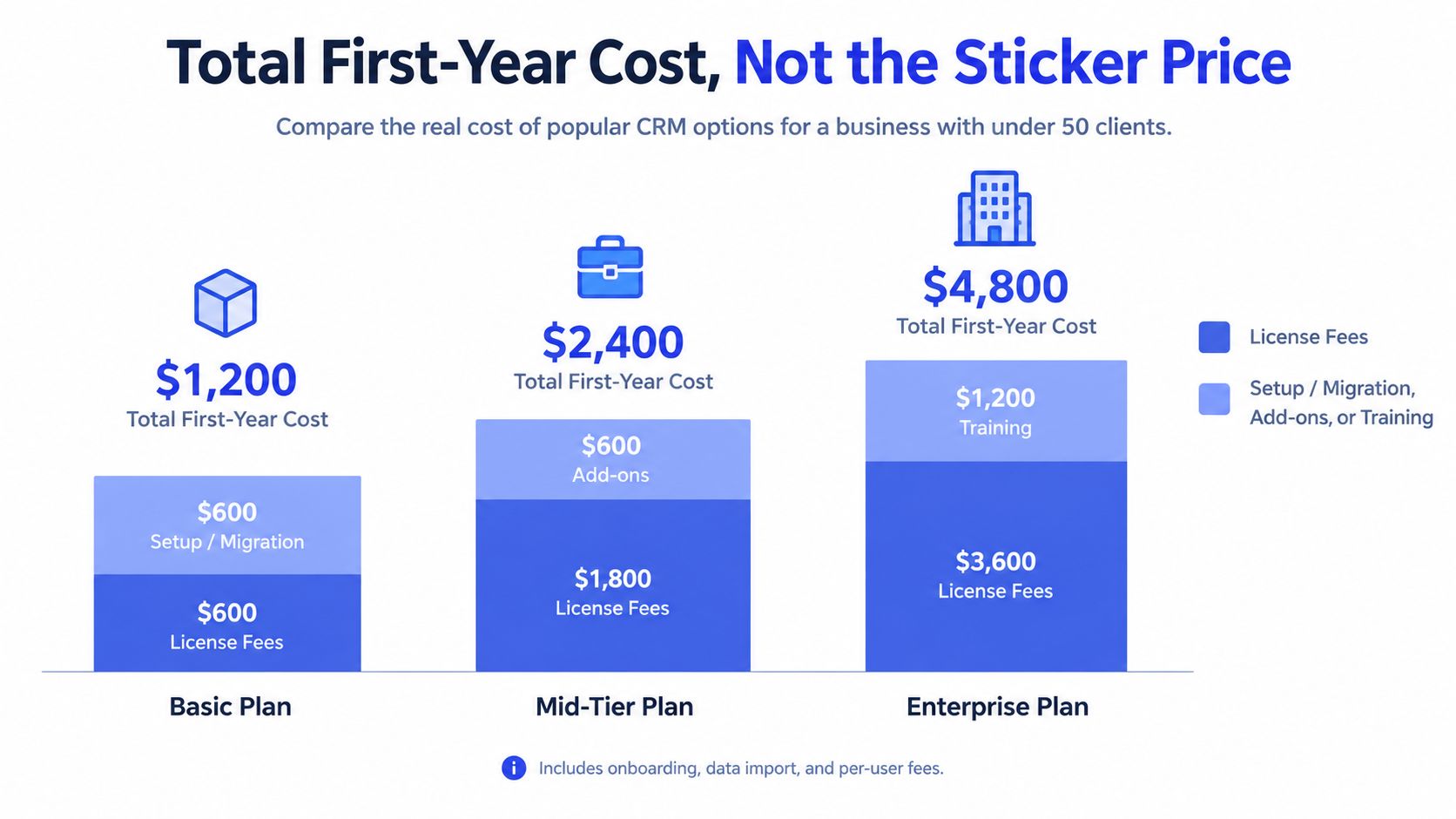
Build a simple worksheet before choosing:
- Subscription: What will the plan cost for the people who will use it?
- Migration and setup: Who will clean and import records, and how much work will that take?
- Training: How much work time will onboarding and ongoing questions consume?
- Connected tools: Which integrations or separate apps will remain necessary?
- Unused capacity: Are you paying for seats, automation, or reporting that your workflow won't use?
For a freelancer, a free or low-cost plan is useful only if it handles the core routine without forcing a growing patchwork of paid add-ons. Check contact, deal, email, and sequence limits before importing everything, and note exactly when a workflow would require an upgrade. For a deeper look at how subscription and setup costs fit together, see this CRM pricing guide.
Don't compare a bundle by its price alone. Compare it with the cost of separate invoicing, scheduling, and follow-up tools, plus the time spent moving information between them. The right choice is the one that covers your real work at a sustainable total cost, not the one with the lowest headline figure.
The One-Week Test Drive That Beats a Demo
A polished sales demo shows what a CRM can do when someone else has prepared the workflow. A fair test shows what you can do with it during an ordinary work week. Run the same tasks in each shortlisted product, then compare friction rather than presentation.
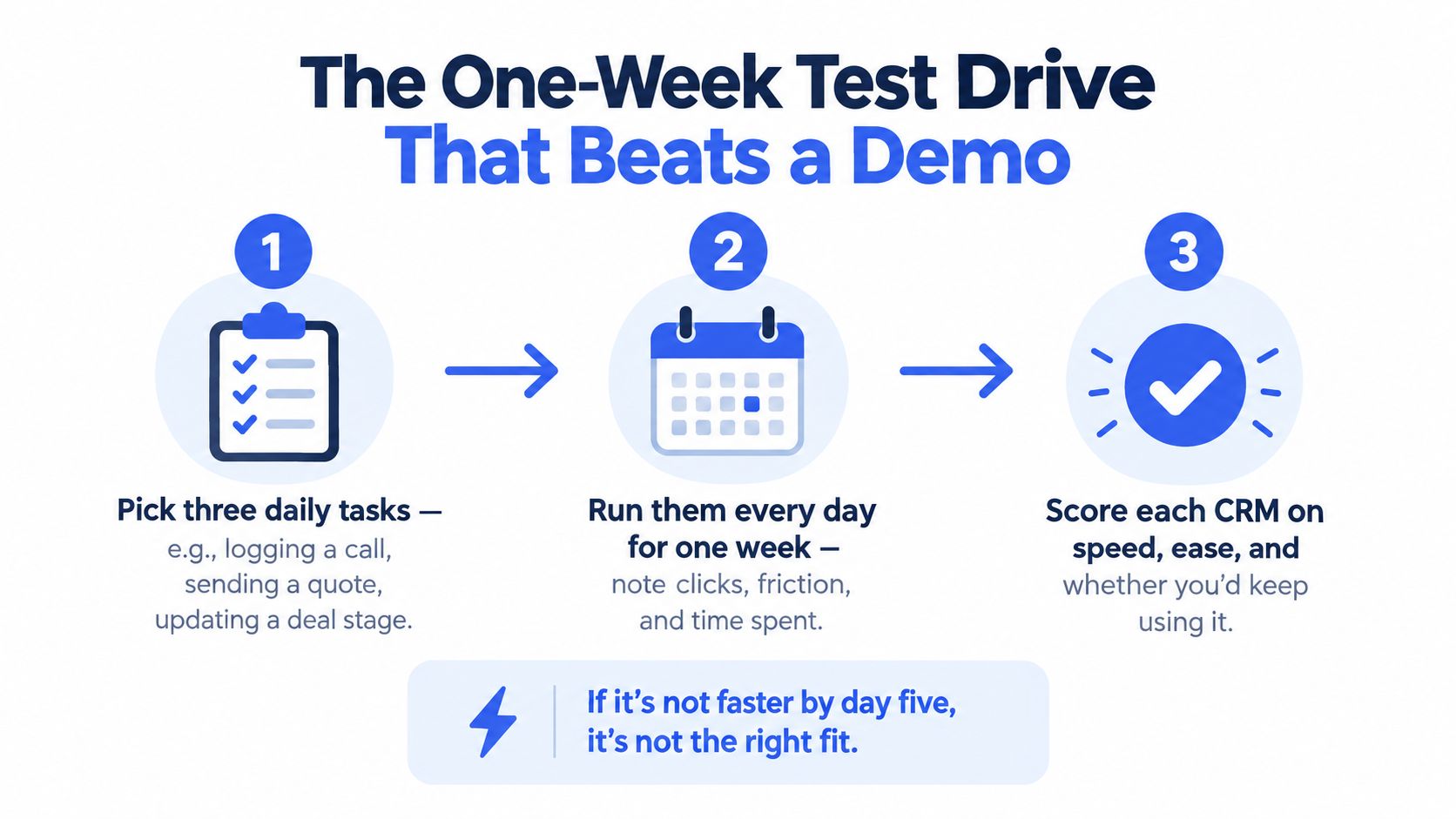
- Choose representative tasks. Create a contact, record a client interaction, move a deal through pipeline stages, and prepare an invoice. Use realistic information, but avoid importing sensitive client records until you're comfortable with the product's data practices.
- Repeat the work during normal days. Notice setup prompts, duplicate entry, unclear labels, and whether you can finish without jumping between apps. Don't reward a system just because it has an automation feature you haven't needed.
- Keep a small scorecard. Record time to a usable pipeline, mandatory setup steps, task errors, and how much routine work stays inside the application. Add one judgment call: would you keep using it after the trial?
Independent evidence summarized in CRM research reports that 30–60% of implementations fail to meet their original objectives, with poor adoption commonly linked to complexity, insufficient training, and weak workflow enforcement (CRM implementation and adoption overview). That's why a demo isn't enough. A system that looks capable but slows down routine work is not a win.
The best trial result isn't the longest list of features. It's the tool you can use correctly without having to persuade yourself to open it.
Pick the option that lets you complete the same daily work with fewer obstacles while preserving the records you need. If none passes, stay with your current process briefly and simplify it before buying another tool.
Which CRM Fits Your Small-Business Persona
A good CRM recommendation depends on how you earn, bill, and follow up. A tool that suits a project studio may be overbuilt for a photographer who mainly needs contacts and invoices. Start with the work pattern, then choose the system.
Freelance photographers
A photographer who bills per shoot should prioritize a clear contact record, appointment scheduling, and straightforward invoice creation. The CRM should make it easy to see whether a client has booked, received an invoice, or needs a follow-up. A spreadsheet can still work if the booking flow is simple and nothing gets missed; upgrade when you find yourself checking multiple places to confirm a client's status.
Independent designers and creative studios
Studios juggling proposals, project discussions, and incoming leads need a visual pipeline that shows what is active and what has stalled. Deal stages and automatic probability calculations can help make progress visible, while client history keeps feedback and commitments together. A mid-market CRM earns its keep when the team needs deeper coordination or reporting. It's too much if someone has to maintain a complicated field structure just to answer basic questions.
Coaches and consultants
Recurring engagements depend on timely conversations and well-managed appointments. Prioritize contact history, calendar scheduling, and templated follow-ups so a prospective client doesn't disappear after an introductory call. Don't buy advanced automation before you've confirmed that a simple reminder and a reliable record of the last conversation solve the actual problem.
Small agencies managing fewer than 50 clients
Agencies need to see client and deal status while keeping billing and communication connected. Useful capabilities include a Kanban pipeline, multi-currency invoices if the agency bills internationally, and templates for repeatable follow-ups. A lightweight specialist is often the sensible starting point; choose a broader platform only when specific workflow demands justify the extra setup and cost. For solo operators weighing a similar decision, this guide to CRM options for solo entrepreneurs offers another angle.
The upside of adopting a CRM should be practical, not theoretical. In a 2023 survey of more than 1,500 U.S. small businesses, 58% of CRM users reported being very satisfied with how they conduct business, compared with 30% of non-users, and 42% of CRM users said they saved between 5 and 10 hours per week (2023 small-business CRM survey). Treat those results as context, not a promise that every product will deliver the same outcome. Pick the smallest system that reliably supports your work.
The Question Most Comparisons Forget, Can You Leave
A CRM comparison should include the exit, not just the signup. Freelancers and seasonal businesses may need to pause, downgrade, or switch tools. If leaving means losing access to invoice history, email sequences, or client notes, a low subscription price can hide a significant continuity risk.
Ask every provider what formats it exports, what remains accessible after cancellation, whether attachments and invoice records can be archived, and what reactivation restores. A CSV file may preserve rows and columns, but it may not be a usable archive of the relationships and workflow your business depends on.
One industry survey reports that three-quarters of sales representatives hear buyers ask about moving existing data, while adoption concerns can remain hidden until late in the buying process (questions to ask before buying a CRM). Make data ownership part of the buying conversation from the start.
Micro CRM states that accounts can be paused with data preserved and no billing, and describes AWS-hosted storage, encryption at rest and in transit, and managed authentication. Check the current product terms and test exports before relying on any provider's continuity policy.
Your Decision Checklist and First 30 Days
Before choosing, score each CRM on time to first useful pipeline, workflow coverage, first-year cost, reversibility, and security. Give extra weight to setup work: a low subscription price can still cost weeks of staff time. Watch for configuration fatigue, billing friction, and separate tools creeping back into daily work. Those are signs the system is adding work rather than removing it.
Invoice handling belongs on the checklist. A 2026 accounts-receivable report found that 92% of surveyed businesses typically received payment after the due date, including 25.3% waiting 15–30 days beyond it and 17.2% waiting at least 31 days (2026 accounts-receivable report). Faster invoice creation and follow-up can reduce administrative delays, though they cannot guarantee prompt payment. Use these CRM best practices to keep the system useful after setup.
For the first month, start with a real workflow and test whether the CRM gets a useful pipeline running quickly, covers the work you need, and lets you pause without losing history. Micro CRM combines contacts, deals, invoicing, email follow-ups, scheduling, and reporting in one workspace. Its free plan requires no credit card. Visit Micro CRM to test whether it simplifies your daily work.